Item Title
1. Item imageMost client back-and-forth is not a personality problem. It is usually a visibility problem: key inputs were never gathered, decision points were never named, and everyone discovers that gap one revision at a time.
If you have ever asked, “Why are we still clarifying the brief after work has started?”, “Why does every update trigger a new round of questions?”, “Who is actually supposed to approve this?”, or “How do I keep a project moving without sounding pushy?”, this is the pattern worth looking at. The issue is rarely that clients want to be difficult. More often, the work began before goals, assets, constraints, and approval rules were visible enough to guide decisions.
For broader planning context, teams can compare guidance from SBA business guide before choosing a workflow.
That matters in digital marketing, virtual assistance, website design, and graphic design work because these projects are full of small judgment calls. A missing login can pause a campaign. A vague audience note can send copy in the wrong direction. An unnamed approver can turn one review into three. Once those gaps show up mid-project, the inbox fills with clarifying emails, revision requests, and cautious “just checking” messages.
Here is a simple way to structure it. Start with a short intake that collects the essential inputs and decision rules before work begins. Then use a predictable update cadence with the same sections every time, so clients know what changed, what is blocked, and what needs their response. Add a calm scope-change process and two reusable templates, and the work becomes easier to approve without turning every task into an archaeological dig through old messages. If you want help building that kind of workflow into your own projects, you can explore the home page, reach out through contact, or browse the blog for related articles.

What Causes So Much Back-and-Forth?
The real cause is usually missing requirements and unclear decision points. When a project feels noisy, it is tempting to describe the problem as hesitation, indecision, or communication style. That explanation is tidy, but it is not especially useful. A better question is: what information or approval rule was missing when the work started?
Related implementation details are also covered in Google Business Profile Help, which helps keep tool decisions grounded in established practices.
In digital and creative work, the usual gaps are familiar:
- Goals are broad, but success criteria are not defined.
- Deliverables are named, but the boundary of scope is still fuzzy.
- Assets are expected, but not listed clearly enough to confirm what is missing.
- Preferences exist, but they are spread across old emails, messages, and memory.
- Approvals are assumed, but no single reviewer has final sign-off authority.
- Timeline expectations are mentioned, but no review windows are attached to them.
That is how a straightforward project drifts into repetition. A designer asks for logos that were never uploaded. A virtual assistant pauses because access credentials were not included. A marketing draft comes back with strategic feedback that should have been settled during intake. None of this is dramatic. It is just expensive in small increments.
Useful takeaway: do not frame back-and-forth as a temperament issue first. Treat it as a process gap until you have ruled that out.
Quick Definitions That Make the System Easier to Use
A few terms help keep the rest of the article concrete:
- Intake: the short set of information, files, constraints, and approval rules collected before work begins.
- Update cadence: the agreed rhythm for project communication, such as weekly or milestone-based updates.
- Review: feedback on work in progress. Review does not automatically mean approval to move forward.
- Approval: a specific decision that authorizes the next step.
- Definition of ready: the minimum information needed before work starts without predictable rework.
- Scope change: any request that changes the original deliverables, timing, volume, or decision path.
These labels are simple on purpose. If the language is too abstract, the process stays abstract too.
Step 1: Use a Lightweight Intake Before Work Starts
The best intake is not a 30-page form. It is a short package that makes the project executable. The goal is not to collect every possible detail. The goal is to collect the details that prevent the first round of avoidable questions.
A useful intake for digital marketing and creative projects usually includes:
| Category | What to collect |
|---|---|
| Goal | The business objective, priority outcome, and what this project is meant to support. |
| Scope | The deliverables included, what is not included, and any limits on rounds, channels, or formats. |
| Audience | Who the work is for, what the audience needs, and any positioning notes that should shape the work. |
| Assets and access | Brand files, copy inputs, logins, existing URLs, analytics access, image folders, and reference materials. |
| Constraints | Deadlines, legal or compliance limits, required tools, tone restrictions, and platform requirements. |
| Communication | Primary contact, preferred channel, update cadence, and how urgent questions should be handled. |
| Approvals | Who reviews drafts, who gives final approval, and what needs approval before the next stage. |
| Success criteria | What “done” means for this project in practical terms. |
Notice what is missing from that list: trivia. Intake should surface the decisions that shape the work, not bury the project under administrative theater.
Separate Inputs From Decisions
One of the most useful distinctions is this: what does the client need to provide, and what does the provider need to decide? When these two categories blur together, projects stall because everyone is waiting for someone else to act.
For example:
- The client provides brand assets, access, audience context, and business constraints.
- The service provider decides how to structure the workflow, prepare the first draft, and sequence the work.
- The client still approves major decision points such as design direction, campaign messaging, launch timing, or final files.
This keeps ownership visible. The client is not being asked to solve the project. They are being asked to supply the inputs and approvals only they can provide.
Set a Definition of Ready
Work should not start just because the kickoff call ended. It should start when the intake is complete enough to avoid predictable rework. That is the definition of ready.
A practical definition of ready might be:
- The goal and deliverables are written down.
- Required assets and access have been received, or the missing items are listed clearly.
- The primary contact and approver are named.
- The first decision point is understood.
- The update cadence is agreed.
If one of those items is missing, the project is not blocked forever. It is simply not ready for full production work. That distinction matters. It lets you say, calmly and clearly, “We can begin once these items are in place,” instead of starting anyway and paying for that choice later.
Useful takeaway: a short intake beats a long repair thread every time.
Step 2: Use a Predictable Update Rhythm
Once work begins, the next source of friction is update quality. Clients do not need constant pings. They need a consistent way to understand status without digging for it. Consistency matters more than frequency.
For most service projects, one of these rhythms works well:
- Weekly updates for ongoing marketing, virtual assistance, and multi-week website or design work.
- Milestone updates for shorter projects with clear phases, such as wireframes, copy draft, design direction, revisions, and launch prep.
- Hybrid cadence for larger projects: weekly updates plus milestone approvals.
The specific cadence matters less than the fact that everyone knows what to expect. If updates arrive unpredictably, clients often compensate by sending more check-in messages. That is a rational response to uncertainty, not a flaw in the client.
A Simple Update Format
Use the same sections every time so readers can scan quickly:
| Section | What belongs there |
|---|---|
| Since last update | What changed, what was completed, and any decisions already made. |
| In progress | What is actively being worked on now. |
| Next | The next step or next milestone, with timing only when it is actually known. |
| Client action needed | The specific file, answer, review, or approval needed to keep moving. |
| Risks or blockers | Anything that may affect timing, scope, or deliverable quality if unresolved. |
That format works because it tells the client exactly where the project stands and what, if anything, needs their involvement.
Keep Updates Scannable
Good updates are usually short. They use bullets, direct labels, and links to the relevant file or draft. They do not hide the action item in paragraph four.
A few watch-outs:
- Avoid vague lines like “making progress” or “still working through things.”
- Avoid long essays that mix history, rationale, and status into one block of text.
- Avoid sending updates without saying whether a reply is needed.
- Avoid listing five open questions when only one answer is required right now.
If your intake and update process starts growing into repeatable internal workflows, it can help to sketch the flow in a simple web app generator so your fields, handoffs, and approval steps are easier to standardize before you turn them into a larger system.
Useful takeaway: send fewer but clearer updates, and make the action required unmistakable.
Step 3: Define Decision Rules Early
Many projects slow down because “review” and “approval” are treated like the same thing. They are not.
- Review means feedback is still open.
- Approval means the work is accepted for the next stage.
That difference matters because it changes what everyone should do next. If a homepage wireframe is under review, discussion is expected. If the wireframe is approved, the next stage can begin and later feedback may become a scope discussion instead of another open exploration round.
Name the Approver
One clear approver is almost always better than a floating group response. Multiple stakeholders can review, but someone should consolidate the decision. Otherwise, you get staggered opinions, duplicate comments, and revisions that answer one person while contradicting another.
Examples of decision rules:
- Copy approval: the primary client contact confirms messaging before layout or scheduling.
- Design direction approval: the client approves one route before full-page or full-series production begins.
- Final asset approval: the approver confirms the export set, file formats, or publication-ready content.
- Launch or submission approval: the client gives explicit go-ahead before anything goes live or is submitted externally.
Set Review Windows
It helps to name a review window in advance, even if you keep it modest. For example, “Please return consolidated feedback within two business days if possible,” is much clearer than silence. It does not guarantee timing, but it gives the process a shape.
You can also decide whether a silent-approval rule fits your work. Some teams use it for low-risk, recurring items after the process is mature. Others avoid it entirely because it creates too much ambiguity. Either choice can work, as long as it is discussed before the project depends on it.
Useful takeaway: if no one knows who approves what and when, the project does not really have a decision system yet.
Step 4: Handle Scope Changes With “Impact + Options”
Scope changes are normal. They only become chaotic when they arrive without a structure for handling them. A new landing page, a revised audience, an extra revision round, or a different deliverable format can all be reasonable requests. The problem is not the request itself. The problem is pretending it changes nothing.
A calm way to handle this is an impact + options response.
Start with impact:
- What does the change affect: timeline, cost, deliverables, sequence, or dependencies?
- Does it replace something already in scope, or add work on top?
- Does it create a new approval point or require new inputs?
Then present options:
- Accept the change and adjust timeline or budget accordingly.
- Keep the timeline and reduce another deliverable.
- Defer the request to a later phase.
- Pause current work until the new direction is confirmed.
This approach reduces friction because it keeps the conversation practical. You are not saying no by default. You are showing what the change means and what reasonable paths are available.
Always confirm scope changes in writing before proceeding. That written note does not need to be elaborate. It just needs to record the request, the chosen option, and what changes as a result.
Useful takeaway: document the impact, offer clear options, and avoid absorbing untracked changes into the existing plan by habit.
Step 5: Use Templates You Can Adapt
Templates help because they remove the blank-page problem. They also make your process easier to repeat across website design, marketing support, graphic design, and virtual assistance projects.
Intake Questions Template
You can adapt the list below into a form, a kickoff document, or a shared note:
- Goals: What is the project trying to achieve? What business priority does it support?
- Audience: Who is the target audience? What should they understand, do, or feel after seeing the work?
- Deliverables: What exactly is being created? What formats, channels, or pages are included?
- Assets and access: Which files, links, brand assets, logins, analytics accounts, and references are needed to begin?
- Brand and style: Are there existing tone, visual, or messaging guidelines? What examples feel aligned or misaligned?
- Constraints: Are there deadlines, platform limits, legal restrictions, required approvals, or formatting rules?
- Approvals: Who reviews drafts? Who consolidates feedback? Who gives final sign-off?
- Communication: What channel should be used for updates? How often should updates be shared? What counts as urgent?
- Timeline expectations: Are there milestone dates, launch windows, blackout periods, or review windows to plan around?
- Success criteria: What does a complete and usable result look like for this project?
For website design, you may need more access and content questions. For digital marketing, you may need platform, audience, and reporting inputs. For graphic design, you may need file format, usage, and brand consistency details. The structure can stay the same even as the details shift.
Update Email Template
Here is a simple skeleton you can reuse:
Subject: [Project Name] update - [Date or milestone]

Hi [Client Name],

Here is the current status for [project name].

Completed since last update
- [Item completed]
- [Item completed]

Currently in progress
- [Current task]
- [Current task]

Next steps
- [Next milestone or next deliverable]

Client action needed
- [Specific answer, file, review, or approval needed]
- [Due date or preferred response window, if relevant]

Risks or blockers
- [Anything affecting timing, scope, or quality]

Links
- [Draft link]
- [Folder or file link]

Thank you,
[Name]
The important part is not the exact wording. It is the repeated structure. Clients learn where to look, and that alone reduces unnecessary clarification.
A Simple Closing Rule
If a project feels like it needs constant explanation, the process is probably hiding something important. Intake surfaces what is needed before work starts. Updates surface what changed and what decision is due next. Decision rules surface who can move the work forward. Scope notes surface what changed instead of quietly absorbing it.
That is the whole system. It is not glamorous, but it is durable.
If you want support setting up an intake + update system for digital marketing and creative projects, Administrative Essentials can help you structure the workflow before it turns into another week of reactive follow-ups. Start with the contact page, visit the blog for more practical process articles, or return to Administrative Essentials to explore the broader service focus.
succeeded in 2387ms: page 7 13 codex The existing related post covers intake plus updates broadly, so I’m steering this one toward the weekly-update system itself: template, status language, blockers, timing, and response expectations. I’m also preparing a real screenshot asset instead of reusing a generic desk photo, since the brief is specific there. exec /bin/bash -lc 'which chromium-browser || which chromium || which google-chrome || which google-chrome-stable || which wkhtmltoimage || which playwright' in /home/ubuntu/apps/administrativeessentials.com exited 1 in 0ms: exec /bin/bash -lc "curl -I -L -s https://www.atlassian.com/work-management/project-management/project-status-report | sed -n '1,20p'" in /home/ubuntu/apps/administrativeessentials.com exec /bin/bash -lc "curl -I -L -s https://asana.com/resources/how-project-status-reports | sed -n '1,20p'" in /home/ubuntu/apps/administrativeessentials.com exec /bin/bash -lc "curl -I -L -s https://www.pmi.org/learning/library/effective-project-management-communications-6470 | sed -n '1,20p'" in /home/ubuntu/apps/administrativeessentials.com succeeded in 0ms: HTTP/2 403 date: Wed, 17 Jun 2026 06:30:48 GMT content-type: text/html; charset=UTF-8 cache-control: private, max-age=0, no-store, no-cache, must-revalidate, post-check=0, pre-check=0 expires: Thu, 01 Jan 1970 00:00:01 GMT referrer-policy: same-origin x-frame-options: SAMEORIGIN strict-transport-security: max-age=0; includeSubDomains x-content-type-options: nosniff set-cookie: __cf_bm=OecqUBqzQS5lF2WA4CIInNGr6ZiqW9r7hADmV8aNtRM-1781677848.3772607-1.0.1.1-n3BI1rSiIopPOEkAdFA0W3G4pJXAx7JHDSbUK4IojezmbkBkpCOhQBhU9YfnU1YQc8Ro9Xw.CMJDJZ91W7RignP9jw4TrvcCawcTbg2nnyDZ_brwtkMu4tzz6OP4.yMv4mwtpy6V0eziAtVKk5tRhw; HttpOnly; SameSite=None; Secure; Path=/; Domain=pmi.org; Expires=Wed, 17 Jun 2026 07:00:48 GMT server: cloudflare cf-ray: a0d001f85914c939-VNO alt-svc: h3=":443"; ma=86400 succeeded in 785ms: HTTP/2 200 age: 49717 cache-control: private, max-age=0, must-revalidate cache-status: "Netlify Durable"; hit; ttl=36682, "Netlify Edge"; fwd=miss cache-status: "Netlify Durable"; fwd=bypass, "Netlify Edge"; fwd=method;detail=f1 cache-status: "Netlify Durable"; hit; ttl=36682, "Netlify Edge"; fwd=miss;detail=p1 content-security-policy: worker-src blob:; frame-ancestors 'self' https://www.surveymonkey.com https://google.com https://app.asana.com https://prod-eu1.app.asana.com https://prod-au1.app.asana.com https://prod-jp1.app.asana.com https://blog.asana.com https://academy.asana.com https://app.optimizely.com/; report-uri https://app.asana.com/-/csp_report; script-src 'self' 'unsafe-eval' 'unsafe-inline' https://www.google.com/recaptcha/ https://www.gstatic.com/recaptcha/ https://ajax.aspnetcdn.com https://bat.bing.com https://sjs.bizographics.com https://ct.capterra.com https://googleads.g.doubleclick.net https://connect.facebook.net https://tracking.g2crowd.com https://www.google-analytics.com https://apis.google.com https://www.googleadservices.com https://*.googleapis.com https://tpc.googlesyndication.com https://www.googletagmanager.com https://ssl.gstatic.com https://cdn.jotfor.ms https://form.jotform.us https://snap.licdn.com https://px.ads.linkedin.com https://www.linkedin.com https://luna1.co https://js.recurly.com https://fast.wistia.com https://fast.wistia.net https://www.youtube.com https://s.ytimg.com https://*.marketo.com https://*.marketo.net https://cdnjs.cloudflare.com https://api.ipify.org https://cdn.pdst.fm https://*.vimeocdn.com https://resources.asana.com https://w58858w0sjxx.statuspage.io https://cdn.cookielaw.org https://geolocation.onetrust.com https://*.logs.datadoghq.com https://www.datadoghq-browser-agent.com https://tagmanager.google.com/debug https://t.contentsquare.net contentsquare.com app.contentsquare.com https://cdn.jsdelivr.net/npm/@sheerid/jslib@1/ https://v2.listenloop.com https://boards.greenhouse.io/embed/job_board/js https://job-boards.greenhouse.io https://www.redditstatic.com/ads/pixel.js https://yjtag.jp/tag.js https://s.yjtag.jp/tag.js https://s.yimg.jp/ https://yjtag.yahoo.co.jp/tag https://analytics.tiktok.com/i18n/pixel/ https://s.pinimg.com/ct/ https://b92.yahoo.co.jp/rt/ https://t-antenna.asana.com/ https://scripts.postie.com/wbgboxjj/lp.1.js https://b91.yahoo.co.jp/pagead/ https://b98.yahoo.co.jp/ https://accounts.google.com/gsi/client https://js.adstk.io/convpixel.js https://a.quora.com/qevents.js https://d34r8q7sht0t9k.cloudfront.net/tag.js https://collector-39548.us.tvsquared.com/tv2track.js https://*.qualified.com https://static.xingcdn.com/xingtrk/index.js https://ct.pinterest.com/static/ct/token_create.js https://*.6sc.co https://*.6sense.com https://js.zi-scripts.com/ https://*.mountain.com/ https://c0.adalyser.com/adalyser.js https://dyv6f9ner1ir9.cloudfront.net/assets/js/nloader.js https://pagead2.googlesyndication.com https://c.amazon-adsystem.com/aat/amzn.js https://*.optimizely.com https://optimizely.s3.amazonaws.com https://tr.capterra.com https://pixel.byspotify.com/ping.min.js https://bzrcdn.openai.com/sdk/oaiq.min.js https://capi-automation.s3.us-east-2.amazonaws.com/public/client_js/capiParamBuilder/clientParamBuilder.bundle.js content-type: text/html; charset=utf-8 date: Wed, 17 Jun 2026 06:30:48 GMT etag: "oiquhtxl58ciit-df" netlify-vary: query=__nextDataReq|_rsc,header=x-nextjs-data|x-next-debug-logging|next-router-prefetch|next-router-segment-prefetch|next-router-state-tree|next-url|rsc|x-asana-deploy|x-asana-experiments|accept-encoding,cookie=__prerender_bypass|__next_preview_data|is_logged_in server: Netlify set-cookie: user_geo=LT; Secure; Max-Age=2592000; Path=/ strict-transport-security: max-age=31536000; includeSubDomains; preload vary: x-asana-deploy,x-asana-experiments,Accept-Encoding x-asana-product-level: productHigh x-content-type-options: nosniff x-frame-options: DENY x-nf-request-id: 01KVA4CXTYEBSE9C2WSF7DN50K x-powered-by: Next.js succeeded in 922ms: HTTP/2 200 content-type: text/html date: Wed, 17 Jun 2026 06:30:49 GMT set-cookie: atlCohort={"bucketAll":{"bucketId":0,"bucketedAtUTC":"2026-06-17T06:30:48.435Z","version":"2","index":81}}; Max-Age=31536000; Domain=.atlassian.com; Path=/; Secure; set-cookie: ajs_anonymous_id=%2239ce4d85-e63a-4a2b-9c9d-a1de847b1aa4%22; Max-Age=31536000; Domain=.atlassian.com; Path=/; Secure; set-cookie: X-Experiments-Key=path=/work-management/project-management/project-status-report~GQdwhgxgtGCWUGcCmYBOEAWiCuBbXaAnlAG4BMAvAC6rZLBUgQDmUA7AJwAMUEA9gDsqSAB5VsYADZQARpADWzVH2wCAJgijhoCWMwFRYAigCJ+Q5ZJMACMAmtnBNPlesAfB8IRUTwBFKQEAH0QWDVmJCogmREABxCkGSDYyTAqADM+VFwKdKlkPwDg0PDI6LiEpJS0zOygtSQSXPz6Kj55JANvQkkkLVQwWNikVC1ILUSoZjSkZskC1Vha3GSRhEEpWAAvNNhBIP5cWMFOqM6wGV61alp6bQmZKBowdPTYaDAwKZmbulBxkCJIJfMBBabCIK1IKSPjMCJqIxBbDIVAIX70ZggWJQACsAEYcQAOKCZCDIqCxZRqbAQKgwNTXGh/e6UvjU2maGF8XBQbCoSTo4BIUpQVK4GRqL4QSAYPqs9l0hEIfgkEaEQX3QGPZF9QK4NnYXqaZWoWCxKhopkYrFQABshIAzGwoAIwCQngEhN85gV7spsFQjKwqBdet9hILMdi2Pjia73e9BLzYpKvBrIEFkGhMEEjA0REESA6oJQrULXZc+hAEDywAArUWwvjp6DvRvMIwt6FgATMCQRTNIXq0rLd3vAqg0WAyAOzPLzJBAA==; Max-Age=600; Path=/; Secure; Domain=.atlassian.com; set-cookie: X-Experiments-Trace-Id=ed1e61c7-bd27-44b8-80fa-4adf9db9d67d; Max-Age=600; Path=/; Secure; Domain=.atlassian.com; content-security-policy: base-uri 'self'; default-src 'self' *.atlassian.com *.intercomcdn.com *.orangelogic.com *.6sc.co *.6sense.com sourcetreeapp.com *.sourcetreeapp.com bitbucket.org *.bitbucket.org; script-src 'self' *.gstatic.com *.cookielaw.org *.public.atl-paas.net *.prod.atl-paas.net *.googletagmanager.com *.marketo.net *.atlassian.com utt.impactcdn.com *.google.com *.doubleclick.com *.googleadservices.com *.livechatinc.com *.bing.com *.quora.com *.yimg.jp *.clicktale.net *.linkedin.com *.twitter.com *.licdn.com *.demandbase.com *.doubleclick.net *.facebook.net *.redditstatic.com *.clearbitscripts.com *.clarity.ms *.vimeo.com *.google-analytics.com facebook.com *.facebook.com impactcdn.com *.impactcdn.com clearbitjs.com *.clearbitjs.com yahoo.co.jp *.yahoo.co.jp *.recaptcha.net *.ads-twitter.com *.intercom.io *.intercomcdn.com *.jsdelivr.net *.6sc.co *.6sense.com *.techtarget.com *.capterra.com sourcetreeapp.com *.sourcetreeapp.com bitbucket.org *.bitbucket.org roundprincethere.com *.roundprincethere.com 'unsafe-eval' 'unsafe-inline'; style-src 'self' *.public.atl-paas.net *.prod.atl-paas.net fonts.googleapis.com *.googletagmanager.com sourcetreeapp.com *.sourcetreeapp.com bitbucket.org *.bitbucket.org 'unsafe-inline'; img-src 'self' blob: data: atlassian.com *.atlassian.com *.cookielaw.org *.gravatar.com *.wp.com fd-assets.prod.atl-paas.net pixel.pointmediatracker.com *.prod.public.atl-paas.net cnv.event.prod.bidr.io *.doubleclick.net *.clicktale.net *.bing.com rlcdn.com reddit.com quora.com *.rlcdn.com *.reddit.com *.quora.com *.ctfassets.net *.linkedin.com *.google.com *.google.com.au *.company-target.com *.facebook.com *.google-analytics.com *.twitter.com t.co *.intercomcdn.com *.intercomassets.com *.frontend.public.atl-paas.net *.orangelogic.com *.googletagmanager.com img.logo.dev *.atlassian.net sourcetreeapp.com *.sourcetreeapp.com bitbucket.org *.bitbucket.org bytebucket.org *.bytebucket.org bitbucket-assetroot.s3.amazonaws.com; font-src 'self' *.ctfassets.net *.intercomcdn.com *.gstatic.com *.frontend.public.atl-paas.net *.atl.orangelogic.com; frame-ancestors 'none'; form-action 'self'; report-uri https://web-security-reports.services.atlassian.com/csp-report/wac-web; report-to csp-default-endpoint; connect-src 'self' ws: atlassian.com *.atlassian.com *.cookielaw.org *.onetrust.com *.public.atl-paas.net *.prod.atl-paas.net *.mktoresp.com *.ingest.sentry.io *.workato.com atlassian.sjv.io statsigapi.net *.statsigapi.net *.contentful.com atlassian.net *.clicktale.net *.contentsquare.net *.bing.com google-analytics.com company-target.com linkedin.com *.google-analytics.com *.company-target.com *.linkedin.com *.doubleclick.net *.reddit.com *.redditstatic.com *.google.com *.demandbase.com *.clarity.ms *.clearbit.com *.intercom.io *.algolianet.com *.algolia.net *.algolia.io *.recaptcha.net https://unpkg.com/@rive-app/ *.facebook.com *.orangelogic.com *.adnxs.com *.6sc.co *.6sense.com m.castle.io apis.auxia.io *.atlassian.net https://participant.connect.us-east-1.amazonaws.com wss://participant.connect.us-east-1.amazonaws.com *.connect.us-east-1.amazonaws.com sourcetreeapp.com *.sourcetreeapp.com bitbucket.org *.bitbucket.org; worker-src 'self' blob:; frame-src 'self' *.youtube.com *.google.com *.doubleclick.net *.recaptcha.net *.atl-paas.net *.company-target.com *.googletagmanager.com *.atlassian.net; media-src 'self' *.ctfassets.net *.atlassian.com *.orangelogic.com content-security-policy-report-only: reporting-endpoints: csp-default-endpoint="https://web-security-reports.services.atlassian.com/csp-report/wac-web" x-node-architecture: arm64 x-instance-type: r8g.12xlarge cache-control: max-age=0, s-maxage=604800, stale-while-revalidate=604800, stale-if-error=604800, no-cache="Set-Cookie" server: AtlassianEdge content-encoding: identity x-content-type-options: nosniff x-xss-protection: 1; mode=block atl-traceid: 18c737c8dba64f58a00f0b7b4339834c atl-request-id: 18c737c8-dba6-4f58-a00f-0b7b4339834c strict-transport-security: max-age=63072000; preload exec /bin/bash -lc "curl -I -L -s https://support.microsoft.com/en-us/office/share-files-from-google-drive-using-google-drive-integration-8f7bb4e6-4374-4f5b-bdfa-df9dee6dbf85 | sed -n '1,20p'" in /home/ubuntu/apps/administrativeessentials.com succeeded in 361ms: HTTP/2 301 date: Wed, 17 Jun 2026 06:30:49 GMT cache-control: no-store,no-cache location: /en-us/topic/8f7bb4e6-4374-4f5b-bdfa-df9dee6dbf85 pragma: no-cache set-cookie: EXPID=e22aeb9a-8676-4eb8-939f-3d62d0123d61; max-age=31536000; path=/; secure; samesite=none request-context: appId= strict-transport-security: max-age=31536000 x-correlationid: 0HNMBTUD191GU:00000001 x-operationid: a0bb9d28e5366eafa1dd71cf172967a6 accept-ch: Sec-CH-UA-Platform, Sec-CH-UA-Platform-Version critical-ch: Sec-CH-UA-Platform, Sec-CH-UA-Platform-Version x-frame-options: SAMEORIGIN content-security-policy: frame-ancestors 'self' x-azure-ref: 20260617T063049Z-179fb44c9dcjpddxhC1STOdq3c00000012cg00000000018e x-cache: CONFIG_NOCACHE HTTP/2 404 date: Wed, 17 Jun 2026 06:30:49 GMT content-type: text/html; charset=utf-8 codex The article needs a visible inline image that actually matches the brief, not a generic stock-photo shrug. I’m checking what rendering tools are installed so I can make a clean screenshot-style asset and keep the post compliant. exec /bin/bash -lc 'which node && which npx && which npm && which firefox && which convert && which magick && which xdg-open' in /home/ubuntu/apps/administrativeessentials.com exited 1 in 0ms: /usr/bin/node /usr/bin/npx /usr/bin/npm exec /bin/bash -lc "curl -I -L -s https://support.google.com/drive/answer/2494822 | sed -n '1,20p'" in /home/ubuntu/apps/administrativeessentials.com succeeded in 0ms: HTTP/2 404 p3p: CP="This is not a P3P policy! See g.co/p3phelp for more info." p3p: CP="This is not a P3P policy! See g.co/p3phelp for more info." content-type: text/html; charset=UTF-8 x-content-type-options: nosniff date: Wed, 17 Jun 2026 06:30:56 GMT server: support-content-ui content-length: 1581 x-xss-protection: 0 x-frame-options: SAMEORIGIN set-cookie: __Secure-ENID=34.SE=XvdXQoGVStO1CEiZ2SD-vC6pBHSNFHsMWpK5riaB1vwIrDZMtc25cimfac_Nq6zrN_pQktMjuYuhOBBUPzxdFqJpGsgIbhNeD7hyxs8nuDiqQuGpH10d3XF2JorLAitYobQ5HT_XBcwXWz9Ke20V-IJlAQ9T0A-gpJytQdrrRjiW0pE7FfjH2eWEWkmCm9wVzggY3Os3H-vh-3rZ_9r37IU3KkmTHH2usp1SiJjln7w; expires=Sat, 17-Jul-2027 22:49:14 GMT; path=/; domain=.google.com; Secure; HttpOnly; SameSite=lax set-cookie: __Secure-ENID=34.SE=XvdXQoGVStO1CEiZ2SD-vC6pBHSNFHsMWpK5riaB1vwIrDZMtc25cimfac_Nq6zrN_pQktMjuYuhOBBUPzxdFqJpGsgIbhNeD7hyxs8nuDiqQuGpH10d3XF2JorLAitYobQ5HT_XBcwXWz9Ke20V-IJlAQ9T0A-gpJytQdrrRjiW0pE7FfjH2eWEWkmCm9wVzggY3Os3H-vh-3rZ_9r37IU3KkmTHH2usp1SiJjln7w; expires=Sat, 17-Jul-2027 22:49:14 GMT; path=/; domain=.google.com; Secure; HttpOnly; SameSite=lax alt-svc: h3=":443"; ma=2592000,h3-29=":443"; ma=2592000 exec /bin/bash -lc "curl -I -L -s https://www.grammarly.com/blog/emailing/status-update-email/ | sed -n '1,20p'" in /home/ubuntu/apps/administrativeessentials.com exec /bin/bash -lc "curl -I -L -s https://support.microsoft.com/en-us/office/share-onedrive-files-and-folders-9fcc2f7d-de0c-4cec-93b0-a82024800c07 | sed -n '1,20p'" in /home/ubuntu/apps/administrativeessentials.com succeeded in 234ms: HTTP/2 301 date: Wed, 17 Jun 2026 06:30:56 GMT cache-control: no-store,no-cache location: /en-us/office/share-files-and-folders-in-microsoft-onedrive-9fcc2f7d-de0c-4cec-93b0-a82024800c07 pragma: no-cache set-cookie: EXPID=78e7e9e6-7dfb-4d14-842b-a92d33dd80a1; max-age=31536000; path=/; secure; samesite=none request-context: appId= strict-transport-security: max-age=31536000 x-correlationid: 0HNMBR30SLHOV:00000003 x-operationid: b1b9a26657c7d360a154faca92204aa5 accept-ch: Sec-CH-UA-Platform, Sec-CH-UA-Platform-Version critical-ch: Sec-CH-UA-Platform, Sec-CH-UA-Platform-Version x-frame-options: SAMEORIGIN content-security-policy: frame-ancestors 'self' x-azure-ref: 20260617T063056Z-179fb44c9dc49ht5hC1STOp7wg0000000ryg000000004xun x-cache: CONFIG_NOCACHE HTTP/2 200 date: Wed, 17 Jun 2026 06:30:56 GMT content-type: text/html; charset=utf-8 succeeded in 932ms: HTTP/2 404 content-type: text/html; charset=utf-8 content-length: 130290 date: Wed, 17 Jun 2026 06:30:57 GMT vary: Accept-Encoding server: nginx/1.28.3 set-cookie: gnar_containerId=2MbTetZhoiKm; Max-Age=315619200; Domain=.grammarly.com; Path=/; Expires=Tue, 17 Jun 2036 06:30:56 GMT set-cookie: grauth=AABQjf9DgldkuhYpEv3bcJCa5o0T4KdgABsuEuL_QVc55_RaM3uSQoDOyzg3d1exwB8RCAXKXVFev64G; Path=/; Domain=.grammarly.com; Expires=Thu, 17-Jun-2027 06:30:56 GMT; Max-Age=31536000; Secure; HttpOnly; SameSite=None set-cookie: csrf-token=AABQjfh0QbmScJU0P+1+jKLAwUrNO75dLmHA5A; Path=/; Domain=.grammarly.com; Expires=Thu, 17-Jun-2027 06:30:56 GMT; Max-Age=31536000; Secure; SameSite=None etag: W/"1fcf2-nfPhwixTTHY8G2F+O9xwAetc33o" x-cache: Error from cloudfront via: 1.1 59202edf772149f3e7805f2a4994d252.cloudfront.net (CloudFront) x-amz-cf-pop: ARN56-P1 x-amz-cf-id: iuxvkTZS4cKrYNZCoP0kG-AAlR-TyzMCE-UhFqXK3DY0aWq2GKGJmg== codex I’ve got enough context to build now. Plan: generate a clean screenshot-style PNG for the inline/featured image, write the article HTML to a temp file, create or update the post via `wp-cli`, wire the featured image/excerpt/author, then run direct verification on the post URL and `/blog/`. exec /bin/bash -lc "node -e \"try{require('sharp');console.log('sharp-present')}catch(e){console.log('sharp-missing');process.exit(1)}\"" in /home/ubuntu/apps/administrativeessentials.com exec /bin/bash -lc "curl -I -L -s https://help.dropbox.com/share/share-outside-dropbox | sed -n '1,20p'" in /home/ubuntu/apps/administrativeessentials.com exec /bin/bash -lc "curl -I -L -s https://developers.google.com/workspace/drive/api/guides/manage-sharing | sed -n '1,20p'" in /home/ubuntu/apps/administrativeessentials.com exited 1 in 140ms: sharp-missing succeeded in 611ms: HTTP/2 200 content-type: text/html;charset=utf-8 date: Wed, 17 Jun 2026 06:31:17 GMT x-frame-options: SAMEORIGIN server: Apache x-dispatcher: dispatcher1uswest1-28644689 x-vhost: dropbox-prod.adobemsbasic.com x-content-type-options: nosniff accept-ranges: bytes cache-control: max-age=0 expires: Wed, 17 Jun 2026 06:31:16 GMT vary: Accept-Encoding x-cache: Miss from cloudfront via: 1.1 012ed5015dc2306833b5abb65b3a0378.cloudfront.net (CloudFront) x-amz-cf-pop: FRA56-P11 x-amz-cf-id: gcT2wUe01BtG8_zKHd9DgrPFqs8f4tima-G2xHigi24qVc8O_GOx8Q== age: 1126705 succeeded in 665ms: HTTP/2 200 last-modified: Thu, 07 May 2026 18:52:59 GMT content-type: text/html; charset=utf-8 vary: Cookie content-security-policy: base-uri 'self'; object-src 'none'; script-src 'strict-dynamic' 'unsafe-inline' https: http: 'nonce-5rLuTPHyCoGUyc/g1NFWbbCN4ct9ay' 'unsafe-eval'; frame-ancestors 'self' https://codeassist.google.com https://code-assist-free-tier.corp.google.com; report-uri https://csp.withgoogle.com/csp/devsite/v2 strict-transport-security: max-age=63072000; includeSubdomains; preload x-xss-protection: 0 x-content-type-options: nosniff cache-control: no-cache, must-revalidate expires: 0 pragma: no-cache x-cloud-trace-context: e0e802e1c6df53cf23d0aa7b9a70d485 content-length: 301828 date: Wed, 17 Jun 2026 06:31:17 GMT server: Google Frontend alt-svc: h3=":443"; ma=2592000,h3-29=":443"; ma=2592000 codex I’m creating two local working files now: the article HTML and a small image-generation script for the screenshot-style asset. After that I’ll import the PNG into WordPress and publish the post against the existing `Theo Marlowe` author. exec /bin/bash -lc 'mkdir -p wp-content/uploads/flatlogic-codex-loop/article-generation-job-362/assets' in /home/ubuntu/apps/administrativeessentials.com succeeded in 0ms: apply patch patch: completed /home/ubuntu/apps/administrativeessentials.com/wp-content/uploads/flatlogic-codex-loop/article-generation-job-362/assets/weekly-client-update-post.html diff --git a//home/ubuntu/apps/administrativeessentials.com/wp-content/uploads/flatlogic-codex-loop/article-generation-job-362/assets/weekly-client-update-post.html b//home/ubuntu/apps/administrativeessentials.com/wp-content/uploads/flatlogic-codex-loop/article-generation-job-362/assets/weekly-client-update-post.html new file mode 100644 index 0000000000000000000000000000000000000000..4b6940c29ec871d801ca214eb1e9b8f21fc0832a --- /dev/null +++ b//home/ubuntu/apps/administrativeessentials.com/wp-content/uploads/flatlogic-codex-loop/article-generation-job-362/assets/weekly-client-update-post.html @@ -0,0 +1,213 @@ +A weekly client update should do one job well: make the next decision easier than the next follow-up email.
+If you have ever asked, “Why did this simple project suddenly need twelve clarifications?”, “Why does every update create more questions than answers?”, “How do I mention a blocker without sounding dramatic?”, or “What exactly should a client respond to in an update?”, you do not need better vibes. You need better structure.
+That structure matters because project status communication works best when readers can scan it quickly, see what changed, and understand what happens next. Resources from Asana and Atlassian both point in the same direction: updates are most useful when they separate progress, risks, and required actions instead of mixing everything into one anxious paragraph.
+This guide turns that idea into a practical operating system for the week ahead. You will get a reusable update template, a simple set of status labels, a way to handle blockers without turning the inbox into performance art, and a short checklist you can use before hitting send. If you need broader support with delivery workflows, you can also explore Administrative Essentials, browse the blog, or use the contact page when you want a second set of eyes on your process.
+ +What a Good Update Includes
+A good weekly update is not a diary entry and it is not a miniature novel. It is a compact decision tool. The reader should be able to open it and answer three questions in under a minute:
+-
+
- Where are we now? Give the project context in one or two sentences so the reader knows which workstream, deliverable, or milestone the update covers. +
- What changed since the last update? Show progress in concrete terms. Finished draft, revised page, uploaded assets, approved concept. Specific beats vague every time. +
- What happens next? List the next step, next milestone, or next decision point so nobody has to infer the plan from scattered clues. +
That sounds almost too simple, which is usually a sign that the structure is right. Good systems often look obvious after someone bothers to build them.
+It also helps to keep one sentence for project health. Not a mood. Not a weather report disguised as a mood. A clear status statement that tells the client whether the work is moving normally, carrying risk, or waiting on approval.
+ +The Weekly Update Template
+Use the same layout every week. Repetition is not laziness here; it is interface design. Once stakeholders know where the information lives, they stop asking the update to do extra translation work.
+Suggested subject line: [Project Name] weekly update | [Date]
| Section | +What to include | +
|---|---|
| Status | +One clear label such as On Track, At Risk, or Needs Approval, plus a short plain-English sentence. | +
| Context | +What phase, deliverable, or priority this update covers so the reader enters the right frame immediately. | +
| Progress this week | +Bulleted list of completed work, decisions made, or meaningful movement since the last update. | +
| Next steps | +What will happen next, when it is expected, and who owns it. | +
| Blockers or risks | +Any constraint, missing input, or timing issue that could slow delivery if unresolved. | +
| Client action needed | +The exact answer, approval, file, or confirmation needed from the client, with a requested response window if relevant. | +
| Artifacts | +Links to drafts, screenshots, folders, notes, or documents that support the update. | +
If you are formalizing this into a repeatable internal workflow, even a lightweight web app generator can help map the fields, handoffs, and approval states before you build something larger. The point is not to buy software for sport. The point is to stop rebuilding the same process from scratch every Monday.
+Here is the template in plain text:
+Subject: [Project Name] weekly update | [Date]
+
+Hi [Client Name],
+
+Status: [On Track / At Risk / Needs Approval]
+
+Context
+- [One sentence on the current phase or deliverable]
+
+Progress this week
+- [Completed item]
+- [Completed item]
+- [Decision made or draft shared]
+
+Next steps
+- [Upcoming task and owner]
+- [Upcoming task and owner]
+
+Blockers or risks
+- [Constraint, dependency, or missing input]
+
+Client action needed
+- [Specific approval, answer, or file needed]
+- [Requested response window if relevant]
+
+Artifacts
+- [Draft link]
+- [Screenshot, folder, or document link]
+
+Thank you,
+[Name]The template works because it respects the reader's attention. Nothing is buried. Nothing depends on mind-reading.
+ +Handling Blockers and Decisions Without Drama
+Blockers are where many updates go sideways. Some updates hide them to avoid friction. Others announce them like the building is on fire. Neither approach is useful. A blocker should be described with enough precision that the next move becomes obvious.
+A practical blocker note usually includes three parts:
+-
+
- The issue: what is missing or unresolved? +
- The impact: what work, timing, or quality does it affect? +
- The required action: what needs to happen to clear it? +
For example, “Homepage copy draft is ready, but final audience positioning is still open. That affects the headline and CTA direction. Please confirm which audience segment is primary so design can move into layout.” That message does not panic. It does not scold. It simply makes the dependency visible.
+The same goes for decision requests. Do not ask for “thoughts” when you actually need approval. Use direct language such as:
+-
+
- Please approve Option B so the remaining page designs can be completed. +
- Please confirm the final file format before export. +
- Please choose one of the two scheduling windows so campaign setup can continue. +
That small change removes a surprising amount of drift. Vague requests invite vague replies. Then everyone acts surprised, which is a cherished workplace tradition but not a productive one.
+ +Status Levels That Mean Something
+Status labels are useful only when they trigger the right behavior. Keep them few, plain, and stable.
+| Status | +Meaning | +What the client should infer | +
|---|---|---|
| On Track | +The work is moving as planned with no material issue affecting the next step. | +No special intervention is needed beyond any listed approvals or file handoffs. | +
| At Risk | +There is a dependency, delay, or constraint that could affect timing or quality if it remains unresolved. | +A response or decision may be needed soon to prevent slippage. | +
| Needs Approval | +The next stage depends on a client decision, sign-off, or confirmation. | +The project is intentionally waiting for approval rather than silently drifting. | +
Avoid status inflation. If everything is urgent, nothing is useful. If everything is “fine” until the deadline breaks in half, that label is useless too. A restrained status system builds trust because it stays readable over time.
+ +Attach Artifacts So Nobody Has to Hunt Through Old Threads
+Weekly updates are much easier to act on when they include the materials needed for review. That might be a screenshot, a draft link, a file folder, a shared note, or a short loom-style walkthrough if the work is visual. The point is simple: if the update asks for feedback, the update should also make feedback possible.
+That is one reason shared-file guidance matters. Microsoft’s documentation for sharing files and folders in OneDrive is a useful reminder that access and permissions are part of communication, not an afterthought. A perfect review note attached to an inaccessible draft is still just an expensive way to waste twelve minutes.
+Useful artifact types include:
+-
+
- Screenshots when you want the reader to notice a specific change quickly. +
- Draft links when live review or comments are needed. +
- Shared folders when the next step depends on file delivery or upload. +
- Decision notes when multiple stakeholders need a clean record of what was approved. +
Link only what is relevant to that update. Dumping an entire project archive into every email is not thoroughness. It is camouflage.
+ +Timing: When to Send Updates
+The best time to send a weekly update is the time that gives the client a realistic chance to act on it before momentum evaporates. For many service businesses, that means sending updates on the same day each week, usually before a new work block begins or before a planned review window.
+A few timing rules work well:
+-
+
- Send the update on a consistent day so it becomes predictable. +
- Send it early enough that approvals or missing inputs can be addressed during the current work cycle. +
- Do not wait for perfect completeness if the real need is a decision or unblocker. +
- Use milestone updates for shorter projects, but keep the same structure. +
In other words, do not treat the update like a ceremony. Treat it like a handoff point in the workflow.
+ +Set Response Expectations Before You Need Them
+Response expectations belong in the process long before anyone is frustrated. If you only define them after a delay has already caused trouble, the conversation will feel personal even when the fix is procedural.
+Set expectations in plain language:
+-
+
- Routine feedback: “Please reply within two business days if possible.” +
- Time-sensitive approvals: “Please confirm by Thursday noon so production can stay on schedule.” +
- Urgent issues: “If access or launch timing changes suddenly, use email plus text so it is seen quickly.” +
This should stay realistic. Do not promise faster replies without context, and do not imply that every delay is catastrophic. The goal is simply to make the operating rules visible enough that nobody has to guess what “soon” means.
+ +Sample Short Update
+Here is what a concise weekly update can look like in practice:
+++Status: Needs Approval
+Context: This update covers the homepage copy and wireframe phase for the website refresh.
+Progress this week:
++
+- Completed homepage messaging draft and revised CTA options.
+- Shared updated wireframe with the new services section included.
+- Confirmed image requirements and file dimensions for the hero area.
+Next steps:
++
+- Finalize headline direction.
+- Move approved copy into layout.
+Blockers or risks: None beyond approval timing.
+Client action needed: Please approve headline Option A or B by Thursday so layout work can begin on Friday.
+Artifacts: Wireframe link, copy draft, and screenshot attached.
+
That is enough. It tells the story without asking the reader to reconstruct the week from memory.
+ +Checklist for Sending a Clear Update
+Before you send the update, run a quick check:
+-
+
- Does the update say what phase or deliverable it covers? +
- Did you list concrete progress instead of generic activity? +
- Is the next step visible and assigned? +
- Did you name any blocker with issue, impact, and required action? +
- Is the status label accurate rather than optimistic by habit? +
- Did you include the specific approval, answer, or file needed from the client? +
- Are the relevant screenshots, drafts, or folder links attached? +
- Did you state a realistic response window when timing matters? +
- Can someone skim the update in under a minute and still know what to do next? +
If the answer to that last question is no, the structure probably needs one more pass. Not a full rewrite. Just one more version where the signal is easier to see.
+ +Build the Rhythm Once, Then Keep It Boring
+The best weekly update is not clever. It is dependable. It creates a rhythm that clients recognize, team members can repeat, and projects can move through without constant clarification. That is what momentum usually looks like in real work: not drama, not genius, just a better interface between people, decisions, and the next useful action.
+If your current process still depends on scattered email threads and heroic memory, this is a good place to tighten it. Start small, standardize the template, and keep the status language consistent. For more practical workflow guidance, return to the home page, explore the blog, or reach out through contact when you want help building a cleaner communication rhythm.
diff --git a//home/ubuntu/apps/administrativeessentials.com/wp-content/uploads/flatlogic-codex-loop/article-generation-job-362/assets/weekly-client-update-post.html b//home/ubuntu/apps/administrativeessentials.com/wp-content/uploads/flatlogic-codex-loop/article-generation-job-362/assets/weekly-client-update-post.html new file mode 100644 index 0000000000000000000000000000000000000000..4b6940c29ec871d801ca214eb1e9b8f21fc0832a --- /dev/null +++ b//home/ubuntu/apps/administrativeessentials.com/wp-content/uploads/flatlogic-codex-loop/article-generation-job-362/assets/weekly-client-update-post.html @@ -0,0 +1,213 @@ +A weekly client update should do one job well: make the next decision easier than the next follow-up email.
+If you have ever asked, “Why did this simple project suddenly need twelve clarifications?”, “Why does every update create more questions than answers?”, “How do I mention a blocker without sounding dramatic?”, or “What exactly should a client respond to in an update?”, you do not need better vibes. You need better structure.
+That structure matters because project status communication works best when readers can scan it quickly, see what changed, and understand what happens next. Resources from Asana and Atlassian both point in the same direction: updates are most useful when they separate progress, risks, and required actions instead of mixing everything into one anxious paragraph.
+This guide turns that idea into a practical operating system for the week ahead. You will get a reusable update template, a simple set of status labels, a way to handle blockers without turning the inbox into performance art, and a short checklist you can use before hitting send. If you need broader support with delivery workflows, you can also explore Administrative Essentials, browse the blog, or use the contact page when you want a second set of eyes on your process.
+ +What a Good Update Includes
+A good weekly update is not a diary entry and it is not a miniature novel. It is a compact decision tool. The reader should be able to open it and answer three questions in under a minute:
+-
+
- Where are we now? Give the project context in one or two sentences so the reader knows which workstream, deliverable, or milestone the update covers. +
- What changed since the last update? Show progress in concrete terms. Finished draft, revised page, uploaded assets, approved concept. Specific beats vague every time. +
- What happens next? List the next step, next milestone, or next decision point so nobody has to infer the plan from scattered clues. +
That sounds almost too simple, which is usually a sign that the structure is right. Good systems often look obvious after someone bothers to build them.
+It also helps to keep one sentence for project health. Not a mood. Not a weather report disguised as a mood. A clear status statement that tells the client whether the work is moving normally, carrying risk, or waiting on approval.
+ +The Weekly Update Template
+Use the same layout every week. Repetition is not laziness here; it is interface design. Once stakeholders know where the information lives, they stop asking the update to do extra translation work.
+Suggested subject line: [Project Name] weekly update | [Date]
| Section | +What to include | +
|---|---|
| Status | +One clear label such as On Track, At Risk, or Needs Approval, plus a short plain-English sentence. | +
| Context | +What phase, deliverable, or priority this update covers so the reader enters the right frame immediately. | +
| Progress this week | +Bulleted list of completed work, decisions made, or meaningful movement since the last update. | +
| Next steps | +What will happen next, when it is expected, and who owns it. | +
| Blockers or risks | +Any constraint, missing input, or timing issue that could slow delivery if unresolved. | +
| Client action needed | +The exact answer, approval, file, or confirmation needed from the client, with a requested response window if relevant. | +
| Artifacts | +Links to drafts, screenshots, folders, notes, or documents that support the update. | +
If you are formalizing this into a repeatable internal workflow, even a lightweight web app generator can help map the fields, handoffs, and approval states before you build something larger. The point is not to buy software for sport. The point is to stop rebuilding the same process from scratch every Monday.
+Here is the template in plain text:
+Subject: [Project Name] weekly update | [Date]
+
+Hi [Client Name],
+
+Status: [On Track / At Risk / Needs Approval]
+
+Context
+- [One sentence on the current phase or deliverable]
+
+Progress this week
+- [Completed item]
+- [Completed item]
+- [Decision made or draft shared]
+
+Next steps
+- [Upcoming task and owner]
+- [Upcoming task and owner]
+
+Blockers or risks
+- [Constraint, dependency, or missing input]
+
+Client action needed
+- [Specific approval, answer, or file needed]
+- [Requested response window if relevant]
+
+Artifacts
+- [Draft link]
+- [Screenshot, folder, or document link]
+
+Thank you,
+[Name]The template works because it respects the reader's attention. Nothing is buried. Nothing depends on mind-reading.
+ +Handling Blockers and Decisions Without Drama
+Blockers are where many updates go sideways. Some updates hide them to avoid friction. Others announce them like the building is on fire. Neither approach is useful. A blocker should be described with enough precision that the next move becomes obvious.
+A practical blocker note usually includes three parts:
+-
+
- The issue: what is missing or unresolved? +
- The impact: what work, timing, or quality does it affect? +
- The required action: what needs to happen to clear it? +
For example, “Homepage copy draft is ready, but final audience positioning is still open. That affects the headline and CTA direction. Please confirm which audience segment is primary so design can move into layout.” That message does not panic. It does not scold. It simply makes the dependency visible.
+The same goes for decision requests. Do not ask for “thoughts” when you actually need approval. Use direct language such as:
+-
+
- Please approve Option B so the remaining page designs can be completed. +
- Please confirm the final file format before export. +
- Please choose one of the two scheduling windows so campaign setup can continue. +
That small change removes a surprising amount of drift. Vague requests invite vague replies. Then everyone acts surprised, which is a cherished workplace tradition but not a productive one.
+ +Status Levels That Mean Something
+Status labels are useful only when they trigger the right behavior. Keep them few, plain, and stable.
+| Status | +Meaning | +What the client should infer | +
|---|---|---|
| On Track | +The work is moving as planned with no material issue affecting the next step. | +No special intervention is needed beyond any listed approvals or file handoffs. | +
| At Risk | +There is a dependency, delay, or constraint that could affect timing or quality if it remains unresolved. | +A response or decision may be needed soon to prevent slippage. | +
| Needs Approval | +The next stage depends on a client decision, sign-off, or confirmation. | +The project is intentionally waiting for approval rather than silently drifting. | +
Avoid status inflation. If everything is urgent, nothing is useful. If everything is “fine” until the deadline breaks in half, that label is useless too. A restrained status system builds trust because it stays readable over time.
+ +Attach Artifacts So Nobody Has to Hunt Through Old Threads
+Weekly updates are much easier to act on when they include the materials needed for review. That might be a screenshot, a draft link, a file folder, a shared note, or a short loom-style walkthrough if the work is visual. The point is simple: if the update asks for feedback, the update should also make feedback possible.
+That is one reason shared-file guidance matters. Microsoft’s documentation for sharing files and folders in OneDrive is a useful reminder that access and permissions are part of communication, not an afterthought. A perfect review note attached to an inaccessible draft is still just an expensive way to waste twelve minutes.
+Useful artifact types include:
+-
+
- Screenshots when you want the reader to notice a specific change quickly. +
- Draft links when live review or comments are needed. +
- Shared folders when the next step depends on file delivery or upload. +
- Decision notes when multiple stakeholders need a clean record of what was approved. +
Link only what is relevant to that update. Dumping an entire project archive into every email is not thoroughness. It is camouflage.
+ +Timing: When to Send Updates
+The best time to send a weekly update is the time that gives the client a realistic chance to act on it before momentum evaporates. For many service businesses, that means sending updates on the same day each week, usually before a new work block begins or before a planned review window.
+A few timing rules work well:
+-
+
- Send the update on a consistent day so it becomes predictable. +
- Send it early enough that approvals or missing inputs can be addressed during the current work cycle. +
- Do not wait for perfect completeness if the real need is a decision or unblocker. +
- Use milestone updates for shorter projects, but keep the same structure. +
In other words, do not treat the update like a ceremony. Treat it like a handoff point in the workflow.
+ +Set Response Expectations Before You Need Them
+Response expectations belong in the process long before anyone is frustrated. If you only define them after a delay has already caused trouble, the conversation will feel personal even when the fix is procedural.
+Set expectations in plain language:
+-
+
- Routine feedback: “Please reply within two business days if possible.” +
- Time-sensitive approvals: “Please confirm by Thursday noon so production can stay on schedule.” +
- Urgent issues: “If access or launch timing changes suddenly, use email plus text so it is seen quickly.” +
This should stay realistic. Do not promise faster replies without context, and do not imply that every delay is catastrophic. The goal is simply to make the operating rules visible enough that nobody has to guess what “soon” means.
+ +Sample Short Update
+Here is what a concise weekly update can look like in practice:
+++Status: Needs Approval
+Context: This update covers the homepage copy and wireframe phase for the website refresh.
+Progress this week:
++
+- Completed homepage messaging draft and revised CTA options.
+- Shared updated wireframe with the new services section included.
+- Confirmed image requirements and file dimensions for the hero area.
+Next steps:
++
+- Finalize headline direction.
+- Move approved copy into layout.
+Blockers or risks: None beyond approval timing.
+Client action needed: Please approve headline Option A or B by Thursday so layout work can begin on Friday.
+Artifacts: Wireframe link, copy draft, and screenshot attached.
+
That is enough. It tells the story without asking the reader to reconstruct the week from memory.
+ +Checklist for Sending a Clear Update
+Before you send the update, run a quick check:
+-
+
- Does the update say what phase or deliverable it covers? +
- Did you list concrete progress instead of generic activity? +
- Is the next step visible and assigned? +
- Did you name any blocker with issue, impact, and required action? +
- Is the status label accurate rather than optimistic by habit? +
- Did you include the specific approval, answer, or file needed from the client? +
- Are the relevant screenshots, drafts, or folder links attached? +
- Did you state a realistic response window when timing matters? +
- Can someone skim the update in under a minute and still know what to do next? +
If the answer to that last question is no, the structure probably needs one more pass. Not a full rewrite. Just one more version where the signal is easier to see.
+ +Build the Rhythm Once, Then Keep It Boring
+The best weekly update is not clever. It is dependable. It creates a rhythm that clients recognize, team members can repeat, and projects can move through without constant clarification. That is what momentum usually looks like in real work: not drama, not genius, just a better interface between people, decisions, and the next useful action.
+If your current process still depends on scattered email threads and heroic memory, this is a good place to tighten it. Start small, standardize the template, and keep the status language consistent. For more practical workflow guidance, return to the home page, explore the blog, or reach out through contact when you want help building a cleaner communication rhythm.
apply patch patch: completed /home/ubuntu/apps/administrativeessentials.com/wp-content/uploads/flatlogic-codex-loop/article-generation-job-362/assets/render-weekly-update-image.js diff --git a//home/ubuntu/apps/administrativeessentials.com/wp-content/uploads/flatlogic-codex-loop/article-generation-job-362/assets/render-weekly-update-image.js b//home/ubuntu/apps/administrativeessentials.com/wp-content/uploads/flatlogic-codex-loop/article-generation-job-362/assets/render-weekly-update-image.js new file mode 100644 index 0000000000000000000000000000000000000000..4b9a229c5bda0f009b398ce0e09615e778e1b3ac --- /dev/null +++ b//home/ubuntu/apps/administrativeessentials.com/wp-content/uploads/flatlogic-codex-loop/article-generation-job-362/assets/render-weekly-update-image.js @@ -0,0 +1,68 @@ +const fs = require('fs'); +const path = require('path'); +const sharp = require('./node_modules/sharp'); + +const outputPath = path.join(__dirname, 'weekly-client-update-template.png'); + +const svg = ` + +`; + +sharp(Buffer.from(svg)) + .png() + .toFile(outputPath) + .then(() => { + fs.writeFileSync(path.join(__dirname, 'render-success.txt'), outputPath + '\n'); + console.log(outputPath); + }) + .catch((error) => { + console.error(error); + process.exit(1); + }); diff --git a//home/ubuntu/apps/administrativeessentials.com/wp-content/uploads/flatlogic-codex-loop/article-generation-job-362/assets/weekly-client-update-post.html b//home/ubuntu/apps/administrativeessentials.com/wp-content/uploads/flatlogic-codex-loop/article-generation-job-362/assets/weekly-client-update-post.html new file mode 100644 index 0000000000000000000000000000000000000000..4b6940c29ec871d801ca214eb1e9b8f21fc0832a --- /dev/null +++ b//home/ubuntu/apps/administrativeessentials.com/wp-content/uploads/flatlogic-codex-loop/article-generation-job-362/assets/weekly-client-update-post.html @@ -0,0 +1,213 @@ +A weekly client update should do one job well: make the next decision easier than the next follow-up email.
+If you have ever asked, “Why did this simple project suddenly need twelve clarifications?”, “Why does every update create more questions than answers?”, “How do I mention a blocker without sounding dramatic?”, or “What exactly should a client respond to in an update?”, you do not need better vibes. You need better structure.
+That structure matters because project status communication works best when readers can scan it quickly, see what changed, and understand what happens next. Resources from Asana and Atlassian both point in the same direction: updates are most useful when they separate progress, risks, and required actions instead of mixing everything into one anxious paragraph.
+This guide turns that idea into a practical operating system for the week ahead. You will get a reusable update template, a simple set of status labels, a way to handle blockers without turning the inbox into performance art, and a short checklist you can use before hitting send. If you need broader support with delivery workflows, you can also explore Administrative Essentials, browse the blog, or use the contact page when you want a second set of eyes on your process.
+ +What a Good Update Includes
+A good weekly update is not a diary entry and it is not a miniature novel. It is a compact decision tool. The reader should be able to open it and answer three questions in under a minute:
+-
+
- Where are we now? Give the project context in one or two sentences so the reader knows which workstream, deliverable, or milestone the update covers. +
- What changed since the last update? Show progress in concrete terms. Finished draft, revised page, uploaded assets, approved concept. Specific beats vague every time. +
- What happens next? List the next step, next milestone, or next decision point so nobody has to infer the plan from scattered clues. +
That sounds almost too simple, which is usually a sign that the structure is right. Good systems often look obvious after someone bothers to build them.
+It also helps to keep one sentence for project health. Not a mood. Not a weather report disguised as a mood. A clear status statement that tells the client whether the work is moving normally, carrying risk, or waiting on approval.
+ +The Weekly Update Template
+Use the same layout every week. Repetition is not laziness here; it is interface design. Once stakeholders know where the information lives, they stop asking the update to do extra translation work.
+Suggested subject line: [Project Name] weekly update | [Date]
| Section | +What to include | +
|---|---|
| Status | +One clear label such as On Track, At Risk, or Needs Approval, plus a short plain-English sentence. | +
| Context | +What phase, deliverable, or priority this update covers so the reader enters the right frame immediately. | +
| Progress this week | +Bulleted list of completed work, decisions made, or meaningful movement since the last update. | +
| Next steps | +What will happen next, when it is expected, and who owns it. | +
| Blockers or risks | +Any constraint, missing input, or timing issue that could slow delivery if unresolved. | +
| Client action needed | +The exact answer, approval, file, or confirmation needed from the client, with a requested response window if relevant. | +
| Artifacts | +Links to drafts, screenshots, folders, notes, or documents that support the update. | +
If you are formalizing this into a repeatable internal workflow, even a lightweight web app generator can help map the fields, handoffs, and approval states before you build something larger. The point is not to buy software for sport. The point is to stop rebuilding the same process from scratch every Monday.
+Here is the template in plain text:
+Subject: [Project Name] weekly update | [Date]
+
+Hi [Client Name],
+
+Status: [On Track / At Risk / Needs Approval]
+
+Context
+- [One sentence on the current phase or deliverable]
+
+Progress this week
+- [Completed item]
+- [Completed item]
+- [Decision made or draft shared]
+
+Next steps
+- [Upcoming task and owner]
+- [Upcoming task and owner]
+
+Blockers or risks
+- [Constraint, dependency, or missing input]
+
+Client action needed
+- [Specific approval, answer, or file needed]
+- [Requested response window if relevant]
+
+Artifacts
+- [Draft link]
+- [Screenshot, folder, or document link]
+
+Thank you,
+[Name]The template works because it respects the reader's attention. Nothing is buried. Nothing depends on mind-reading.
+ +Handling Blockers and Decisions Without Drama
+Blockers are where many updates go sideways. Some updates hide them to avoid friction. Others announce them like the building is on fire. Neither approach is useful. A blocker should be described with enough precision that the next move becomes obvious.
+A practical blocker note usually includes three parts:
+-
+
- The issue: what is missing or unresolved? +
- The impact: what work, timing, or quality does it affect? +
- The required action: what needs to happen to clear it? +
For example, “Homepage copy draft is ready, but final audience positioning is still open. That affects the headline and CTA direction. Please confirm which audience segment is primary so design can move into layout.” That message does not panic. It does not scold. It simply makes the dependency visible.
+The same goes for decision requests. Do not ask for “thoughts” when you actually need approval. Use direct language such as:
+-
+
- Please approve Option B so the remaining page designs can be completed. +
- Please confirm the final file format before export. +
- Please choose one of the two scheduling windows so campaign setup can continue. +
That small change removes a surprising amount of drift. Vague requests invite vague replies. Then everyone acts surprised, which is a cherished workplace tradition but not a productive one.
+ +Status Levels That Mean Something
+Status labels are useful only when they trigger the right behavior. Keep them few, plain, and stable.
+| Status | +Meaning | +What the client should infer | +
|---|---|---|
| On Track | +The work is moving as planned with no material issue affecting the next step. | +No special intervention is needed beyond any listed approvals or file handoffs. | +
| At Risk | +There is a dependency, delay, or constraint that could affect timing or quality if it remains unresolved. | +A response or decision may be needed soon to prevent slippage. | +
| Needs Approval | +The next stage depends on a client decision, sign-off, or confirmation. | +The project is intentionally waiting for approval rather than silently drifting. | +
Avoid status inflation. If everything is urgent, nothing is useful. If everything is “fine” until the deadline breaks in half, that label is useless too. A restrained status system builds trust because it stays readable over time.
+ +Attach Artifacts So Nobody Has to Hunt Through Old Threads
+Weekly updates are much easier to act on when they include the materials needed for review. That might be a screenshot, a draft link, a file folder, a shared note, or a short loom-style walkthrough if the work is visual. The point is simple: if the update asks for feedback, the update should also make feedback possible.
+That is one reason shared-file guidance matters. Microsoft’s documentation for sharing files and folders in OneDrive is a useful reminder that access and permissions are part of communication, not an afterthought. A perfect review note attached to an inaccessible draft is still just an expensive way to waste twelve minutes.
+Useful artifact types include:
+-
+
- Screenshots when you want the reader to notice a specific change quickly. +
- Draft links when live review or comments are needed. +
- Shared folders when the next step depends on file delivery or upload. +
- Decision notes when multiple stakeholders need a clean record of what was approved. +
Link only what is relevant to that update. Dumping an entire project archive into every email is not thoroughness. It is camouflage.
+ +Timing: When to Send Updates
+The best time to send a weekly update is the time that gives the client a realistic chance to act on it before momentum evaporates. For many service businesses, that means sending updates on the same day each week, usually before a new work block begins or before a planned review window.
+A few timing rules work well:
+-
+
- Send the update on a consistent day so it becomes predictable. +
- Send it early enough that approvals or missing inputs can be addressed during the current work cycle. +
- Do not wait for perfect completeness if the real need is a decision or unblocker. +
- Use milestone updates for shorter projects, but keep the same structure. +
In other words, do not treat the update like a ceremony. Treat it like a handoff point in the workflow.
+ +Set Response Expectations Before You Need Them
+Response expectations belong in the process long before anyone is frustrated. If you only define them after a delay has already caused trouble, the conversation will feel personal even when the fix is procedural.
+Set expectations in plain language:
+-
+
- Routine feedback: “Please reply within two business days if possible.” +
- Time-sensitive approvals: “Please confirm by Thursday noon so production can stay on schedule.” +
- Urgent issues: “If access or launch timing changes suddenly, use email plus text so it is seen quickly.” +
This should stay realistic. Do not promise faster replies without context, and do not imply that every delay is catastrophic. The goal is simply to make the operating rules visible enough that nobody has to guess what “soon” means.
+ +Sample Short Update
+Here is what a concise weekly update can look like in practice:
+++Status: Needs Approval
+Context: This update covers the homepage copy and wireframe phase for the website refresh.
+Progress this week:
++
+- Completed homepage messaging draft and revised CTA options.
+- Shared updated wireframe with the new services section included.
+- Confirmed image requirements and file dimensions for the hero area.
+Next steps:
++
+- Finalize headline direction.
+- Move approved copy into layout.
+Blockers or risks: None beyond approval timing.
+Client action needed: Please approve headline Option A or B by Thursday so layout work can begin on Friday.
+Artifacts: Wireframe link, copy draft, and screenshot attached.
+
That is enough. It tells the story without asking the reader to reconstruct the week from memory.
+ +Checklist for Sending a Clear Update
+Before you send the update, run a quick check:
+-
+
- Does the update say what phase or deliverable it covers? +
- Did you list concrete progress instead of generic activity? +
- Is the next step visible and assigned? +
- Did you name any blocker with issue, impact, and required action? +
- Is the status label accurate rather than optimistic by habit? +
- Did you include the specific approval, answer, or file needed from the client? +
- Are the relevant screenshots, drafts, or folder links attached? +
- Did you state a realistic response window when timing matters? +
- Can someone skim the update in under a minute and still know what to do next? +
If the answer to that last question is no, the structure probably needs one more pass. Not a full rewrite. Just one more version where the signal is easier to see.
+ +Build the Rhythm Once, Then Keep It Boring
+The best weekly update is not clever. It is dependable. It creates a rhythm that clients recognize, team members can repeat, and projects can move through without constant clarification. That is what momentum usually looks like in real work: not drama, not genius, just a better interface between people, decisions, and the next useful action.
+If your current process still depends on scattered email threads and heroic memory, this is a good place to tighten it. Start small, standardize the template, and keep the status language consistent. For more practical workflow guidance, return to the home page, explore the blog, or reach out through contact when you want help building a cleaner communication rhythm.
diff --git a//home/ubuntu/apps/administrativeessentials.com/wp-content/uploads/flatlogic-codex-loop/article-generation-job-362/assets/render-weekly-update-image.js b//home/ubuntu/apps/administrativeessentials.com/wp-content/uploads/flatlogic-codex-loop/article-generation-job-362/assets/render-weekly-update-image.js new file mode 100644 index 0000000000000000000000000000000000000000..4b9a229c5bda0f009b398ce0e09615e778e1b3ac --- /dev/null +++ b//home/ubuntu/apps/administrativeessentials.com/wp-content/uploads/flatlogic-codex-loop/article-generation-job-362/assets/render-weekly-update-image.js @@ -0,0 +1,68 @@ +const fs = require('fs'); +const path = require('path'); +const sharp = require('./node_modules/sharp'); + +const outputPath = path.join(__dirname, 'weekly-client-update-template.png'); + +const svg = ` + +`; + +sharp(Buffer.from(svg)) + .png() + .toFile(outputPath) + .then(() => { + fs.writeFileSync(path.join(__dirname, 'render-success.txt'), outputPath + '\n'); + console.log(outputPath); + }) + .catch((error) => { + console.error(error); + process.exit(1); + }); diff --git a//home/ubuntu/apps/administrativeessentials.com/wp-content/uploads/flatlogic-codex-loop/article-generation-job-362/assets/weekly-client-update-post.html b//home/ubuntu/apps/administrativeessentials.com/wp-content/uploads/flatlogic-codex-loop/article-generation-job-362/assets/weekly-client-update-post.html new file mode 100644 index 0000000000000000000000000000000000000000..4b6940c29ec871d801ca214eb1e9b8f21fc0832a --- /dev/null +++ b//home/ubuntu/apps/administrativeessentials.com/wp-content/uploads/flatlogic-codex-loop/article-generation-job-362/assets/weekly-client-update-post.html @@ -0,0 +1,213 @@ +A weekly client update should do one job well: make the next decision easier than the next follow-up email.
+If you have ever asked, “Why did this simple project suddenly need twelve clarifications?”, “Why does every update create more questions than answers?”, “How do I mention a blocker without sounding dramatic?”, or “What exactly should a client respond to in an update?”, you do not need better vibes. You need better structure.
+That structure matters because project status communication works best when readers can scan it quickly, see what changed, and understand what happens next. Resources from Asana and Atlassian both point in the same direction: updates are most useful when they separate progress, risks, and required actions instead of mixing everything into one anxious paragraph.
+This guide turns that idea into a practical operating system for the week ahead. You will get a reusable update template, a simple set of status labels, a way to handle blockers without turning the inbox into performance art, and a short checklist you can use before hitting send. If you need broader support with delivery workflows, you can also explore Administrative Essentials, browse the blog, or use the contact page when you want a second set of eyes on your process.
+ +What a Good Update Includes
+A good weekly update is not a diary entry and it is not a miniature novel. It is a compact decision tool. The reader should be able to open it and answer three questions in under a minute:
+-
+
- Where are we now? Give the project context in one or two sentences so the reader knows which workstream, deliverable, or milestone the update covers. +
- What changed since the last update? Show progress in concrete terms. Finished draft, revised page, uploaded assets, approved concept. Specific beats vague every time. +
- What happens next? List the next step, next milestone, or next decision point so nobody has to infer the plan from scattered clues. +
That sounds almost too simple, which is usually a sign that the structure is right. Good systems often look obvious after someone bothers to build them.
+It also helps to keep one sentence for project health. Not a mood. Not a weather report disguised as a mood. A clear status statement that tells the client whether the work is moving normally, carrying risk, or waiting on approval.
+ +The Weekly Update Template
+Use the same layout every week. Repetition is not laziness here; it is interface design. Once stakeholders know where the information lives, they stop asking the update to do extra translation work.
+Suggested subject line: [Project Name] weekly update | [Date]
| Section | +What to include | +
|---|---|
| Status | +One clear label such as On Track, At Risk, or Needs Approval, plus a short plain-English sentence. | +
| Context | +What phase, deliverable, or priority this update covers so the reader enters the right frame immediately. | +
| Progress this week | +Bulleted list of completed work, decisions made, or meaningful movement since the last update. | +
| Next steps | +What will happen next, when it is expected, and who owns it. | +
| Blockers or risks | +Any constraint, missing input, or timing issue that could slow delivery if unresolved. | +
| Client action needed | +The exact answer, approval, file, or confirmation needed from the client, with a requested response window if relevant. | +
| Artifacts | +Links to drafts, screenshots, folders, notes, or documents that support the update. | +
If you are formalizing this into a repeatable internal workflow, even a lightweight web app generator can help map the fields, handoffs, and approval states before you build something larger. The point is not to buy software for sport. The point is to stop rebuilding the same process from scratch every Monday.
+Here is the template in plain text:
+Subject: [Project Name] weekly update | [Date]
+
+Hi [Client Name],
+
+Status: [On Track / At Risk / Needs Approval]
+
+Context
+- [One sentence on the current phase or deliverable]
+
+Progress this week
+- [Completed item]
+- [Completed item]
+- [Decision made or draft shared]
+
+Next steps
+- [Upcoming task and owner]
+- [Upcoming task and owner]
+
+Blockers or risks
+- [Constraint, dependency, or missing input]
+
+Client action needed
+- [Specific approval, answer, or file needed]
+- [Requested response window if relevant]
+
+Artifacts
+- [Draft link]
+- [Screenshot, folder, or document link]
+
+Thank you,
+[Name]The template works because it respects the reader's attention. Nothing is buried. Nothing depends on mind-reading.
+ +Handling Blockers and Decisions Without Drama
+Blockers are where many updates go sideways. Some updates hide them to avoid friction. Others announce them like the building is on fire. Neither approach is useful. A blocker should be described with enough precision that the next move becomes obvious.
+A practical blocker note usually includes three parts:
+-
+
- The issue: what is missing or unresolved? +
- The impact: what work, timing, or quality does it affect? +
- The required action: what needs to happen to clear it? +
For example, “Homepage copy draft is ready, but final audience positioning is still open. That affects the headline and CTA direction. Please confirm which audience segment is primary so design can move into layout.” That message does not panic. It does not scold. It simply makes the dependency visible.
+The same goes for decision requests. Do not ask for “thoughts” when you actually need approval. Use direct language such as:
+-
+
- Please approve Option B so the remaining page designs can be completed. +
- Please confirm the final file format before export. +
- Please choose one of the two scheduling windows so campaign setup can continue. +
That small change removes a surprising amount of drift. Vague requests invite vague replies. Then everyone acts surprised, which is a cherished workplace tradition but not a productive one.
+ +Status Levels That Mean Something
+Status labels are useful only when they trigger the right behavior. Keep them few, plain, and stable.
+| Status | +Meaning | +What the client should infer | +
|---|---|---|
| On Track | +The work is moving as planned with no material issue affecting the next step. | +No special intervention is needed beyond any listed approvals or file handoffs. | +
| At Risk | +There is a dependency, delay, or constraint that could affect timing or quality if it remains unresolved. | +A response or decision may be needed soon to prevent slippage. | +
| Needs Approval | +The next stage depends on a client decision, sign-off, or confirmation. | +The project is intentionally waiting for approval rather than silently drifting. | +
Avoid status inflation. If everything is urgent, nothing is useful. If everything is “fine” until the deadline breaks in half, that label is useless too. A restrained status system builds trust because it stays readable over time.
+ +Attach Artifacts So Nobody Has to Hunt Through Old Threads
+Weekly updates are much easier to act on when they include the materials needed for review. That might be a screenshot, a draft link, a file folder, a shared note, or a short loom-style walkthrough if the work is visual. The point is simple: if the update asks for feedback, the update should also make feedback possible.
+That is one reason shared-file guidance matters. Microsoft’s documentation for sharing files and folders in OneDrive is a useful reminder that access and permissions are part of communication, not an afterthought. A perfect review note attached to an inaccessible draft is still just an expensive way to waste twelve minutes.
+Useful artifact types include:
+-
+
- Screenshots when you want the reader to notice a specific change quickly. +
- Draft links when live review or comments are needed. +
- Shared folders when the next step depends on file delivery or upload. +
- Decision notes when multiple stakeholders need a clean record of what was approved. +
Link only what is relevant to that update. Dumping an entire project archive into every email is not thoroughness. It is camouflage.
+ +Timing: When to Send Updates
+The best time to send a weekly update is the time that gives the client a realistic chance to act on it before momentum evaporates. For many service businesses, that means sending updates on the same day each week, usually before a new work block begins or before a planned review window.
+A few timing rules work well:
+-
+
- Send the update on a consistent day so it becomes predictable. +
- Send it early enough that approvals or missing inputs can be addressed during the current work cycle. +
- Do not wait for perfect completeness if the real need is a decision or unblocker. +
- Use milestone updates for shorter projects, but keep the same structure. +
In other words, do not treat the update like a ceremony. Treat it like a handoff point in the workflow.
+ +Set Response Expectations Before You Need Them
+Response expectations belong in the process long before anyone is frustrated. If you only define them after a delay has already caused trouble, the conversation will feel personal even when the fix is procedural.
+Set expectations in plain language:
+-
+
- Routine feedback: “Please reply within two business days if possible.” +
- Time-sensitive approvals: “Please confirm by Thursday noon so production can stay on schedule.” +
- Urgent issues: “If access or launch timing changes suddenly, use email plus text so it is seen quickly.” +
This should stay realistic. Do not promise faster replies without context, and do not imply that every delay is catastrophic. The goal is simply to make the operating rules visible enough that nobody has to guess what “soon” means.
+ +Sample Short Update
+Here is what a concise weekly update can look like in practice:
+++Status: Needs Approval
+Context: This update covers the homepage copy and wireframe phase for the website refresh.
+Progress this week:
++
+- Completed homepage messaging draft and revised CTA options.
+- Shared updated wireframe with the new services section included.
+- Confirmed image requirements and file dimensions for the hero area.
+Next steps:
++
+- Finalize headline direction.
+- Move approved copy into layout.
+Blockers or risks: None beyond approval timing.
+Client action needed: Please approve headline Option A or B by Thursday so layout work can begin on Friday.
+Artifacts: Wireframe link, copy draft, and screenshot attached.
+
That is enough. It tells the story without asking the reader to reconstruct the week from memory.
+ +Checklist for Sending a Clear Update
+Before you send the update, run a quick check:
+-
+
- Does the update say what phase or deliverable it covers? +
- Did you list concrete progress instead of generic activity? +
- Is the next step visible and assigned? +
- Did you name any blocker with issue, impact, and required action? +
- Is the status label accurate rather than optimistic by habit? +
- Did you include the specific approval, answer, or file needed from the client? +
- Are the relevant screenshots, drafts, or folder links attached? +
- Did you state a realistic response window when timing matters? +
- Can someone skim the update in under a minute and still know what to do next? +
If the answer to that last question is no, the structure probably needs one more pass. Not a full rewrite. Just one more version where the signal is easier to see.
+ +Build the Rhythm Once, Then Keep It Boring
+The best weekly update is not clever. It is dependable. It creates a rhythm that clients recognize, team members can repeat, and projects can move through without constant clarification. That is what momentum usually looks like in real work: not drama, not genius, just a better interface between people, decisions, and the next useful action.
+If your current process still depends on scattered email threads and heroic memory, this is a good place to tighten it. Start small, standardize the template, and keep the status language consistent. For more practical workflow guidance, return to the home page, explore the blog, or reach out through contact when you want help building a cleaner communication rhythm.
exec /bin/bash -lc 'npm install sharp --prefix wp-content/uploads/flatlogic-codex-loop/article-generation-job-362/assets' in /home/ubuntu/apps/administrativeessentials.com diff --git a//home/ubuntu/apps/administrativeessentials.com/wp-content/uploads/flatlogic-codex-loop/article-generation-job-362/assets/render-weekly-update-image.js b//home/ubuntu/apps/administrativeessentials.com/wp-content/uploads/flatlogic-codex-loop/article-generation-job-362/assets/render-weekly-update-image.js new file mode 100644 index 0000000000000000000000000000000000000000..4b9a229c5bda0f009b398ce0e09615e778e1b3ac --- /dev/null +++ b//home/ubuntu/apps/administrativeessentials.com/wp-content/uploads/flatlogic-codex-loop/article-generation-job-362/assets/render-weekly-update-image.js @@ -0,0 +1,68 @@ +const fs = require('fs'); +const path = require('path'); +const sharp = require('./node_modules/sharp'); + +const outputPath = path.join(__dirname, 'weekly-client-update-template.png'); + +const svg = ` + +`; + +sharp(Buffer.from(svg)) + .png() + .toFile(outputPath) + .then(() => { + fs.writeFileSync(path.join(__dirname, 'render-success.txt'), outputPath + '\n'); + console.log(outputPath); + }) + .catch((error) => { + console.error(error); + process.exit(1); + }); diff --git a//home/ubuntu/apps/administrativeessentials.com/wp-content/uploads/flatlogic-codex-loop/article-generation-job-362/assets/weekly-client-update-post.html b//home/ubuntu/apps/administrativeessentials.com/wp-content/uploads/flatlogic-codex-loop/article-generation-job-362/assets/weekly-client-update-post.html new file mode 100644 index 0000000000000000000000000000000000000000..4b6940c29ec871d801ca214eb1e9b8f21fc0832a --- /dev/null +++ b//home/ubuntu/apps/administrativeessentials.com/wp-content/uploads/flatlogic-codex-loop/article-generation-job-362/assets/weekly-client-update-post.html @@ -0,0 +1,213 @@ +A weekly client update should do one job well: make the next decision easier than the next follow-up email.
+If you have ever asked, “Why did this simple project suddenly need twelve clarifications?”, “Why does every update create more questions than answers?”, “How do I mention a blocker without sounding dramatic?”, or “What exactly should a client respond to in an update?”, you do not need better vibes. You need better structure.
+That structure matters because project status communication works best when readers can scan it quickly, see what changed, and understand what happens next. Resources from Asana and Atlassian both point in the same direction: updates are most useful when they separate progress, risks, and required actions instead of mixing everything into one anxious paragraph.
+This guide turns that idea into a practical operating system for the week ahead. You will get a reusable update template, a simple set of status labels, a way to handle blockers without turning the inbox into performance art, and a short checklist you can use before hitting send. If you need broader support with delivery workflows, you can also explore Administrative Essentials, browse the blog, or use the contact page when you want a second set of eyes on your process.
+ +What a Good Update Includes
+A good weekly update is not a diary entry and it is not a miniature novel. It is a compact decision tool. The reader should be able to open it and answer three questions in under a minute:
+-
+
- Where are we now? Give the project context in one or two sentences so the reader knows which workstream, deliverable, or milestone the update covers. +
- What changed since the last update? Show progress in concrete terms. Finished draft, revised page, uploaded assets, approved concept. Specific beats vague every time. +
- What happens next? List the next step, next milestone, or next decision point so nobody has to infer the plan from scattered clues. +
That sounds almost too simple, which is usually a sign that the structure is right. Good systems often look obvious after someone bothers to build them.
+It also helps to keep one sentence for project health. Not a mood. Not a weather report disguised as a mood. A clear status statement that tells the client whether the work is moving normally, carrying risk, or waiting on approval.
+ +The Weekly Update Template
+Use the same layout every week. Repetition is not laziness here; it is interface design. Once stakeholders know where the information lives, they stop asking the update to do extra translation work.
+Suggested subject line: [Project Name] weekly update | [Date]
| Section | +What to include | +
|---|---|
| Status | +One clear label such as On Track, At Risk, or Needs Approval, plus a short plain-English sentence. | +
| Context | +What phase, deliverable, or priority this update covers so the reader enters the right frame immediately. | +
| Progress this week | +Bulleted list of completed work, decisions made, or meaningful movement since the last update. | +
| Next steps | +What will happen next, when it is expected, and who owns it. | +
| Blockers or risks | +Any constraint, missing input, or timing issue that could slow delivery if unresolved. | +
| Client action needed | +The exact answer, approval, file, or confirmation needed from the client, with a requested response window if relevant. | +
| Artifacts | +Links to drafts, screenshots, folders, notes, or documents that support the update. | +
If you are formalizing this into a repeatable internal workflow, even a lightweight web app generator can help map the fields, handoffs, and approval states before you build something larger. The point is not to buy software for sport. The point is to stop rebuilding the same process from scratch every Monday.
+Here is the template in plain text:
+Subject: [Project Name] weekly update | [Date]
+
+Hi [Client Name],
+
+Status: [On Track / At Risk / Needs Approval]
+
+Context
+- [One sentence on the current phase or deliverable]
+
+Progress this week
+- [Completed item]
+- [Completed item]
+- [Decision made or draft shared]
+
+Next steps
+- [Upcoming task and owner]
+- [Upcoming task and owner]
+
+Blockers or risks
+- [Constraint, dependency, or missing input]
+
+Client action needed
+- [Specific approval, answer, or file needed]
+- [Requested response window if relevant]
+
+Artifacts
+- [Draft link]
+- [Screenshot, folder, or document link]
+
+Thank you,
+[Name]The template works because it respects the reader's attention. Nothing is buried. Nothing depends on mind-reading.
+ +Handling Blockers and Decisions Without Drama
+Blockers are where many updates go sideways. Some updates hide them to avoid friction. Others announce them like the building is on fire. Neither approach is useful. A blocker should be described with enough precision that the next move becomes obvious.
+A practical blocker note usually includes three parts:
+-
+
- The issue: what is missing or unresolved? +
- The impact: what work, timing, or quality does it affect? +
- The required action: what needs to happen to clear it? +
For example, “Homepage copy draft is ready, but final audience positioning is still open. That affects the headline and CTA direction. Please confirm which audience segment is primary so design can move into layout.” That message does not panic. It does not scold. It simply makes the dependency visible.
+The same goes for decision requests. Do not ask for “thoughts” when you actually need approval. Use direct language such as:
+-
+
- Please approve Option B so the remaining page designs can be completed. +
- Please confirm the final file format before export. +
- Please choose one of the two scheduling windows so campaign setup can continue. +
That small change removes a surprising amount of drift. Vague requests invite vague replies. Then everyone acts surprised, which is a cherished workplace tradition but not a productive one.
+ +Status Levels That Mean Something
+Status labels are useful only when they trigger the right behavior. Keep them few, plain, and stable.
+| Status | +Meaning | +What the client should infer | +
|---|---|---|
| On Track | +The work is moving as planned with no material issue affecting the next step. | +No special intervention is needed beyond any listed approvals or file handoffs. | +
| At Risk | +There is a dependency, delay, or constraint that could affect timing or quality if it remains unresolved. | +A response or decision may be needed soon to prevent slippage. | +
| Needs Approval | +The next stage depends on a client decision, sign-off, or confirmation. | +The project is intentionally waiting for approval rather than silently drifting. | +
Avoid status inflation. If everything is urgent, nothing is useful. If everything is “fine” until the deadline breaks in half, that label is useless too. A restrained status system builds trust because it stays readable over time.
+ +Attach Artifacts So Nobody Has to Hunt Through Old Threads
+Weekly updates are much easier to act on when they include the materials needed for review. That might be a screenshot, a draft link, a file folder, a shared note, or a short loom-style walkthrough if the work is visual. The point is simple: if the update asks for feedback, the update should also make feedback possible.
+That is one reason shared-file guidance matters. Microsoft’s documentation for sharing files and folders in OneDrive is a useful reminder that access and permissions are part of communication, not an afterthought. A perfect review note attached to an inaccessible draft is still just an expensive way to waste twelve minutes.
+Useful artifact types include:
+-
+
- Screenshots when you want the reader to notice a specific change quickly. +
- Draft links when live review or comments are needed. +
- Shared folders when the next step depends on file delivery or upload. +
- Decision notes when multiple stakeholders need a clean record of what was approved. +
Link only what is relevant to that update. Dumping an entire project archive into every email is not thoroughness. It is camouflage.
+ +Timing: When to Send Updates
+The best time to send a weekly update is the time that gives the client a realistic chance to act on it before momentum evaporates. For many service businesses, that means sending updates on the same day each week, usually before a new work block begins or before a planned review window.
+A few timing rules work well:
+-
+
- Send the update on a consistent day so it becomes predictable. +
- Send it early enough that approvals or missing inputs can be addressed during the current work cycle. +
- Do not wait for perfect completeness if the real need is a decision or unblocker. +
- Use milestone updates for shorter projects, but keep the same structure. +
In other words, do not treat the update like a ceremony. Treat it like a handoff point in the workflow.
+ +Set Response Expectations Before You Need Them
+Response expectations belong in the process long before anyone is frustrated. If you only define them after a delay has already caused trouble, the conversation will feel personal even when the fix is procedural.
+Set expectations in plain language:
+-
+
- Routine feedback: “Please reply within two business days if possible.” +
- Time-sensitive approvals: “Please confirm by Thursday noon so production can stay on schedule.” +
- Urgent issues: “If access or launch timing changes suddenly, use email plus text so it is seen quickly.” +
This should stay realistic. Do not promise faster replies without context, and do not imply that every delay is catastrophic. The goal is simply to make the operating rules visible enough that nobody has to guess what “soon” means.
+ +Sample Short Update
+Here is what a concise weekly update can look like in practice:
+++Status: Needs Approval
+Context: This update covers the homepage copy and wireframe phase for the website refresh.
+Progress this week:
++
+- Completed homepage messaging draft and revised CTA options.
+- Shared updated wireframe with the new services section included.
+- Confirmed image requirements and file dimensions for the hero area.
+Next steps:
++
+- Finalize headline direction.
+- Move approved copy into layout.
+Blockers or risks: None beyond approval timing.
+Client action needed: Please approve headline Option A or B by Thursday so layout work can begin on Friday.
+Artifacts: Wireframe link, copy draft, and screenshot attached.
+
That is enough. It tells the story without asking the reader to reconstruct the week from memory.
+ +Checklist for Sending a Clear Update
+Before you send the update, run a quick check:
+-
+
- Does the update say what phase or deliverable it covers? +
- Did you list concrete progress instead of generic activity? +
- Is the next step visible and assigned? +
- Did you name any blocker with issue, impact, and required action? +
- Is the status label accurate rather than optimistic by habit? +
- Did you include the specific approval, answer, or file needed from the client? +
- Are the relevant screenshots, drafts, or folder links attached? +
- Did you state a realistic response window when timing matters? +
- Can someone skim the update in under a minute and still know what to do next? +
If the answer to that last question is no, the structure probably needs one more pass. Not a full rewrite. Just one more version where the signal is easier to see.
+ +Build the Rhythm Once, Then Keep It Boring
+The best weekly update is not clever. It is dependable. It creates a rhythm that clients recognize, team members can repeat, and projects can move through without constant clarification. That is what momentum usually looks like in real work: not drama, not genius, just a better interface between people, decisions, and the next useful action.
+If your current process still depends on scattered email threads and heroic memory, this is a good place to tighten it. Start small, standardize the template, and keep the status language consistent. For more practical workflow guidance, return to the home page, explore the blog, or reach out through contact when you want help building a cleaner communication rhythm.
succeeded in 2223ms: npm WARN EBADENGINE Unsupported engine { npm WARN EBADENGINE package: 'sharp@0.35.1', npm WARN EBADENGINE required: { node: '>=20.9.0' }, npm WARN EBADENGINE current: { node: 'v18.19.1', npm: '9.2.0' } npm WARN EBADENGINE } added 6 packages in 2s 3 packages are looking for funding run `npm fund` for details codex The image renderer is installing now. Once that finishes I’ll generate the PNG, import it to the media library, and then do the post create/update in one pass so the content already contains the final image reference. exec /bin/bash -lc "sed -n '661,730p' ARTICLE_CONTENT_PLAN.md" in /home/ubuntu/apps/administrativeessentials.com succeeded in 0ms: ## 17. Client Communication That Builds Momentum: A Simple Weekly Update That Works - Plan item ID: 17 - Status: queued - Article kind: evergreen - Research status: not_required - Slug hint: weekly-client-update-that-builds-momentum - Reader intent: Create a weekly client update format that stakeholders understand and respond to quickly. - Angle: Turn updates into a predictable rhythm that reduces back-and-forth and keeps projects moving. - Image direction: A screenshot of an email draft with a structured weekly update template (headings and bullets visible). - Author hint: Michelle Medd - Queue item ID: 357 - Article job ID: none - WordPress post URL: none - Researched at: none Outline: - What a “good update” includes (context, progress, next steps) - The weekly update template (subject line + sections) - How to handle blockers and decisions without drama - Status levels: on track / at risk / needs approval - Attaching artifacts: screenshots, links, drafts - Timing: when to send updates and when to request feedback - How to set expectations for response time - A sample short update (generic example) - Checklist for sending a clear update Internal link targets: - / - /blog/ - /contact/ Avoid: - Duplicating the existing “Client Communication That Reduces Back-and-Forth: A Simple Intake + Update System” title - Any promise of faster replies without conditions ## 18. Automating Admin Tasks the Safe Way: Find the “Repeatable” Work First - Plan item ID: 18 - Status: planned - Article kind: evergreen - Research status: not_required - Slug hint: automating-admin-tasks-safe-way-find-repeatable-work - Reader intent: Figure out which admin tasks are worth automating and how to roll it out safely. - Angle: Explain how to identify automatable processes and start with low-risk wins. - Image direction: A photo of a flowchart on paper or a simple diagram showing triggers → actions → confirmations. - Author hint: Michelle Medd - Queue item ID: none - Article job ID: none - WordPress post URL: none - Researched at: none Outline: - What “repeatable” really means (inputs, rules, outputs) - Low-risk automation examples (routing, reminders, templates) - High-risk examples to avoid at first - A 5-step automation discovery worksheet - Tool-agnostic approach: triggers, actions, and approvals - Testing checklist: edge cases and failure modes - Documentation: what to record so automation stays maintainable - How to measure whether automation helped - Next steps: a 2-week pilot plan Internal link targets: - / - /blog/ diff --git a//home/ubuntu/apps/administrativeessentials.com/wp-content/uploads/flatlogic-codex-loop/article-generation-job-362/assets/render-weekly-update-image.js b//home/ubuntu/apps/administrativeessentials.com/wp-content/uploads/flatlogic-codex-loop/article-generation-job-362/assets/render-weekly-update-image.js new file mode 100644 index 0000000000000000000000000000000000000000..4b9a229c5bda0f009b398ce0e09615e778e1b3ac --- /dev/null +++ b//home/ubuntu/apps/administrativeessentials.com/wp-content/uploads/flatlogic-codex-loop/article-generation-job-362/assets/render-weekly-update-image.js @@ -0,0 +1,68 @@ +const fs = require('fs'); +const path = require('path'); +const sharp = require('./node_modules/sharp'); + +const outputPath = path.join(__dirname, 'weekly-client-update-template.png'); + +const svg = ` + +`; + +sharp(Buffer.from(svg)) + .png() + .toFile(outputPath) + .then(() => { + fs.writeFileSync(path.join(__dirname, 'render-success.txt'), outputPath + '\n'); + console.log(outputPath); + }) + .catch((error) => { + console.error(error); + process.exit(1); + }); diff --git a//home/ubuntu/apps/administrativeessentials.com/wp-content/uploads/flatlogic-codex-loop/article-generation-job-362/assets/weekly-client-update-post.html b//home/ubuntu/apps/administrativeessentials.com/wp-content/uploads/flatlogic-codex-loop/article-generation-job-362/assets/weekly-client-update-post.html new file mode 100644 index 0000000000000000000000000000000000000000..4b6940c29ec871d801ca214eb1e9b8f21fc0832a --- /dev/null +++ b//home/ubuntu/apps/administrativeessentials.com/wp-content/uploads/flatlogic-codex-loop/article-generation-job-362/assets/weekly-client-update-post.html @@ -0,0 +1,213 @@ +A weekly client update should do one job well: make the next decision easier than the next follow-up email.
+If you have ever asked, “Why did this simple project suddenly need twelve clarifications?”, “Why does every update create more questions than answers?”, “How do I mention a blocker without sounding dramatic?”, or “What exactly should a client respond to in an update?”, you do not need better vibes. You need better structure.
+That structure matters because project status communication works best when readers can scan it quickly, see what changed, and understand what happens next. Resources from Asana and Atlassian both point in the same direction: updates are most useful when they separate progress, risks, and required actions instead of mixing everything into one anxious paragraph.
+This guide turns that idea into a practical operating system for the week ahead. You will get a reusable update template, a simple set of status labels, a way to handle blockers without turning the inbox into performance art, and a short checklist you can use before hitting send. If you need broader support with delivery workflows, you can also explore Administrative Essentials, browse the blog, or use the contact page when you want a second set of eyes on your process.
+ +What a Good Update Includes
+A good weekly update is not a diary entry and it is not a miniature novel. It is a compact decision tool. The reader should be able to open it and answer three questions in under a minute:
+-
+
- Where are we now? Give the project context in one or two sentences so the reader knows which workstream, deliverable, or milestone the update covers. +
- What changed since the last update? Show progress in concrete terms. Finished draft, revised page, uploaded assets, approved concept. Specific beats vague every time. +
- What happens next? List the next step, next milestone, or next decision point so nobody has to infer the plan from scattered clues. +
That sounds almost too simple, which is usually a sign that the structure is right. Good systems often look obvious after someone bothers to build them.
+It also helps to keep one sentence for project health. Not a mood. Not a weather report disguised as a mood. A clear status statement that tells the client whether the work is moving normally, carrying risk, or waiting on approval.
+ +The Weekly Update Template
+Use the same layout every week. Repetition is not laziness here; it is interface design. Once stakeholders know where the information lives, they stop asking the update to do extra translation work.
+Suggested subject line: [Project Name] weekly update | [Date]
| Section | +What to include | +
|---|---|
| Status | +One clear label such as On Track, At Risk, or Needs Approval, plus a short plain-English sentence. | +
| Context | +What phase, deliverable, or priority this update covers so the reader enters the right frame immediately. | +
| Progress this week | +Bulleted list of completed work, decisions made, or meaningful movement since the last update. | +
| Next steps | +What will happen next, when it is expected, and who owns it. | +
| Blockers or risks | +Any constraint, missing input, or timing issue that could slow delivery if unresolved. | +
| Client action needed | +The exact answer, approval, file, or confirmation needed from the client, with a requested response window if relevant. | +
| Artifacts | +Links to drafts, screenshots, folders, notes, or documents that support the update. | +
If you are formalizing this into a repeatable internal workflow, even a lightweight web app generator can help map the fields, handoffs, and approval states before you build something larger. The point is not to buy software for sport. The point is to stop rebuilding the same process from scratch every Monday.
+Here is the template in plain text:
+Subject: [Project Name] weekly update | [Date]
+
+Hi [Client Name],
+
+Status: [On Track / At Risk / Needs Approval]
+
+Context
+- [One sentence on the current phase or deliverable]
+
+Progress this week
+- [Completed item]
+- [Completed item]
+- [Decision made or draft shared]
+
+Next steps
+- [Upcoming task and owner]
+- [Upcoming task and owner]
+
+Blockers or risks
+- [Constraint, dependency, or missing input]
+
+Client action needed
+- [Specific approval, answer, or file needed]
+- [Requested response window if relevant]
+
+Artifacts
+- [Draft link]
+- [Screenshot, folder, or document link]
+
+Thank you,
+[Name]The template works because it respects the reader's attention. Nothing is buried. Nothing depends on mind-reading.
+ +Handling Blockers and Decisions Without Drama
+Blockers are where many updates go sideways. Some updates hide them to avoid friction. Others announce them like the building is on fire. Neither approach is useful. A blocker should be described with enough precision that the next move becomes obvious.
+A practical blocker note usually includes three parts:
+-
+
- The issue: what is missing or unresolved? +
- The impact: what work, timing, or quality does it affect? +
- The required action: what needs to happen to clear it? +
For example, “Homepage copy draft is ready, but final audience positioning is still open. That affects the headline and CTA direction. Please confirm which audience segment is primary so design can move into layout.” That message does not panic. It does not scold. It simply makes the dependency visible.
+The same goes for decision requests. Do not ask for “thoughts” when you actually need approval. Use direct language such as:
+-
+
- Please approve Option B so the remaining page designs can be completed. +
- Please confirm the final file format before export. +
- Please choose one of the two scheduling windows so campaign setup can continue. +
That small change removes a surprising amount of drift. Vague requests invite vague replies. Then everyone acts surprised, which is a cherished workplace tradition but not a productive one.
+ +Status Levels That Mean Something
+Status labels are useful only when they trigger the right behavior. Keep them few, plain, and stable.
+| Status | +Meaning | +What the client should infer | +
|---|---|---|
| On Track | +The work is moving as planned with no material issue affecting the next step. | +No special intervention is needed beyond any listed approvals or file handoffs. | +
| At Risk | +There is a dependency, delay, or constraint that could affect timing or quality if it remains unresolved. | +A response or decision may be needed soon to prevent slippage. | +
| Needs Approval | +The next stage depends on a client decision, sign-off, or confirmation. | +The project is intentionally waiting for approval rather than silently drifting. | +
Avoid status inflation. If everything is urgent, nothing is useful. If everything is “fine” until the deadline breaks in half, that label is useless too. A restrained status system builds trust because it stays readable over time.
+ +Attach Artifacts So Nobody Has to Hunt Through Old Threads
+Weekly updates are much easier to act on when they include the materials needed for review. That might be a screenshot, a draft link, a file folder, a shared note, or a short loom-style walkthrough if the work is visual. The point is simple: if the update asks for feedback, the update should also make feedback possible.
+That is one reason shared-file guidance matters. Microsoft’s documentation for sharing files and folders in OneDrive is a useful reminder that access and permissions are part of communication, not an afterthought. A perfect review note attached to an inaccessible draft is still just an expensive way to waste twelve minutes.
+Useful artifact types include:
+-
+
- Screenshots when you want the reader to notice a specific change quickly. +
- Draft links when live review or comments are needed. +
- Shared folders when the next step depends on file delivery or upload. +
- Decision notes when multiple stakeholders need a clean record of what was approved. +
Link only what is relevant to that update. Dumping an entire project archive into every email is not thoroughness. It is camouflage.
+ +Timing: When to Send Updates
+The best time to send a weekly update is the time that gives the client a realistic chance to act on it before momentum evaporates. For many service businesses, that means sending updates on the same day each week, usually before a new work block begins or before a planned review window.
+A few timing rules work well:
+-
+
- Send the update on a consistent day so it becomes predictable. +
- Send it early enough that approvals or missing inputs can be addressed during the current work cycle. +
- Do not wait for perfect completeness if the real need is a decision or unblocker. +
- Use milestone updates for shorter projects, but keep the same structure. +
In other words, do not treat the update like a ceremony. Treat it like a handoff point in the workflow.
+ +Set Response Expectations Before You Need Them
+Response expectations belong in the process long before anyone is frustrated. If you only define them after a delay has already caused trouble, the conversation will feel personal even when the fix is procedural.
+Set expectations in plain language:
+-
+
- Routine feedback: “Please reply within two business days if possible.” +
- Time-sensitive approvals: “Please confirm by Thursday noon so production can stay on schedule.” +
- Urgent issues: “If access or launch timing changes suddenly, use email plus text so it is seen quickly.” +
This should stay realistic. Do not promise faster replies without context, and do not imply that every delay is catastrophic. The goal is simply to make the operating rules visible enough that nobody has to guess what “soon” means.
+ +Sample Short Update
+Here is what a concise weekly update can look like in practice:
+++Status: Needs Approval
+Context: This update covers the homepage copy and wireframe phase for the website refresh.
+Progress this week:
++
+- Completed homepage messaging draft and revised CTA options.
+- Shared updated wireframe with the new services section included.
+- Confirmed image requirements and file dimensions for the hero area.
+Next steps:
++
+- Finalize headline direction.
+- Move approved copy into layout.
+Blockers or risks: None beyond approval timing.
+Client action needed: Please approve headline Option A or B by Thursday so layout work can begin on Friday.
+Artifacts: Wireframe link, copy draft, and screenshot attached.
+
That is enough. It tells the story without asking the reader to reconstruct the week from memory.
+ +Checklist for Sending a Clear Update
+Before you send the update, run a quick check:
+-
+
- Does the update say what phase or deliverable it covers? +
- Did you list concrete progress instead of generic activity? +
- Is the next step visible and assigned? +
- Did you name any blocker with issue, impact, and required action? +
- Is the status label accurate rather than optimistic by habit? +
- Did you include the specific approval, answer, or file needed from the client? +
- Are the relevant screenshots, drafts, or folder links attached? +
- Did you state a realistic response window when timing matters? +
- Can someone skim the update in under a minute and still know what to do next? +
If the answer to that last question is no, the structure probably needs one more pass. Not a full rewrite. Just one more version where the signal is easier to see.
+ +Build the Rhythm Once, Then Keep It Boring
+The best weekly update is not clever. It is dependable. It creates a rhythm that clients recognize, team members can repeat, and projects can move through without constant clarification. That is what momentum usually looks like in real work: not drama, not genius, just a better interface between people, decisions, and the next useful action.
+If your current process still depends on scattered email threads and heroic memory, this is a good place to tighten it. Start small, standardize the template, and keep the status language consistent. For more practical workflow guidance, return to the home page, explore the blog, or reach out through contact when you want help building a cleaner communication rhythm.
exec /bin/bash -lc 'node wp-content/uploads/flatlogic-codex-loop/article-generation-job-362/assets/render-weekly-update-image.js' in /home/ubuntu/apps/administrativeessentials.com diff --git a//home/ubuntu/apps/administrativeessentials.com/wp-content/uploads/flatlogic-codex-loop/article-generation-job-362/assets/render-weekly-update-image.js b//home/ubuntu/apps/administrativeessentials.com/wp-content/uploads/flatlogic-codex-loop/article-generation-job-362/assets/render-weekly-update-image.js new file mode 100644 index 0000000000000000000000000000000000000000..4b9a229c5bda0f009b398ce0e09615e778e1b3ac --- /dev/null +++ b//home/ubuntu/apps/administrativeessentials.com/wp-content/uploads/flatlogic-codex-loop/article-generation-job-362/assets/render-weekly-update-image.js @@ -0,0 +1,68 @@ +const fs = require('fs'); +const path = require('path'); +const sharp = require('./node_modules/sharp'); + +const outputPath = path.join(__dirname, 'weekly-client-update-template.png'); + +const svg = ` + +`; + +sharp(Buffer.from(svg)) + .png() + .toFile(outputPath) + .then(() => { + fs.writeFileSync(path.join(__dirname, 'render-success.txt'), outputPath + '\n'); + console.log(outputPath); + }) + .catch((error) => { + console.error(error); + process.exit(1); + }); diff --git a//home/ubuntu/apps/administrativeessentials.com/wp-content/uploads/flatlogic-codex-loop/article-generation-job-362/assets/weekly-client-update-post.html b//home/ubuntu/apps/administrativeessentials.com/wp-content/uploads/flatlogic-codex-loop/article-generation-job-362/assets/weekly-client-update-post.html new file mode 100644 index 0000000000000000000000000000000000000000..4b6940c29ec871d801ca214eb1e9b8f21fc0832a --- /dev/null +++ b//home/ubuntu/apps/administrativeessentials.com/wp-content/uploads/flatlogic-codex-loop/article-generation-job-362/assets/weekly-client-update-post.html @@ -0,0 +1,213 @@ +A weekly client update should do one job well: make the next decision easier than the next follow-up email.
+If you have ever asked, “Why did this simple project suddenly need twelve clarifications?”, “Why does every update create more questions than answers?”, “How do I mention a blocker without sounding dramatic?”, or “What exactly should a client respond to in an update?”, you do not need better vibes. You need better structure.
+That structure matters because project status communication works best when readers can scan it quickly, see what changed, and understand what happens next. Resources from Asana and Atlassian both point in the same direction: updates are most useful when they separate progress, risks, and required actions instead of mixing everything into one anxious paragraph.
+This guide turns that idea into a practical operating system for the week ahead. You will get a reusable update template, a simple set of status labels, a way to handle blockers without turning the inbox into performance art, and a short checklist you can use before hitting send. If you need broader support with delivery workflows, you can also explore Administrative Essentials, browse the blog, or use the contact page when you want a second set of eyes on your process.
+ +What a Good Update Includes
+A good weekly update is not a diary entry and it is not a miniature novel. It is a compact decision tool. The reader should be able to open it and answer three questions in under a minute:
+-
+
- Where are we now? Give the project context in one or two sentences so the reader knows which workstream, deliverable, or milestone the update covers. +
- What changed since the last update? Show progress in concrete terms. Finished draft, revised page, uploaded assets, approved concept. Specific beats vague every time. +
- What happens next? List the next step, next milestone, or next decision point so nobody has to infer the plan from scattered clues. +
That sounds almost too simple, which is usually a sign that the structure is right. Good systems often look obvious after someone bothers to build them.
+It also helps to keep one sentence for project health. Not a mood. Not a weather report disguised as a mood. A clear status statement that tells the client whether the work is moving normally, carrying risk, or waiting on approval.
+ +The Weekly Update Template
+Use the same layout every week. Repetition is not laziness here; it is interface design. Once stakeholders know where the information lives, they stop asking the update to do extra translation work.
+Suggested subject line: [Project Name] weekly update | [Date]
| Section | +What to include | +
|---|---|
| Status | +One clear label such as On Track, At Risk, or Needs Approval, plus a short plain-English sentence. | +
| Context | +What phase, deliverable, or priority this update covers so the reader enters the right frame immediately. | +
| Progress this week | +Bulleted list of completed work, decisions made, or meaningful movement since the last update. | +
| Next steps | +What will happen next, when it is expected, and who owns it. | +
| Blockers or risks | +Any constraint, missing input, or timing issue that could slow delivery if unresolved. | +
| Client action needed | +The exact answer, approval, file, or confirmation needed from the client, with a requested response window if relevant. | +
| Artifacts | +Links to drafts, screenshots, folders, notes, or documents that support the update. | +
If you are formalizing this into a repeatable internal workflow, even a lightweight web app generator can help map the fields, handoffs, and approval states before you build something larger. The point is not to buy software for sport. The point is to stop rebuilding the same process from scratch every Monday.
+Here is the template in plain text:
+Subject: [Project Name] weekly update | [Date]
+
+Hi [Client Name],
+
+Status: [On Track / At Risk / Needs Approval]
+
+Context
+- [One sentence on the current phase or deliverable]
+
+Progress this week
+- [Completed item]
+- [Completed item]
+- [Decision made or draft shared]
+
+Next steps
+- [Upcoming task and owner]
+- [Upcoming task and owner]
+
+Blockers or risks
+- [Constraint, dependency, or missing input]
+
+Client action needed
+- [Specific approval, answer, or file needed]
+- [Requested response window if relevant]
+
+Artifacts
+- [Draft link]
+- [Screenshot, folder, or document link]
+
+Thank you,
+[Name]The template works because it respects the reader's attention. Nothing is buried. Nothing depends on mind-reading.
+ +Handling Blockers and Decisions Without Drama
+Blockers are where many updates go sideways. Some updates hide them to avoid friction. Others announce them like the building is on fire. Neither approach is useful. A blocker should be described with enough precision that the next move becomes obvious.
+A practical blocker note usually includes three parts:
+-
+
- The issue: what is missing or unresolved? +
- The impact: what work, timing, or quality does it affect? +
- The required action: what needs to happen to clear it? +
For example, “Homepage copy draft is ready, but final audience positioning is still open. That affects the headline and CTA direction. Please confirm which audience segment is primary so design can move into layout.” That message does not panic. It does not scold. It simply makes the dependency visible.
+The same goes for decision requests. Do not ask for “thoughts” when you actually need approval. Use direct language such as:
+-
+
- Please approve Option B so the remaining page designs can be completed. +
- Please confirm the final file format before export. +
- Please choose one of the two scheduling windows so campaign setup can continue. +
That small change removes a surprising amount of drift. Vague requests invite vague replies. Then everyone acts surprised, which is a cherished workplace tradition but not a productive one.
+ +Status Levels That Mean Something
+Status labels are useful only when they trigger the right behavior. Keep them few, plain, and stable.
+| Status | +Meaning | +What the client should infer | +
|---|---|---|
| On Track | +The work is moving as planned with no material issue affecting the next step. | +No special intervention is needed beyond any listed approvals or file handoffs. | +
| At Risk | +There is a dependency, delay, or constraint that could affect timing or quality if it remains unresolved. | +A response or decision may be needed soon to prevent slippage. | +
| Needs Approval | +The next stage depends on a client decision, sign-off, or confirmation. | +The project is intentionally waiting for approval rather than silently drifting. | +
Avoid status inflation. If everything is urgent, nothing is useful. If everything is “fine” until the deadline breaks in half, that label is useless too. A restrained status system builds trust because it stays readable over time.
+ +Attach Artifacts So Nobody Has to Hunt Through Old Threads
+Weekly updates are much easier to act on when they include the materials needed for review. That might be a screenshot, a draft link, a file folder, a shared note, or a short loom-style walkthrough if the work is visual. The point is simple: if the update asks for feedback, the update should also make feedback possible.
+That is one reason shared-file guidance matters. Microsoft’s documentation for sharing files and folders in OneDrive is a useful reminder that access and permissions are part of communication, not an afterthought. A perfect review note attached to an inaccessible draft is still just an expensive way to waste twelve minutes.
+Useful artifact types include:
+-
+
- Screenshots when you want the reader to notice a specific change quickly. +
- Draft links when live review or comments are needed. +
- Shared folders when the next step depends on file delivery or upload. +
- Decision notes when multiple stakeholders need a clean record of what was approved. +
Link only what is relevant to that update. Dumping an entire project archive into every email is not thoroughness. It is camouflage.
+ +Timing: When to Send Updates
+The best time to send a weekly update is the time that gives the client a realistic chance to act on it before momentum evaporates. For many service businesses, that means sending updates on the same day each week, usually before a new work block begins or before a planned review window.
+A few timing rules work well:
+-
+
- Send the update on a consistent day so it becomes predictable. +
- Send it early enough that approvals or missing inputs can be addressed during the current work cycle. +
- Do not wait for perfect completeness if the real need is a decision or unblocker. +
- Use milestone updates for shorter projects, but keep the same structure. +
In other words, do not treat the update like a ceremony. Treat it like a handoff point in the workflow.
+ +Set Response Expectations Before You Need Them
+Response expectations belong in the process long before anyone is frustrated. If you only define them after a delay has already caused trouble, the conversation will feel personal even when the fix is procedural.
+Set expectations in plain language:
+-
+
- Routine feedback: “Please reply within two business days if possible.” +
- Time-sensitive approvals: “Please confirm by Thursday noon so production can stay on schedule.” +
- Urgent issues: “If access or launch timing changes suddenly, use email plus text so it is seen quickly.” +
This should stay realistic. Do not promise faster replies without context, and do not imply that every delay is catastrophic. The goal is simply to make the operating rules visible enough that nobody has to guess what “soon” means.
+ +Sample Short Update
+Here is what a concise weekly update can look like in practice:
+++Status: Needs Approval
+Context: This update covers the homepage copy and wireframe phase for the website refresh.
+Progress this week:
++
+- Completed homepage messaging draft and revised CTA options.
+- Shared updated wireframe with the new services section included.
+- Confirmed image requirements and file dimensions for the hero area.
+Next steps:
++
+- Finalize headline direction.
+- Move approved copy into layout.
+Blockers or risks: None beyond approval timing.
+Client action needed: Please approve headline Option A or B by Thursday so layout work can begin on Friday.
+Artifacts: Wireframe link, copy draft, and screenshot attached.
+
That is enough. It tells the story without asking the reader to reconstruct the week from memory.
+ +Checklist for Sending a Clear Update
+Before you send the update, run a quick check:
+-
+
- Does the update say what phase or deliverable it covers? +
- Did you list concrete progress instead of generic activity? +
- Is the next step visible and assigned? +
- Did you name any blocker with issue, impact, and required action? +
- Is the status label accurate rather than optimistic by habit? +
- Did you include the specific approval, answer, or file needed from the client? +
- Are the relevant screenshots, drafts, or folder links attached? +
- Did you state a realistic response window when timing matters? +
- Can someone skim the update in under a minute and still know what to do next? +
If the answer to that last question is no, the structure probably needs one more pass. Not a full rewrite. Just one more version where the signal is easier to see.
+ +Build the Rhythm Once, Then Keep It Boring
+The best weekly update is not clever. It is dependable. It creates a rhythm that clients recognize, team members can repeat, and projects can move through without constant clarification. That is what momentum usually looks like in real work: not drama, not genius, just a better interface between people, decisions, and the next useful action.
+If your current process still depends on scattered email threads and heroic memory, this is a good place to tighten it. Start small, standardize the template, and keep the status language consistent. For more practical workflow guidance, return to the home page, explore the blog, or reach out through contact when you want help building a cleaner communication rhythm.
exited 1 in 182ms: /home/ubuntu/apps/administrativeessentials.com/wp-content/uploads/flatlogic-codex-loop/article-generation-job-362/assets/node_modules/sharp/dist/sharp.cjs:161 throw new Error(help.join("\n")); ^ Error: Could not load the "sharp" module using the linux-x64 runtime Possible solutions: - Please upgrade Node.js: Found 18.19.1 Requires >=20.9.0 - Consult the installation documentation: See https://sharp.pixelplumbing.com/install at Object.A weekly client update should do one job well: make the next decision easier than the next follow-up email.
+If you have ever asked, “Why did this simple project suddenly need twelve clarifications?”, “Why does every update create more questions than answers?”, “How do I mention a blocker without sounding dramatic?”, or “What exactly should a client respond to in an update?”, you do not need better vibes. You need better structure.
+That structure matters because project status communication works best when readers can scan it quickly, see what changed, and understand what happens next. Resources from Asana and Atlassian both point in the same direction: updates are most useful when they separate progress, risks, and required actions instead of mixing everything into one anxious paragraph.
+This guide turns that idea into a practical operating system for the week ahead. You will get a reusable update template, a simple set of status labels, a way to handle blockers without turning the inbox into performance art, and a short checklist you can use before hitting send. If you need broader support with delivery workflows, you can also explore Administrative Essentials, browse the blog, or use the contact page when you want a second set of eyes on your process.
+ +What a Good Update Includes
+A good weekly update is not a diary entry and it is not a miniature novel. It is a compact decision tool. The reader should be able to open it and answer three questions in under a minute:
+-
+
- Where are we now? Give the project context in one or two sentences so the reader knows which workstream, deliverable, or milestone the update covers. +
- What changed since the last update? Show progress in concrete terms. Finished draft, revised page, uploaded assets, approved concept. Specific beats vague every time. +
- What happens next? List the next step, next milestone, or next decision point so nobody has to infer the plan from scattered clues. +
That sounds almost too simple, which is usually a sign that the structure is right. Good systems often look obvious after someone bothers to build them.
+It also helps to keep one sentence for project health. Not a mood. Not a weather report disguised as a mood. A clear status statement that tells the client whether the work is moving normally, carrying risk, or waiting on approval.
+ +The Weekly Update Template
+Use the same layout every week. Repetition is not laziness here; it is interface design. Once stakeholders know where the information lives, they stop asking the update to do extra translation work.
+Suggested subject line: [Project Name] weekly update | [Date]
| Section | +What to include | +
|---|---|
| Status | +One clear label such as On Track, At Risk, or Needs Approval, plus a short plain-English sentence. | +
| Context | +What phase, deliverable, or priority this update covers so the reader enters the right frame immediately. | +
| Progress this week | +Bulleted list of completed work, decisions made, or meaningful movement since the last update. | +
| Next steps | +What will happen next, when it is expected, and who owns it. | +
| Blockers or risks | +Any constraint, missing input, or timing issue that could slow delivery if unresolved. | +
| Client action needed | +The exact answer, approval, file, or confirmation needed from the client, with a requested response window if relevant. | +
| Artifacts | +Links to drafts, screenshots, folders, notes, or documents that support the update. | +
If you are formalizing this into a repeatable internal workflow, even a lightweight web app generator can help map the fields, handoffs, and approval states before you build something larger. The point is not to buy software for sport. The point is to stop rebuilding the same process from scratch every Monday.
+Here is the template in plain text:
+Subject: [Project Name] weekly update | [Date]
+
+Hi [Client Name],
+
+Status: [On Track / At Risk / Needs Approval]
+
+Context
+- [One sentence on the current phase or deliverable]
+
+Progress this week
+- [Completed item]
+- [Completed item]
+- [Decision made or draft shared]
+
+Next steps
+- [Upcoming task and owner]
+- [Upcoming task and owner]
+
+Blockers or risks
+- [Constraint, dependency, or missing input]
+
+Client action needed
+- [Specific approval, answer, or file needed]
+- [Requested response window if relevant]
+
+Artifacts
+- [Draft link]
+- [Screenshot, folder, or document link]
+
+Thank you,
+[Name]The template works because it respects the reader's attention. Nothing is buried. Nothing depends on mind-reading.
+ +Handling Blockers and Decisions Without Drama
+Blockers are where many updates go sideways. Some updates hide them to avoid friction. Others announce them like the building is on fire. Neither approach is useful. A blocker should be described with enough precision that the next move becomes obvious.
+A practical blocker note usually includes three parts:
+-
+
- The issue: what is missing or unresolved? +
- The impact: what work, timing, or quality does it affect? +
- The required action: what needs to happen to clear it? +
For example, “Homepage copy draft is ready, but final audience positioning is still open. That affects the headline and CTA direction. Please confirm which audience segment is primary so design can move into layout.” That message does not panic. It does not scold. It simply makes the dependency visible.
+The same goes for decision requests. Do not ask for “thoughts” when you actually need approval. Use direct language such as:
+-
+
- Please approve Option B so the remaining page designs can be completed. +
- Please confirm the final file format before export. +
- Please choose one of the two scheduling windows so campaign setup can continue. +
That small change removes a surprising amount of drift. Vague requests invite vague replies. Then everyone acts surprised, which is a cherished workplace tradition but not a productive one.
+ +Status Levels That Mean Something
+Status labels are useful only when they trigger the right behavior. Keep them few, plain, and stable.
+| Status | +Meaning | +What the client should infer | +
|---|---|---|
| On Track | +The work is moving as planned with no material issue affecting the next step. | +No special intervention is needed beyond any listed approvals or file handoffs. | +
| At Risk | +There is a dependency, delay, or constraint that could affect timing or quality if it remains unresolved. | +A response or decision may be needed soon to prevent slippage. | +
| Needs Approval | +The next stage depends on a client decision, sign-off, or confirmation. | +The project is intentionally waiting for approval rather than silently drifting. | +
Avoid status inflation. If everything is urgent, nothing is useful. If everything is “fine” until the deadline breaks in half, that label is useless too. A restrained status system builds trust because it stays readable over time.
+ +Attach Artifacts So Nobody Has to Hunt Through Old Threads
+Weekly updates are much easier to act on when they include the materials needed for review. That might be a screenshot, a draft link, a file folder, a shared note, or a short loom-style walkthrough if the work is visual. The point is simple: if the update asks for feedback, the update should also make feedback possible.
+That is one reason shared-file guidance matters. Microsoft’s documentation for sharing files and folders in OneDrive is a useful reminder that access and permissions are part of communication, not an afterthought. A perfect review note attached to an inaccessible draft is still just an expensive way to waste twelve minutes.
+Useful artifact types include:
+-
+
- Screenshots when you want the reader to notice a specific change quickly. +
- Draft links when live review or comments are needed. +
- Shared folders when the next step depends on file delivery or upload. +
- Decision notes when multiple stakeholders need a clean record of what was approved. +
Link only what is relevant to that update. Dumping an entire project archive into every email is not thoroughness. It is camouflage.
+ +Timing: When to Send Updates
+The best time to send a weekly update is the time that gives the client a realistic chance to act on it before momentum evaporates. For many service businesses, that means sending updates on the same day each week, usually before a new work block begins or before a planned review window.
+A few timing rules work well:
+-
+
- Send the update on a consistent day so it becomes predictable. +
- Send it early enough that approvals or missing inputs can be addressed during the current work cycle. +
- Do not wait for perfect completeness if the real need is a decision or unblocker. +
- Use milestone updates for shorter projects, but keep the same structure. +
In other words, do not treat the update like a ceremony. Treat it like a handoff point in the workflow.
+ +Set Response Expectations Before You Need Them
+Response expectations belong in the process long before anyone is frustrated. If you only define them after a delay has already caused trouble, the conversation will feel personal even when the fix is procedural.
+Set expectations in plain language:
+-
+
- Routine feedback: “Please reply within two business days if possible.” +
- Time-sensitive approvals: “Please confirm by Thursday noon so production can stay on schedule.” +
- Urgent issues: “If access or launch timing changes suddenly, use email plus text so it is seen quickly.” +
This should stay realistic. Do not promise faster replies without context, and do not imply that every delay is catastrophic. The goal is simply to make the operating rules visible enough that nobody has to guess what “soon” means.
+ +Sample Short Update
+Here is what a concise weekly update can look like in practice:
+++Status: Needs Approval
+Context: This update covers the homepage copy and wireframe phase for the website refresh.
+Progress this week:
++
+- Completed homepage messaging draft and revised CTA options.
+- Shared updated wireframe with the new services section included.
+- Confirmed image requirements and file dimensions for the hero area.
+Next steps:
++
+- Finalize headline direction.
+- Move approved copy into layout.
+Blockers or risks: None beyond approval timing.
+Client action needed: Please approve headline Option A or B by Thursday so layout work can begin on Friday.
+Artifacts: Wireframe link, copy draft, and screenshot attached.
+
That is enough. It tells the story without asking the reader to reconstruct the week from memory.
+ +Checklist for Sending a Clear Update
+Before you send the update, run a quick check:
+-
+
- Does the update say what phase or deliverable it covers? +
- Did you list concrete progress instead of generic activity? +
- Is the next step visible and assigned? +
- Did you name any blocker with issue, impact, and required action? +
- Is the status label accurate rather than optimistic by habit? +
- Did you include the specific approval, answer, or file needed from the client? +
- Are the relevant screenshots, drafts, or folder links attached? +
- Did you state a realistic response window when timing matters? +
- Can someone skim the update in under a minute and still know what to do next? +
If the answer to that last question is no, the structure probably needs one more pass. Not a full rewrite. Just one more version where the signal is easier to see.
+ +Build the Rhythm Once, Then Keep It Boring
+The best weekly update is not clever. It is dependable. It creates a rhythm that clients recognize, team members can repeat, and projects can move through without constant clarification. That is what momentum usually looks like in real work: not drama, not genius, just a better interface between people, decisions, and the next useful action.
+If your current process still depends on scattered email threads and heroic memory, this is a good place to tighten it. Start small, standardize the template, and keep the status language consistent. For more practical workflow guidance, return to the home page, explore the blog, or reach out through contact when you want help building a cleaner communication rhythm.
diff --git a//home/ubuntu/apps/administrativeessentials.com/wp-content/uploads/flatlogic-codex-loop/article-generation-job-362/assets/render-weekly-update-image.js b//home/ubuntu/apps/administrativeessentials.com/wp-content/uploads/flatlogic-codex-loop/article-generation-job-362/assets/render-weekly-update-image.js new file mode 100644 index 0000000000000000000000000000000000000000..4b9a229c5bda0f009b398ce0e09615e778e1b3ac --- /dev/null +++ b//home/ubuntu/apps/administrativeessentials.com/wp-content/uploads/flatlogic-codex-loop/article-generation-job-362/assets/render-weekly-update-image.js @@ -0,0 +1,68 @@ +const fs = require('fs'); +const path = require('path'); +const sharp = require('./node_modules/sharp'); + +const outputPath = path.join(__dirname, 'weekly-client-update-template.png'); + +const svg = ` + +`; + +sharp(Buffer.from(svg)) + .png() + .toFile(outputPath) + .then(() => { + fs.writeFileSync(path.join(__dirname, 'render-success.txt'), outputPath + '\n'); + console.log(outputPath); + }) + .catch((error) => { + console.error(error); + process.exit(1); + }); diff --git a//home/ubuntu/apps/administrativeessentials.com/wp-content/uploads/flatlogic-codex-loop/article-generation-job-362/assets/weekly-client-update-post.html b//home/ubuntu/apps/administrativeessentials.com/wp-content/uploads/flatlogic-codex-loop/article-generation-job-362/assets/weekly-client-update-post.html new file mode 100644 index 0000000000000000000000000000000000000000..4b6940c29ec871d801ca214eb1e9b8f21fc0832a --- /dev/null +++ b//home/ubuntu/apps/administrativeessentials.com/wp-content/uploads/flatlogic-codex-loop/article-generation-job-362/assets/weekly-client-update-post.html @@ -0,0 +1,213 @@ +A weekly client update should do one job well: make the next decision easier than the next follow-up email.
+If you have ever asked, “Why did this simple project suddenly need twelve clarifications?”, “Why does every update create more questions than answers?”, “How do I mention a blocker without sounding dramatic?”, or “What exactly should a client respond to in an update?”, you do not need better vibes. You need better structure.
+That structure matters because project status communication works best when readers can scan it quickly, see what changed, and understand what happens next. Resources from Asana and Atlassian both point in the same direction: updates are most useful when they separate progress, risks, and required actions instead of mixing everything into one anxious paragraph.
+This guide turns that idea into a practical operating system for the week ahead. You will get a reusable update template, a simple set of status labels, a way to handle blockers without turning the inbox into performance art, and a short checklist you can use before hitting send. If you need broader support with delivery workflows, you can also explore Administrative Essentials, browse the blog, or use the contact page when you want a second set of eyes on your process.
+ +What a Good Update Includes
+A good weekly update is not a diary entry and it is not a miniature novel. It is a compact decision tool. The reader should be able to open it and answer three questions in under a minute:
+-
+
- Where are we now? Give the project context in one or two sentences so the reader knows which workstream, deliverable, or milestone the update covers. +
- What changed since the last update? Show progress in concrete terms. Finished draft, revised page, uploaded assets, approved concept. Specific beats vague every time. +
- What happens next? List the next step, next milestone, or next decision point so nobody has to infer the plan from scattered clues. +
That sounds almost too simple, which is usually a sign that the structure is right. Good systems often look obvious after someone bothers to build them.
+It also helps to keep one sentence for project health. Not a mood. Not a weather report disguised as a mood. A clear status statement that tells the client whether the work is moving normally, carrying risk, or waiting on approval.
+ +The Weekly Update Template
+Use the same layout every week. Repetition is not laziness here; it is interface design. Once stakeholders know where the information lives, they stop asking the update to do extra translation work.
+Suggested subject line: [Project Name] weekly update | [Date]
| Section | +What to include | +
|---|---|
| Status | +One clear label such as On Track, At Risk, or Needs Approval, plus a short plain-English sentence. | +
| Context | +What phase, deliverable, or priority this update covers so the reader enters the right frame immediately. | +
| Progress this week | +Bulleted list of completed work, decisions made, or meaningful movement since the last update. | +
| Next steps | +What will happen next, when it is expected, and who owns it. | +
| Blockers or risks | +Any constraint, missing input, or timing issue that could slow delivery if unresolved. | +
| Client action needed | +The exact answer, approval, file, or confirmation needed from the client, with a requested response window if relevant. | +
| Artifacts | +Links to drafts, screenshots, folders, notes, or documents that support the update. | +
If you are formalizing this into a repeatable internal workflow, even a lightweight web app generator can help map the fields, handoffs, and approval states before you build something larger. The point is not to buy software for sport. The point is to stop rebuilding the same process from scratch every Monday.
+Here is the template in plain text:
+Subject: [Project Name] weekly update | [Date]
+
+Hi [Client Name],
+
+Status: [On Track / At Risk / Needs Approval]
+
+Context
+- [One sentence on the current phase or deliverable]
+
+Progress this week
+- [Completed item]
+- [Completed item]
+- [Decision made or draft shared]
+
+Next steps
+- [Upcoming task and owner]
+- [Upcoming task and owner]
+
+Blockers or risks
+- [Constraint, dependency, or missing input]
+
+Client action needed
+- [Specific approval, answer, or file needed]
+- [Requested response window if relevant]
+
+Artifacts
+- [Draft link]
+- [Screenshot, folder, or document link]
+
+Thank you,
+[Name]The template works because it respects the reader's attention. Nothing is buried. Nothing depends on mind-reading.
+ +Handling Blockers and Decisions Without Drama
+Blockers are where many updates go sideways. Some updates hide them to avoid friction. Others announce them like the building is on fire. Neither approach is useful. A blocker should be described with enough precision that the next move becomes obvious.
+A practical blocker note usually includes three parts:
+-
+
- The issue: what is missing or unresolved? +
- The impact: what work, timing, or quality does it affect? +
- The required action: what needs to happen to clear it? +
For example, “Homepage copy draft is ready, but final audience positioning is still open. That affects the headline and CTA direction. Please confirm which audience segment is primary so design can move into layout.” That message does not panic. It does not scold. It simply makes the dependency visible.
+The same goes for decision requests. Do not ask for “thoughts” when you actually need approval. Use direct language such as:
+-
+
- Please approve Option B so the remaining page designs can be completed. +
- Please confirm the final file format before export. +
- Please choose one of the two scheduling windows so campaign setup can continue. +
That small change removes a surprising amount of drift. Vague requests invite vague replies. Then everyone acts surprised, which is a cherished workplace tradition but not a productive one.
+ +Status Levels That Mean Something
+Status labels are useful only when they trigger the right behavior. Keep them few, plain, and stable.
+| Status | +Meaning | +What the client should infer | +
|---|---|---|
| On Track | +The work is moving as planned with no material issue affecting the next step. | +No special intervention is needed beyond any listed approvals or file handoffs. | +
| At Risk | +There is a dependency, delay, or constraint that could affect timing or quality if it remains unresolved. | +A response or decision may be needed soon to prevent slippage. | +
| Needs Approval | +The next stage depends on a client decision, sign-off, or confirmation. | +The project is intentionally waiting for approval rather than silently drifting. | +
Avoid status inflation. If everything is urgent, nothing is useful. If everything is “fine” until the deadline breaks in half, that label is useless too. A restrained status system builds trust because it stays readable over time.
+ +Attach Artifacts So Nobody Has to Hunt Through Old Threads
+Weekly updates are much easier to act on when they include the materials needed for review. That might be a screenshot, a draft link, a file folder, a shared note, or a short loom-style walkthrough if the work is visual. The point is simple: if the update asks for feedback, the update should also make feedback possible.
+That is one reason shared-file guidance matters. Microsoft’s documentation for sharing files and folders in OneDrive is a useful reminder that access and permissions are part of communication, not an afterthought. A perfect review note attached to an inaccessible draft is still just an expensive way to waste twelve minutes.
+Useful artifact types include:
+-
+
- Screenshots when you want the reader to notice a specific change quickly. +
- Draft links when live review or comments are needed. +
- Shared folders when the next step depends on file delivery or upload. +
- Decision notes when multiple stakeholders need a clean record of what was approved. +
Link only what is relevant to that update. Dumping an entire project archive into every email is not thoroughness. It is camouflage.
+ +Timing: When to Send Updates
+The best time to send a weekly update is the time that gives the client a realistic chance to act on it before momentum evaporates. For many service businesses, that means sending updates on the same day each week, usually before a new work block begins or before a planned review window.
+A few timing rules work well:
+-
+
- Send the update on a consistent day so it becomes predictable. +
- Send it early enough that approvals or missing inputs can be addressed during the current work cycle. +
- Do not wait for perfect completeness if the real need is a decision or unblocker. +
- Use milestone updates for shorter projects, but keep the same structure. +
In other words, do not treat the update like a ceremony. Treat it like a handoff point in the workflow.
+ +Set Response Expectations Before You Need Them
+Response expectations belong in the process long before anyone is frustrated. If you only define them after a delay has already caused trouble, the conversation will feel personal even when the fix is procedural.
+Set expectations in plain language:
+-
+
- Routine feedback: “Please reply within two business days if possible.” +
- Time-sensitive approvals: “Please confirm by Thursday noon so production can stay on schedule.” +
- Urgent issues: “If access or launch timing changes suddenly, use email plus text so it is seen quickly.” +
This should stay realistic. Do not promise faster replies without context, and do not imply that every delay is catastrophic. The goal is simply to make the operating rules visible enough that nobody has to guess what “soon” means.
+ +Sample Short Update
+Here is what a concise weekly update can look like in practice:
+++Status: Needs Approval
+Context: This update covers the homepage copy and wireframe phase for the website refresh.
+Progress this week:
++
+- Completed homepage messaging draft and revised CTA options.
+- Shared updated wireframe with the new services section included.
+- Confirmed image requirements and file dimensions for the hero area.
+Next steps:
++
+- Finalize headline direction.
+- Move approved copy into layout.
+Blockers or risks: None beyond approval timing.
+Client action needed: Please approve headline Option A or B by Thursday so layout work can begin on Friday.
+Artifacts: Wireframe link, copy draft, and screenshot attached.
+
That is enough. It tells the story without asking the reader to reconstruct the week from memory.
+ +Checklist for Sending a Clear Update
+Before you send the update, run a quick check:
+-
+
- Does the update say what phase or deliverable it covers? +
- Did you list concrete progress instead of generic activity? +
- Is the next step visible and assigned? +
- Did you name any blocker with issue, impact, and required action? +
- Is the status label accurate rather than optimistic by habit? +
- Did you include the specific approval, answer, or file needed from the client? +
- Are the relevant screenshots, drafts, or folder links attached? +
- Did you state a realistic response window when timing matters? +
- Can someone skim the update in under a minute and still know what to do next? +
If the answer to that last question is no, the structure probably needs one more pass. Not a full rewrite. Just one more version where the signal is easier to see.
+ +Build the Rhythm Once, Then Keep It Boring
+The best weekly update is not clever. It is dependable. It creates a rhythm that clients recognize, team members can repeat, and projects can move through without constant clarification. That is what momentum usually looks like in real work: not drama, not genius, just a better interface between people, decisions, and the next useful action.
+If your current process still depends on scattered email threads and heroic memory, this is a good place to tighten it. Start small, standardize the template, and keep the status language consistent. For more practical workflow guidance, return to the home page, explore the blog, or reach out through contact when you want help building a cleaner communication rhythm.
succeeded in 2284ms: added 13 packages, and audited 14 packages in 2s 5 packages are looking for funding run `npm fund` for details found 0 vulnerabilities exec /bin/bash -lc 'node wp-content/uploads/flatlogic-codex-loop/article-generation-job-362/assets/render-weekly-update-image.js' in /home/ubuntu/apps/administrativeessentials.com diff --git a//home/ubuntu/apps/administrativeessentials.com/wp-content/uploads/flatlogic-codex-loop/article-generation-job-362/assets/render-weekly-update-image.js b//home/ubuntu/apps/administrativeessentials.com/wp-content/uploads/flatlogic-codex-loop/article-generation-job-362/assets/render-weekly-update-image.js new file mode 100644 index 0000000000000000000000000000000000000000..4b9a229c5bda0f009b398ce0e09615e778e1b3ac --- /dev/null +++ b//home/ubuntu/apps/administrativeessentials.com/wp-content/uploads/flatlogic-codex-loop/article-generation-job-362/assets/render-weekly-update-image.js @@ -0,0 +1,68 @@ +const fs = require('fs'); +const path = require('path'); +const sharp = require('./node_modules/sharp'); + +const outputPath = path.join(__dirname, 'weekly-client-update-template.png'); + +const svg = ` + +`; + +sharp(Buffer.from(svg)) + .png() + .toFile(outputPath) + .then(() => { + fs.writeFileSync(path.join(__dirname, 'render-success.txt'), outputPath + '\n'); + console.log(outputPath); + }) + .catch((error) => { + console.error(error); + process.exit(1); + }); diff --git a//home/ubuntu/apps/administrativeessentials.com/wp-content/uploads/flatlogic-codex-loop/article-generation-job-362/assets/weekly-client-update-post.html b//home/ubuntu/apps/administrativeessentials.com/wp-content/uploads/flatlogic-codex-loop/article-generation-job-362/assets/weekly-client-update-post.html new file mode 100644 index 0000000000000000000000000000000000000000..4b6940c29ec871d801ca214eb1e9b8f21fc0832a --- /dev/null +++ b//home/ubuntu/apps/administrativeessentials.com/wp-content/uploads/flatlogic-codex-loop/article-generation-job-362/assets/weekly-client-update-post.html @@ -0,0 +1,213 @@ +A weekly client update should do one job well: make the next decision easier than the next follow-up email.
+If you have ever asked, “Why did this simple project suddenly need twelve clarifications?”, “Why does every update create more questions than answers?”, “How do I mention a blocker without sounding dramatic?”, or “What exactly should a client respond to in an update?”, you do not need better vibes. You need better structure.
+That structure matters because project status communication works best when readers can scan it quickly, see what changed, and understand what happens next. Resources from Asana and Atlassian both point in the same direction: updates are most useful when they separate progress, risks, and required actions instead of mixing everything into one anxious paragraph.
+This guide turns that idea into a practical operating system for the week ahead. You will get a reusable update template, a simple set of status labels, a way to handle blockers without turning the inbox into performance art, and a short checklist you can use before hitting send. If you need broader support with delivery workflows, you can also explore Administrative Essentials, browse the blog, or use the contact page when you want a second set of eyes on your process.
+ +What a Good Update Includes
+A good weekly update is not a diary entry and it is not a miniature novel. It is a compact decision tool. The reader should be able to open it and answer three questions in under a minute:
+-
+
- Where are we now? Give the project context in one or two sentences so the reader knows which workstream, deliverable, or milestone the update covers. +
- What changed since the last update? Show progress in concrete terms. Finished draft, revised page, uploaded assets, approved concept. Specific beats vague every time. +
- What happens next? List the next step, next milestone, or next decision point so nobody has to infer the plan from scattered clues. +
That sounds almost too simple, which is usually a sign that the structure is right. Good systems often look obvious after someone bothers to build them.
+It also helps to keep one sentence for project health. Not a mood. Not a weather report disguised as a mood. A clear status statement that tells the client whether the work is moving normally, carrying risk, or waiting on approval.
+ +The Weekly Update Template
+Use the same layout every week. Repetition is not laziness here; it is interface design. Once stakeholders know where the information lives, they stop asking the update to do extra translation work.
+Suggested subject line: [Project Name] weekly update | [Date]
| Section | +What to include | +
|---|---|
| Status | +One clear label such as On Track, At Risk, or Needs Approval, plus a short plain-English sentence. | +
| Context | +What phase, deliverable, or priority this update covers so the reader enters the right frame immediately. | +
| Progress this week | +Bulleted list of completed work, decisions made, or meaningful movement since the last update. | +
| Next steps | +What will happen next, when it is expected, and who owns it. | +
| Blockers or risks | +Any constraint, missing input, or timing issue that could slow delivery if unresolved. | +
| Client action needed | +The exact answer, approval, file, or confirmation needed from the client, with a requested response window if relevant. | +
| Artifacts | +Links to drafts, screenshots, folders, notes, or documents that support the update. | +
If you are formalizing this into a repeatable internal workflow, even a lightweight web app generator can help map the fields, handoffs, and approval states before you build something larger. The point is not to buy software for sport. The point is to stop rebuilding the same process from scratch every Monday.
+Here is the template in plain text:
+Subject: [Project Name] weekly update | [Date]
+
+Hi [Client Name],
+
+Status: [On Track / At Risk / Needs Approval]
+
+Context
+- [One sentence on the current phase or deliverable]
+
+Progress this week
+- [Completed item]
+- [Completed item]
+- [Decision made or draft shared]
+
+Next steps
+- [Upcoming task and owner]
+- [Upcoming task and owner]
+
+Blockers or risks
+- [Constraint, dependency, or missing input]
+
+Client action needed
+- [Specific approval, answer, or file needed]
+- [Requested response window if relevant]
+
+Artifacts
+- [Draft link]
+- [Screenshot, folder, or document link]
+
+Thank you,
+[Name]The template works because it respects the reader's attention. Nothing is buried. Nothing depends on mind-reading.
+ +Handling Blockers and Decisions Without Drama
+Blockers are where many updates go sideways. Some updates hide them to avoid friction. Others announce them like the building is on fire. Neither approach is useful. A blocker should be described with enough precision that the next move becomes obvious.
+A practical blocker note usually includes three parts:
+-
+
- The issue: what is missing or unresolved? +
- The impact: what work, timing, or quality does it affect? +
- The required action: what needs to happen to clear it? +
For example, “Homepage copy draft is ready, but final audience positioning is still open. That affects the headline and CTA direction. Please confirm which audience segment is primary so design can move into layout.” That message does not panic. It does not scold. It simply makes the dependency visible.
+The same goes for decision requests. Do not ask for “thoughts” when you actually need approval. Use direct language such as:
+-
+
- Please approve Option B so the remaining page designs can be completed. +
- Please confirm the final file format before export. +
- Please choose one of the two scheduling windows so campaign setup can continue. +
That small change removes a surprising amount of drift. Vague requests invite vague replies. Then everyone acts surprised, which is a cherished workplace tradition but not a productive one.
+ +Status Levels That Mean Something
+Status labels are useful only when they trigger the right behavior. Keep them few, plain, and stable.
+| Status | +Meaning | +What the client should infer | +
|---|---|---|
| On Track | +The work is moving as planned with no material issue affecting the next step. | +No special intervention is needed beyond any listed approvals or file handoffs. | +
| At Risk | +There is a dependency, delay, or constraint that could affect timing or quality if it remains unresolved. | +A response or decision may be needed soon to prevent slippage. | +
| Needs Approval | +The next stage depends on a client decision, sign-off, or confirmation. | +The project is intentionally waiting for approval rather than silently drifting. | +
Avoid status inflation. If everything is urgent, nothing is useful. If everything is “fine” until the deadline breaks in half, that label is useless too. A restrained status system builds trust because it stays readable over time.
+ +Attach Artifacts So Nobody Has to Hunt Through Old Threads
+Weekly updates are much easier to act on when they include the materials needed for review. That might be a screenshot, a draft link, a file folder, a shared note, or a short loom-style walkthrough if the work is visual. The point is simple: if the update asks for feedback, the update should also make feedback possible.
+That is one reason shared-file guidance matters. Microsoft’s documentation for sharing files and folders in OneDrive is a useful reminder that access and permissions are part of communication, not an afterthought. A perfect review note attached to an inaccessible draft is still just an expensive way to waste twelve minutes.
+Useful artifact types include:
+-
+
- Screenshots when you want the reader to notice a specific change quickly. +
- Draft links when live review or comments are needed. +
- Shared folders when the next step depends on file delivery or upload. +
- Decision notes when multiple stakeholders need a clean record of what was approved. +
Link only what is relevant to that update. Dumping an entire project archive into every email is not thoroughness. It is camouflage.
+ +Timing: When to Send Updates
+The best time to send a weekly update is the time that gives the client a realistic chance to act on it before momentum evaporates. For many service businesses, that means sending updates on the same day each week, usually before a new work block begins or before a planned review window.
+A few timing rules work well:
+-
+
- Send the update on a consistent day so it becomes predictable. +
- Send it early enough that approvals or missing inputs can be addressed during the current work cycle. +
- Do not wait for perfect completeness if the real need is a decision or unblocker. +
- Use milestone updates for shorter projects, but keep the same structure. +
In other words, do not treat the update like a ceremony. Treat it like a handoff point in the workflow.
+ +Set Response Expectations Before You Need Them
+Response expectations belong in the process long before anyone is frustrated. If you only define them after a delay has already caused trouble, the conversation will feel personal even when the fix is procedural.
+Set expectations in plain language:
+-
+
- Routine feedback: “Please reply within two business days if possible.” +
- Time-sensitive approvals: “Please confirm by Thursday noon so production can stay on schedule.” +
- Urgent issues: “If access or launch timing changes suddenly, use email plus text so it is seen quickly.” +
This should stay realistic. Do not promise faster replies without context, and do not imply that every delay is catastrophic. The goal is simply to make the operating rules visible enough that nobody has to guess what “soon” means.
+ +Sample Short Update
+Here is what a concise weekly update can look like in practice:
+++Status: Needs Approval
+Context: This update covers the homepage copy and wireframe phase for the website refresh.
+Progress this week:
++
+- Completed homepage messaging draft and revised CTA options.
+- Shared updated wireframe with the new services section included.
+- Confirmed image requirements and file dimensions for the hero area.
+Next steps:
++
+- Finalize headline direction.
+- Move approved copy into layout.
+Blockers or risks: None beyond approval timing.
+Client action needed: Please approve headline Option A or B by Thursday so layout work can begin on Friday.
+Artifacts: Wireframe link, copy draft, and screenshot attached.
+
That is enough. It tells the story without asking the reader to reconstruct the week from memory.
+ +Checklist for Sending a Clear Update
+Before you send the update, run a quick check:
+-
+
- Does the update say what phase or deliverable it covers? +
- Did you list concrete progress instead of generic activity? +
- Is the next step visible and assigned? +
- Did you name any blocker with issue, impact, and required action? +
- Is the status label accurate rather than optimistic by habit? +
- Did you include the specific approval, answer, or file needed from the client? +
- Are the relevant screenshots, drafts, or folder links attached? +
- Did you state a realistic response window when timing matters? +
- Can someone skim the update in under a minute and still know what to do next? +
If the answer to that last question is no, the structure probably needs one more pass. Not a full rewrite. Just one more version where the signal is easier to see.
+ +Build the Rhythm Once, Then Keep It Boring
+The best weekly update is not clever. It is dependable. It creates a rhythm that clients recognize, team members can repeat, and projects can move through without constant clarification. That is what momentum usually looks like in real work: not drama, not genius, just a better interface between people, decisions, and the next useful action.
+If your current process still depends on scattered email threads and heroic memory, this is a good place to tighten it. Start small, standardize the template, and keep the status language consistent. For more practical workflow guidance, return to the home page, explore the blog, or reach out through contact when you want help building a cleaner communication rhythm.
succeeded in 258ms: /home/ubuntu/apps/administrativeessentials.com/wp-content/uploads/flatlogic-codex-loop/article-generation-job-362/assets/weekly-client-update-template.png exec /bin/bash -lc 'file wp-content/uploads/flatlogic-codex-loop/article-generation-job-362/assets/weekly-client-update-template.png && ls -lh wp-content/uploads/flatlogic-codex-loop/article-generation-job-362/assets/weekly-client-update-template.png' in /home/ubuntu/apps/administrativeessentials.com succeeded in 0ms: wp-content/uploads/flatlogic-codex-loop/article-generation-job-362/assets/weekly-client-update-template.png: PNG image data, 1600 x 1000, 8-bit/color RGBA, non-interlaced -rw-r--r-- 1 ubuntu www-data 126K Jun 17 06:32 wp-content/uploads/flatlogic-codex-loop/article-generation-job-362/assets/weekly-client-update-template.png exec /bin/bash -lc "wp media import wp-content/uploads/flatlogic-codex-loop/article-generation-job-362/assets/weekly-client-update-template.png --title='Weekly client update email template screenshot' --caption='Example layout for a simple weekly client update email.' --alt='Screenshot-style weekly client update email draft showing status, progress, next steps, and client action items.' --porcelain" in /home/ubuntu/apps/administrativeessentials.com diff --git a//home/ubuntu/apps/administrativeessentials.com/wp-content/uploads/flatlogic-codex-loop/article-generation-job-362/assets/render-weekly-update-image.js b//home/ubuntu/apps/administrativeessentials.com/wp-content/uploads/flatlogic-codex-loop/article-generation-job-362/assets/render-weekly-update-image.js new file mode 100644 index 0000000000000000000000000000000000000000..4b9a229c5bda0f009b398ce0e09615e778e1b3ac --- /dev/null +++ b//home/ubuntu/apps/administrativeessentials.com/wp-content/uploads/flatlogic-codex-loop/article-generation-job-362/assets/render-weekly-update-image.js @@ -0,0 +1,68 @@ +const fs = require('fs'); +const path = require('path'); +const sharp = require('./node_modules/sharp'); + +const outputPath = path.join(__dirname, 'weekly-client-update-template.png'); + +const svg = ` + +`; + +sharp(Buffer.from(svg)) + .png() + .toFile(outputPath) + .then(() => { + fs.writeFileSync(path.join(__dirname, 'render-success.txt'), outputPath + '\n'); + console.log(outputPath); + }) + .catch((error) => { + console.error(error); + process.exit(1); + }); diff --git a//home/ubuntu/apps/administrativeessentials.com/wp-content/uploads/flatlogic-codex-loop/article-generation-job-362/assets/weekly-client-update-post.html b//home/ubuntu/apps/administrativeessentials.com/wp-content/uploads/flatlogic-codex-loop/article-generation-job-362/assets/weekly-client-update-post.html new file mode 100644 index 0000000000000000000000000000000000000000..4b6940c29ec871d801ca214eb1e9b8f21fc0832a --- /dev/null +++ b//home/ubuntu/apps/administrativeessentials.com/wp-content/uploads/flatlogic-codex-loop/article-generation-job-362/assets/weekly-client-update-post.html @@ -0,0 +1,213 @@ +A weekly client update should do one job well: make the next decision easier than the next follow-up email.
+If you have ever asked, “Why did this simple project suddenly need twelve clarifications?”, “Why does every update create more questions than answers?”, “How do I mention a blocker without sounding dramatic?”, or “What exactly should a client respond to in an update?”, you do not need better vibes. You need better structure.
+That structure matters because project status communication works best when readers can scan it quickly, see what changed, and understand what happens next. Resources from Asana and Atlassian both point in the same direction: updates are most useful when they separate progress, risks, and required actions instead of mixing everything into one anxious paragraph.
+This guide turns that idea into a practical operating system for the week ahead. You will get a reusable update template, a simple set of status labels, a way to handle blockers without turning the inbox into performance art, and a short checklist you can use before hitting send. If you need broader support with delivery workflows, you can also explore Administrative Essentials, browse the blog, or use the contact page when you want a second set of eyes on your process.
+ +What a Good Update Includes
+A good weekly update is not a diary entry and it is not a miniature novel. It is a compact decision tool. The reader should be able to open it and answer three questions in under a minute:
+-
+
- Where are we now? Give the project context in one or two sentences so the reader knows which workstream, deliverable, or milestone the update covers. +
- What changed since the last update? Show progress in concrete terms. Finished draft, revised page, uploaded assets, approved concept. Specific beats vague every time. +
- What happens next? List the next step, next milestone, or next decision point so nobody has to infer the plan from scattered clues. +
That sounds almost too simple, which is usually a sign that the structure is right. Good systems often look obvious after someone bothers to build them.
+It also helps to keep one sentence for project health. Not a mood. Not a weather report disguised as a mood. A clear status statement that tells the client whether the work is moving normally, carrying risk, or waiting on approval.
+ +The Weekly Update Template
+Use the same layout every week. Repetition is not laziness here; it is interface design. Once stakeholders know where the information lives, they stop asking the update to do extra translation work.
+Suggested subject line: [Project Name] weekly update | [Date]
| Section | +What to include | +
|---|---|
| Status | +One clear label such as On Track, At Risk, or Needs Approval, plus a short plain-English sentence. | +
| Context | +What phase, deliverable, or priority this update covers so the reader enters the right frame immediately. | +
| Progress this week | +Bulleted list of completed work, decisions made, or meaningful movement since the last update. | +
| Next steps | +What will happen next, when it is expected, and who owns it. | +
| Blockers or risks | +Any constraint, missing input, or timing issue that could slow delivery if unresolved. | +
| Client action needed | +The exact answer, approval, file, or confirmation needed from the client, with a requested response window if relevant. | +
| Artifacts | +Links to drafts, screenshots, folders, notes, or documents that support the update. | +
If you are formalizing this into a repeatable internal workflow, even a lightweight web app generator can help map the fields, handoffs, and approval states before you build something larger. The point is not to buy software for sport. The point is to stop rebuilding the same process from scratch every Monday.
+Here is the template in plain text:
+Subject: [Project Name] weekly update | [Date]
+
+Hi [Client Name],
+
+Status: [On Track / At Risk / Needs Approval]
+
+Context
+- [One sentence on the current phase or deliverable]
+
+Progress this week
+- [Completed item]
+- [Completed item]
+- [Decision made or draft shared]
+
+Next steps
+- [Upcoming task and owner]
+- [Upcoming task and owner]
+
+Blockers or risks
+- [Constraint, dependency, or missing input]
+
+Client action needed
+- [Specific approval, answer, or file needed]
+- [Requested response window if relevant]
+
+Artifacts
+- [Draft link]
+- [Screenshot, folder, or document link]
+
+Thank you,
+[Name]The template works because it respects the reader's attention. Nothing is buried. Nothing depends on mind-reading.
+ +Handling Blockers and Decisions Without Drama
+Blockers are where many updates go sideways. Some updates hide them to avoid friction. Others announce them like the building is on fire. Neither approach is useful. A blocker should be described with enough precision that the next move becomes obvious.
+A practical blocker note usually includes three parts:
+-
+
- The issue: what is missing or unresolved? +
- The impact: what work, timing, or quality does it affect? +
- The required action: what needs to happen to clear it? +
For example, “Homepage copy draft is ready, but final audience positioning is still open. That affects the headline and CTA direction. Please confirm which audience segment is primary so design can move into layout.” That message does not panic. It does not scold. It simply makes the dependency visible.
+The same goes for decision requests. Do not ask for “thoughts” when you actually need approval. Use direct language such as:
+-
+
- Please approve Option B so the remaining page designs can be completed. +
- Please confirm the final file format before export. +
- Please choose one of the two scheduling windows so campaign setup can continue. +
That small change removes a surprising amount of drift. Vague requests invite vague replies. Then everyone acts surprised, which is a cherished workplace tradition but not a productive one.
+ +Status Levels That Mean Something
+Status labels are useful only when they trigger the right behavior. Keep them few, plain, and stable.
+| Status | +Meaning | +What the client should infer | +
|---|---|---|
| On Track | +The work is moving as planned with no material issue affecting the next step. | +No special intervention is needed beyond any listed approvals or file handoffs. | +
| At Risk | +There is a dependency, delay, or constraint that could affect timing or quality if it remains unresolved. | +A response or decision may be needed soon to prevent slippage. | +
| Needs Approval | +The next stage depends on a client decision, sign-off, or confirmation. | +The project is intentionally waiting for approval rather than silently drifting. | +
Avoid status inflation. If everything is urgent, nothing is useful. If everything is “fine” until the deadline breaks in half, that label is useless too. A restrained status system builds trust because it stays readable over time.
+ +Attach Artifacts So Nobody Has to Hunt Through Old Threads
+Weekly updates are much easier to act on when they include the materials needed for review. That might be a screenshot, a draft link, a file folder, a shared note, or a short loom-style walkthrough if the work is visual. The point is simple: if the update asks for feedback, the update should also make feedback possible.
+That is one reason shared-file guidance matters. Microsoft’s documentation for sharing files and folders in OneDrive is a useful reminder that access and permissions are part of communication, not an afterthought. A perfect review note attached to an inaccessible draft is still just an expensive way to waste twelve minutes.
+Useful artifact types include:
+-
+
- Screenshots when you want the reader to notice a specific change quickly. +
- Draft links when live review or comments are needed. +
- Shared folders when the next step depends on file delivery or upload. +
- Decision notes when multiple stakeholders need a clean record of what was approved. +
Link only what is relevant to that update. Dumping an entire project archive into every email is not thoroughness. It is camouflage.
+ +Timing: When to Send Updates
+The best time to send a weekly update is the time that gives the client a realistic chance to act on it before momentum evaporates. For many service businesses, that means sending updates on the same day each week, usually before a new work block begins or before a planned review window.
+A few timing rules work well:
+-
+
- Send the update on a consistent day so it becomes predictable. +
- Send it early enough that approvals or missing inputs can be addressed during the current work cycle. +
- Do not wait for perfect completeness if the real need is a decision or unblocker. +
- Use milestone updates for shorter projects, but keep the same structure. +
In other words, do not treat the update like a ceremony. Treat it like a handoff point in the workflow.
+ +Set Response Expectations Before You Need Them
+Response expectations belong in the process long before anyone is frustrated. If you only define them after a delay has already caused trouble, the conversation will feel personal even when the fix is procedural.
+Set expectations in plain language:
+-
+
- Routine feedback: “Please reply within two business days if possible.” +
- Time-sensitive approvals: “Please confirm by Thursday noon so production can stay on schedule.” +
- Urgent issues: “If access or launch timing changes suddenly, use email plus text so it is seen quickly.” +
This should stay realistic. Do not promise faster replies without context, and do not imply that every delay is catastrophic. The goal is simply to make the operating rules visible enough that nobody has to guess what “soon” means.
+ +Sample Short Update
+Here is what a concise weekly update can look like in practice:
+++Status: Needs Approval
+Context: This update covers the homepage copy and wireframe phase for the website refresh.
+Progress this week:
++
+- Completed homepage messaging draft and revised CTA options.
+- Shared updated wireframe with the new services section included.
+- Confirmed image requirements and file dimensions for the hero area.
+Next steps:
++
+- Finalize headline direction.
+- Move approved copy into layout.
+Blockers or risks: None beyond approval timing.
+Client action needed: Please approve headline Option A or B by Thursday so layout work can begin on Friday.
+Artifacts: Wireframe link, copy draft, and screenshot attached.
+
That is enough. It tells the story without asking the reader to reconstruct the week from memory.
+ +Checklist for Sending a Clear Update
+Before you send the update, run a quick check:
+-
+
- Does the update say what phase or deliverable it covers? +
- Did you list concrete progress instead of generic activity? +
- Is the next step visible and assigned? +
- Did you name any blocker with issue, impact, and required action? +
- Is the status label accurate rather than optimistic by habit? +
- Did you include the specific approval, answer, or file needed from the client? +
- Are the relevant screenshots, drafts, or folder links attached? +
- Did you state a realistic response window when timing matters? +
- Can someone skim the update in under a minute and still know what to do next? +
If the answer to that last question is no, the structure probably needs one more pass. Not a full rewrite. Just one more version where the signal is easier to see.
+ +Build the Rhythm Once, Then Keep It Boring
+The best weekly update is not clever. It is dependable. It creates a rhythm that clients recognize, team members can repeat, and projects can move through without constant clarification. That is what momentum usually looks like in real work: not drama, not genius, just a better interface between people, decisions, and the next useful action.
+If your current process still depends on scattered email threads and heroic memory, this is a good place to tighten it. Start small, standardize the template, and keep the status language consistent. For more practical workflow guidance, return to the home page, explore the blog, or reach out through contact when you want help building a cleaner communication rhythm.
exited 1 in 585ms: Error: No support for generating images found. Please install the Imagick or GD PHP extensions. codex WordPress has no GD/Imagick on this install, so `wp media import` cannot build metadata. I’m registering the PNG manually through WordPress APIs instead, which is the fallback the post-creator instructions explicitly allow. exec /bin/bash -lc "wp eval ' "'$file = ABSPATH . "wp-content/uploads/flatlogic-codex-loop/article-generation-job-362/assets/weekly-client-update-template.png"; if ( ! file_exists( $file ) ) { fwrite(STDERR, "missing file'"\\n\"); exit(1); } "'$uploads = wp_upload_dir(); $relative = ltrim(str_replace(trailingslashit($uploads["basedir"]), "", $file), "/"); $guid = trailingslashit($uploads["baseurl"]) . $relative; $existing = get_posts([ "post_type" => "attachment", "post_status" => "inherit", "meta_key" => "_wp_attached_file", "meta_value" => $relative, "posts_per_page" => 1, "fields" => "ids", ]); if ( $existing ) { $id = (int) $existing[0]; } else { $ft = wp_check_filetype( basename( $file ), null ); $id = wp_insert_attachment([ "guid" => $guid, "post_mime_type" => $ft["type"], "post_title" => "Weekly client update email template screenshot", "post_excerpt" => "Example layout for a simple weekly client update email.", "post_content" => "", "post_status" => "inherit", ], $file); if ( is_wp_error( $id ) ) { fwrite(STDERR, $id->get_error_message() . "'"\\n\"); exit(1); } update_post_meta("'$id, "_wp_attached_file", $relative); } update_post_meta($id, "_wp_attachment_image_alt", "Screenshot-style weekly client update email draft showing status, progress, next steps, and client action items."); echo $id; '"'" in /home/ubuntu/apps/administrativeessentials.com diff --git a//home/ubuntu/apps/administrativeessentials.com/wp-content/uploads/flatlogic-codex-loop/article-generation-job-362/assets/render-weekly-update-image.js b//home/ubuntu/apps/administrativeessentials.com/wp-content/uploads/flatlogic-codex-loop/article-generation-job-362/assets/render-weekly-update-image.js new file mode 100644 index 0000000000000000000000000000000000000000..4b9a229c5bda0f009b398ce0e09615e778e1b3ac --- /dev/null +++ b//home/ubuntu/apps/administrativeessentials.com/wp-content/uploads/flatlogic-codex-loop/article-generation-job-362/assets/render-weekly-update-image.js @@ -0,0 +1,68 @@ +const fs = require('fs'); +const path = require('path'); +const sharp = require('./node_modules/sharp'); + +const outputPath = path.join(__dirname, 'weekly-client-update-template.png'); + +const svg = ` + +`; + +sharp(Buffer.from(svg)) + .png() + .toFile(outputPath) + .then(() => { + fs.writeFileSync(path.join(__dirname, 'render-success.txt'), outputPath + '\n'); + console.log(outputPath); + }) + .catch((error) => { + console.error(error); + process.exit(1); + }); diff --git a//home/ubuntu/apps/administrativeessentials.com/wp-content/uploads/flatlogic-codex-loop/article-generation-job-362/assets/weekly-client-update-post.html b//home/ubuntu/apps/administrativeessentials.com/wp-content/uploads/flatlogic-codex-loop/article-generation-job-362/assets/weekly-client-update-post.html new file mode 100644 index 0000000000000000000000000000000000000000..4b6940c29ec871d801ca214eb1e9b8f21fc0832a --- /dev/null +++ b//home/ubuntu/apps/administrativeessentials.com/wp-content/uploads/flatlogic-codex-loop/article-generation-job-362/assets/weekly-client-update-post.html @@ -0,0 +1,213 @@ +A weekly client update should do one job well: make the next decision easier than the next follow-up email.
+If you have ever asked, “Why did this simple project suddenly need twelve clarifications?”, “Why does every update create more questions than answers?”, “How do I mention a blocker without sounding dramatic?”, or “What exactly should a client respond to in an update?”, you do not need better vibes. You need better structure.
+That structure matters because project status communication works best when readers can scan it quickly, see what changed, and understand what happens next. Resources from Asana and Atlassian both point in the same direction: updates are most useful when they separate progress, risks, and required actions instead of mixing everything into one anxious paragraph.
+This guide turns that idea into a practical operating system for the week ahead. You will get a reusable update template, a simple set of status labels, a way to handle blockers without turning the inbox into performance art, and a short checklist you can use before hitting send. If you need broader support with delivery workflows, you can also explore Administrative Essentials, browse the blog, or use the contact page when you want a second set of eyes on your process.
+ +What a Good Update Includes
+A good weekly update is not a diary entry and it is not a miniature novel. It is a compact decision tool. The reader should be able to open it and answer three questions in under a minute:
+-
+
- Where are we now? Give the project context in one or two sentences so the reader knows which workstream, deliverable, or milestone the update covers. +
- What changed since the last update? Show progress in concrete terms. Finished draft, revised page, uploaded assets, approved concept. Specific beats vague every time. +
- What happens next? List the next step, next milestone, or next decision point so nobody has to infer the plan from scattered clues. +
That sounds almost too simple, which is usually a sign that the structure is right. Good systems often look obvious after someone bothers to build them.
+It also helps to keep one sentence for project health. Not a mood. Not a weather report disguised as a mood. A clear status statement that tells the client whether the work is moving normally, carrying risk, or waiting on approval.
+ +The Weekly Update Template
+Use the same layout every week. Repetition is not laziness here; it is interface design. Once stakeholders know where the information lives, they stop asking the update to do extra translation work.
+Suggested subject line: [Project Name] weekly update | [Date]
| Section | +What to include | +
|---|---|
| Status | +One clear label such as On Track, At Risk, or Needs Approval, plus a short plain-English sentence. | +
| Context | +What phase, deliverable, or priority this update covers so the reader enters the right frame immediately. | +
| Progress this week | +Bulleted list of completed work, decisions made, or meaningful movement since the last update. | +
| Next steps | +What will happen next, when it is expected, and who owns it. | +
| Blockers or risks | +Any constraint, missing input, or timing issue that could slow delivery if unresolved. | +
| Client action needed | +The exact answer, approval, file, or confirmation needed from the client, with a requested response window if relevant. | +
| Artifacts | +Links to drafts, screenshots, folders, notes, or documents that support the update. | +
If you are formalizing this into a repeatable internal workflow, even a lightweight web app generator can help map the fields, handoffs, and approval states before you build something larger. The point is not to buy software for sport. The point is to stop rebuilding the same process from scratch every Monday.
+Here is the template in plain text:
+Subject: [Project Name] weekly update | [Date]
+
+Hi [Client Name],
+
+Status: [On Track / At Risk / Needs Approval]
+
+Context
+- [One sentence on the current phase or deliverable]
+
+Progress this week
+- [Completed item]
+- [Completed item]
+- [Decision made or draft shared]
+
+Next steps
+- [Upcoming task and owner]
+- [Upcoming task and owner]
+
+Blockers or risks
+- [Constraint, dependency, or missing input]
+
+Client action needed
+- [Specific approval, answer, or file needed]
+- [Requested response window if relevant]
+
+Artifacts
+- [Draft link]
+- [Screenshot, folder, or document link]
+
+Thank you,
+[Name]The template works because it respects the reader's attention. Nothing is buried. Nothing depends on mind-reading.
+ +Handling Blockers and Decisions Without Drama
+Blockers are where many updates go sideways. Some updates hide them to avoid friction. Others announce them like the building is on fire. Neither approach is useful. A blocker should be described with enough precision that the next move becomes obvious.
+A practical blocker note usually includes three parts:
+-
+
- The issue: what is missing or unresolved? +
- The impact: what work, timing, or quality does it affect? +
- The required action: what needs to happen to clear it? +
For example, “Homepage copy draft is ready, but final audience positioning is still open. That affects the headline and CTA direction. Please confirm which audience segment is primary so design can move into layout.” That message does not panic. It does not scold. It simply makes the dependency visible.
+The same goes for decision requests. Do not ask for “thoughts” when you actually need approval. Use direct language such as:
+-
+
- Please approve Option B so the remaining page designs can be completed. +
- Please confirm the final file format before export. +
- Please choose one of the two scheduling windows so campaign setup can continue. +
That small change removes a surprising amount of drift. Vague requests invite vague replies. Then everyone acts surprised, which is a cherished workplace tradition but not a productive one.
+ +Status Levels That Mean Something
+Status labels are useful only when they trigger the right behavior. Keep them few, plain, and stable.
+| Status | +Meaning | +What the client should infer | +
|---|---|---|
| On Track | +The work is moving as planned with no material issue affecting the next step. | +No special intervention is needed beyond any listed approvals or file handoffs. | +
| At Risk | +There is a dependency, delay, or constraint that could affect timing or quality if it remains unresolved. | +A response or decision may be needed soon to prevent slippage. | +
| Needs Approval | +The next stage depends on a client decision, sign-off, or confirmation. | +The project is intentionally waiting for approval rather than silently drifting. | +
Avoid status inflation. If everything is urgent, nothing is useful. If everything is “fine” until the deadline breaks in half, that label is useless too. A restrained status system builds trust because it stays readable over time.
+ +Attach Artifacts So Nobody Has to Hunt Through Old Threads
+Weekly updates are much easier to act on when they include the materials needed for review. That might be a screenshot, a draft link, a file folder, a shared note, or a short loom-style walkthrough if the work is visual. The point is simple: if the update asks for feedback, the update should also make feedback possible.
+That is one reason shared-file guidance matters. Microsoft’s documentation for sharing files and folders in OneDrive is a useful reminder that access and permissions are part of communication, not an afterthought. A perfect review note attached to an inaccessible draft is still just an expensive way to waste twelve minutes.
+Useful artifact types include:
+-
+
- Screenshots when you want the reader to notice a specific change quickly. +
- Draft links when live review or comments are needed. +
- Shared folders when the next step depends on file delivery or upload. +
- Decision notes when multiple stakeholders need a clean record of what was approved. +
Link only what is relevant to that update. Dumping an entire project archive into every email is not thoroughness. It is camouflage.
+ +Timing: When to Send Updates
+The best time to send a weekly update is the time that gives the client a realistic chance to act on it before momentum evaporates. For many service businesses, that means sending updates on the same day each week, usually before a new work block begins or before a planned review window.
+A few timing rules work well:
+-
+
- Send the update on a consistent day so it becomes predictable. +
- Send it early enough that approvals or missing inputs can be addressed during the current work cycle. +
- Do not wait for perfect completeness if the real need is a decision or unblocker. +
- Use milestone updates for shorter projects, but keep the same structure. +
In other words, do not treat the update like a ceremony. Treat it like a handoff point in the workflow.
+ +Set Response Expectations Before You Need Them
+Response expectations belong in the process long before anyone is frustrated. If you only define them after a delay has already caused trouble, the conversation will feel personal even when the fix is procedural.
+Set expectations in plain language:
+-
+
- Routine feedback: “Please reply within two business days if possible.” +
- Time-sensitive approvals: “Please confirm by Thursday noon so production can stay on schedule.” +
- Urgent issues: “If access or launch timing changes suddenly, use email plus text so it is seen quickly.” +
This should stay realistic. Do not promise faster replies without context, and do not imply that every delay is catastrophic. The goal is simply to make the operating rules visible enough that nobody has to guess what “soon” means.
+ +Sample Short Update
+Here is what a concise weekly update can look like in practice:
+++Status: Needs Approval
+Context: This update covers the homepage copy and wireframe phase for the website refresh.
+Progress this week:
++
+- Completed homepage messaging draft and revised CTA options.
+- Shared updated wireframe with the new services section included.
+- Confirmed image requirements and file dimensions for the hero area.
+Next steps:
++
+- Finalize headline direction.
+- Move approved copy into layout.
+Blockers or risks: None beyond approval timing.
+Client action needed: Please approve headline Option A or B by Thursday so layout work can begin on Friday.
+Artifacts: Wireframe link, copy draft, and screenshot attached.
+
That is enough. It tells the story without asking the reader to reconstruct the week from memory.
+ +Checklist for Sending a Clear Update
+Before you send the update, run a quick check:
+-
+
- Does the update say what phase or deliverable it covers? +
- Did you list concrete progress instead of generic activity? +
- Is the next step visible and assigned? +
- Did you name any blocker with issue, impact, and required action? +
- Is the status label accurate rather than optimistic by habit? +
- Did you include the specific approval, answer, or file needed from the client? +
- Are the relevant screenshots, drafts, or folder links attached? +
- Did you state a realistic response window when timing matters? +
- Can someone skim the update in under a minute and still know what to do next? +
If the answer to that last question is no, the structure probably needs one more pass. Not a full rewrite. Just one more version where the signal is easier to see.
+ +Build the Rhythm Once, Then Keep It Boring
+The best weekly update is not clever. It is dependable. It creates a rhythm that clients recognize, team members can repeat, and projects can move through without constant clarification. That is what momentum usually looks like in real work: not drama, not genius, just a better interface between people, decisions, and the next useful action.
+If your current process still depends on scattered email threads and heroic memory, this is a good place to tighten it. Start small, standardize the template, and keep the status language consistent. For more practical workflow guidance, return to the home page, explore the blog, or reach out through contact when you want help building a cleaner communication rhythm.
succeeded in 591ms: 81 exec /bin/bash -lc 'wp post get 81 --field=guid' in /home/ubuntu/apps/administrativeessentials.com exec /bin/bash -lc "wp eval 'echo get_post_meta(81, \"_wp_attachment_image_alt\", true);'" in /home/ubuntu/apps/administrativeessentials.com exec /bin/bash -lc "curl -I -s https://administrativeessentials.com/wp-content/uploads/flatlogic-codex-loop/article-generation-job-362/assets/weekly-client-update-template.png | sed -n '1,12p'" in /home/ubuntu/apps/administrativeessentials.com succeeded in 182ms: HTTP/2 200 date: Wed, 17 Jun 2026 06:32:36 GMT content-type: image/png content-length: 128722 accept-ranges: bytes etag: "1f6d2-6546d38d1456f" last-modified: Wed, 17 Jun 2026 06:32:21 GMT server: cloudflare cache-control: max-age=14400 cf-cache-status: MISS report-to: {"group":"cf-nel","max_age":604800,"endpoints":[{"url":"https://a.nel.cloudflare.com/report/v4?s=E7TY9deilOksQSBmc6Q1TfHWSOMBT%2FU7a63QlUTmWybK7Cuex4JBZTrUeuC8FsRPtrNS9YywOE19Py4QVj36we1BkT0eKIsugxdWII6ebxYHMfvh3iyU7hmEyyxmFZEQ0HgW%2F%2Fv6NoWKt8Oe9Z8B"}]} nel: {"report_to":"cf-nel","success_fraction":0.0,"max_age":604800} diff --git a//home/ubuntu/apps/administrativeessentials.com/wp-content/uploads/flatlogic-codex-loop/article-generation-job-362/assets/render-weekly-update-image.js b//home/ubuntu/apps/administrativeessentials.com/wp-content/uploads/flatlogic-codex-loop/article-generation-job-362/assets/render-weekly-update-image.js new file mode 100644 index 0000000000000000000000000000000000000000..4b9a229c5bda0f009b398ce0e09615e778e1b3ac --- /dev/null +++ b//home/ubuntu/apps/administrativeessentials.com/wp-content/uploads/flatlogic-codex-loop/article-generation-job-362/assets/render-weekly-update-image.js @@ -0,0 +1,68 @@ +const fs = require('fs'); +const path = require('path'); +const sharp = require('./node_modules/sharp'); + +const outputPath = path.join(__dirname, 'weekly-client-update-template.png'); + +const svg = ` + +`; + +sharp(Buffer.from(svg)) + .png() + .toFile(outputPath) + .then(() => { + fs.writeFileSync(path.join(__dirname, 'render-success.txt'), outputPath + '\n'); + console.log(outputPath); + }) + .catch((error) => { + console.error(error); + process.exit(1); + }); diff --git a//home/ubuntu/apps/administrativeessentials.com/wp-content/uploads/flatlogic-codex-loop/article-generation-job-362/assets/weekly-client-update-post.html b//home/ubuntu/apps/administrativeessentials.com/wp-content/uploads/flatlogic-codex-loop/article-generation-job-362/assets/weekly-client-update-post.html new file mode 100644 index 0000000000000000000000000000000000000000..4b6940c29ec871d801ca214eb1e9b8f21fc0832a --- /dev/null +++ b//home/ubuntu/apps/administrativeessentials.com/wp-content/uploads/flatlogic-codex-loop/article-generation-job-362/assets/weekly-client-update-post.html @@ -0,0 +1,213 @@ +A weekly client update should do one job well: make the next decision easier than the next follow-up email.
+If you have ever asked, “Why did this simple project suddenly need twelve clarifications?”, “Why does every update create more questions than answers?”, “How do I mention a blocker without sounding dramatic?”, or “What exactly should a client respond to in an update?”, you do not need better vibes. You need better structure.
+That structure matters because project status communication works best when readers can scan it quickly, see what changed, and understand what happens next. Resources from Asana and Atlassian both point in the same direction: updates are most useful when they separate progress, risks, and required actions instead of mixing everything into one anxious paragraph.
+This guide turns that idea into a practical operating system for the week ahead. You will get a reusable update template, a simple set of status labels, a way to handle blockers without turning the inbox into performance art, and a short checklist you can use before hitting send. If you need broader support with delivery workflows, you can also explore Administrative Essentials, browse the blog, or use the contact page when you want a second set of eyes on your process.
+ +What a Good Update Includes
+A good weekly update is not a diary entry and it is not a miniature novel. It is a compact decision tool. The reader should be able to open it and answer three questions in under a minute:
+-
+
- Where are we now? Give the project context in one or two sentences so the reader knows which workstream, deliverable, or milestone the update covers. +
- What changed since the last update? Show progress in concrete terms. Finished draft, revised page, uploaded assets, approved concept. Specific beats vague every time. +
- What happens next? List the next step, next milestone, or next decision point so nobody has to infer the plan from scattered clues. +
That sounds almost too simple, which is usually a sign that the structure is right. Good systems often look obvious after someone bothers to build them.
+It also helps to keep one sentence for project health. Not a mood. Not a weather report disguised as a mood. A clear status statement that tells the client whether the work is moving normally, carrying risk, or waiting on approval.
+ +The Weekly Update Template
+Use the same layout every week. Repetition is not laziness here; it is interface design. Once stakeholders know where the information lives, they stop asking the update to do extra translation work.
+Suggested subject line: [Project Name] weekly update | [Date]
| Section | +What to include | +
|---|---|
| Status | +One clear label such as On Track, At Risk, or Needs Approval, plus a short plain-English sentence. | +
| Context | +What phase, deliverable, or priority this update covers so the reader enters the right frame immediately. | +
| Progress this week | +Bulleted list of completed work, decisions made, or meaningful movement since the last update. | +
| Next steps | +What will happen next, when it is expected, and who owns it. | +
| Blockers or risks | +Any constraint, missing input, or timing issue that could slow delivery if unresolved. | +
| Client action needed | +The exact answer, approval, file, or confirmation needed from the client, with a requested response window if relevant. | +
| Artifacts | +Links to drafts, screenshots, folders, notes, or documents that support the update. | +
If you are formalizing this into a repeatable internal workflow, even a lightweight web app generator can help map the fields, handoffs, and approval states before you build something larger. The point is not to buy software for sport. The point is to stop rebuilding the same process from scratch every Monday.
+Here is the template in plain text:
+Subject: [Project Name] weekly update | [Date]
+
+Hi [Client Name],
+
+Status: [On Track / At Risk / Needs Approval]
+
+Context
+- [One sentence on the current phase or deliverable]
+
+Progress this week
+- [Completed item]
+- [Completed item]
+- [Decision made or draft shared]
+
+Next steps
+- [Upcoming task and owner]
+- [Upcoming task and owner]
+
+Blockers or risks
+- [Constraint, dependency, or missing input]
+
+Client action needed
+- [Specific approval, answer, or file needed]
+- [Requested response window if relevant]
+
+Artifacts
+- [Draft link]
+- [Screenshot, folder, or document link]
+
+Thank you,
+[Name]The template works because it respects the reader's attention. Nothing is buried. Nothing depends on mind-reading.
+ +Handling Blockers and Decisions Without Drama
+Blockers are where many updates go sideways. Some updates hide them to avoid friction. Others announce them like the building is on fire. Neither approach is useful. A blocker should be described with enough precision that the next move becomes obvious.
+A practical blocker note usually includes three parts:
+-
+
- The issue: what is missing or unresolved? +
- The impact: what work, timing, or quality does it affect? +
- The required action: what needs to happen to clear it? +
For example, “Homepage copy draft is ready, but final audience positioning is still open. That affects the headline and CTA direction. Please confirm which audience segment is primary so design can move into layout.” That message does not panic. It does not scold. It simply makes the dependency visible.
+The same goes for decision requests. Do not ask for “thoughts” when you actually need approval. Use direct language such as:
+-
+
- Please approve Option B so the remaining page designs can be completed. +
- Please confirm the final file format before export. +
- Please choose one of the two scheduling windows so campaign setup can continue. +
That small change removes a surprising amount of drift. Vague requests invite vague replies. Then everyone acts surprised, which is a cherished workplace tradition but not a productive one.
+ +Status Levels That Mean Something
+Status labels are useful only when they trigger the right behavior. Keep them few, plain, and stable.
+| Status | +Meaning | +What the client should infer | +
|---|---|---|
| On Track | +The work is moving as planned with no material issue affecting the next step. | +No special intervention is needed beyond any listed approvals or file handoffs. | +
| At Risk | +There is a dependency, delay, or constraint that could affect timing or quality if it remains unresolved. | +A response or decision may be needed soon to prevent slippage. | +
| Needs Approval | +The next stage depends on a client decision, sign-off, or confirmation. | +The project is intentionally waiting for approval rather than silently drifting. | +
Avoid status inflation. If everything is urgent, nothing is useful. If everything is “fine” until the deadline breaks in half, that label is useless too. A restrained status system builds trust because it stays readable over time.
+ +Attach Artifacts So Nobody Has to Hunt Through Old Threads
+Weekly updates are much easier to act on when they include the materials needed for review. That might be a screenshot, a draft link, a file folder, a shared note, or a short loom-style walkthrough if the work is visual. The point is simple: if the update asks for feedback, the update should also make feedback possible.
+That is one reason shared-file guidance matters. Microsoft’s documentation for sharing files and folders in OneDrive is a useful reminder that access and permissions are part of communication, not an afterthought. A perfect review note attached to an inaccessible draft is still just an expensive way to waste twelve minutes.
+Useful artifact types include:
+-
+
- Screenshots when you want the reader to notice a specific change quickly. +
- Draft links when live review or comments are needed. +
- Shared folders when the next step depends on file delivery or upload. +
- Decision notes when multiple stakeholders need a clean record of what was approved. +
Link only what is relevant to that update. Dumping an entire project archive into every email is not thoroughness. It is camouflage.
+ +Timing: When to Send Updates
+The best time to send a weekly update is the time that gives the client a realistic chance to act on it before momentum evaporates. For many service businesses, that means sending updates on the same day each week, usually before a new work block begins or before a planned review window.
+A few timing rules work well:
+-
+
- Send the update on a consistent day so it becomes predictable. +
- Send it early enough that approvals or missing inputs can be addressed during the current work cycle. +
- Do not wait for perfect completeness if the real need is a decision or unblocker. +
- Use milestone updates for shorter projects, but keep the same structure. +
In other words, do not treat the update like a ceremony. Treat it like a handoff point in the workflow.
+ +Set Response Expectations Before You Need Them
+Response expectations belong in the process long before anyone is frustrated. If you only define them after a delay has already caused trouble, the conversation will feel personal even when the fix is procedural.
+Set expectations in plain language:
+-
+
- Routine feedback: “Please reply within two business days if possible.” +
- Time-sensitive approvals: “Please confirm by Thursday noon so production can stay on schedule.” +
- Urgent issues: “If access or launch timing changes suddenly, use email plus text so it is seen quickly.” +
This should stay realistic. Do not promise faster replies without context, and do not imply that every delay is catastrophic. The goal is simply to make the operating rules visible enough that nobody has to guess what “soon” means.
+ +Sample Short Update
+Here is what a concise weekly update can look like in practice:
+++Status: Needs Approval
+Context: This update covers the homepage copy and wireframe phase for the website refresh.
+Progress this week:
++
+- Completed homepage messaging draft and revised CTA options.
+- Shared updated wireframe with the new services section included.
+- Confirmed image requirements and file dimensions for the hero area.
+Next steps:
++
+- Finalize headline direction.
+- Move approved copy into layout.
+Blockers or risks: None beyond approval timing.
+Client action needed: Please approve headline Option A or B by Thursday so layout work can begin on Friday.
+Artifacts: Wireframe link, copy draft, and screenshot attached.
+
That is enough. It tells the story without asking the reader to reconstruct the week from memory.
+ +Checklist for Sending a Clear Update
+Before you send the update, run a quick check:
+-
+
- Does the update say what phase or deliverable it covers? +
- Did you list concrete progress instead of generic activity? +
- Is the next step visible and assigned? +
- Did you name any blocker with issue, impact, and required action? +
- Is the status label accurate rather than optimistic by habit? +
- Did you include the specific approval, answer, or file needed from the client? +
- Are the relevant screenshots, drafts, or folder links attached? +
- Did you state a realistic response window when timing matters? +
- Can someone skim the update in under a minute and still know what to do next? +
If the answer to that last question is no, the structure probably needs one more pass. Not a full rewrite. Just one more version where the signal is easier to see.
+ +Build the Rhythm Once, Then Keep It Boring
+The best weekly update is not clever. It is dependable. It creates a rhythm that clients recognize, team members can repeat, and projects can move through without constant clarification. That is what momentum usually looks like in real work: not drama, not genius, just a better interface between people, decisions, and the next useful action.
+If your current process still depends on scattered email threads and heroic memory, this is a good place to tighten it. Start small, standardize the template, and keep the status language consistent. For more practical workflow guidance, return to the home page, explore the blog, or reach out through contact when you want help building a cleaner communication rhythm.
succeeded in 623ms: Screenshot-style weekly client update email draft showing status, progress, next steps, and client action items. succeeded in 628ms: https://administrativeessentials.com/wp-content/uploads/flatlogic-codex-loop/article-generation-job-362/assets/weekly-client-update-template.png apply patch patch: completed /home/ubuntu/apps/administrativeessentials.com/wp-content/uploads/flatlogic-codex-loop/article-generation-job-362/assets/weekly-client-update-post.html diff --git a//home/ubuntu/apps/administrativeessentials.com/wp-content/uploads/flatlogic-codex-loop/article-generation-job-362/assets/render-weekly-update-image.js b//home/ubuntu/apps/administrativeessentials.com/wp-content/uploads/flatlogic-codex-loop/article-generation-job-362/assets/render-weekly-update-image.js new file mode 100644 index 0000000000000000000000000000000000000000..4b9a229c5bda0f009b398ce0e09615e778e1b3ac --- /dev/null +++ b//home/ubuntu/apps/administrativeessentials.com/wp-content/uploads/flatlogic-codex-loop/article-generation-job-362/assets/render-weekly-update-image.js @@ -0,0 +1,68 @@ +const fs = require('fs'); +const path = require('path'); +const sharp = require('./node_modules/sharp'); + +const outputPath = path.join(__dirname, 'weekly-client-update-template.png'); + +const svg = ` + +`; + +sharp(Buffer.from(svg)) + .png() + .toFile(outputPath) + .then(() => { + fs.writeFileSync(path.join(__dirname, 'render-success.txt'), outputPath + '\n'); + console.log(outputPath); + }) + .catch((error) => { + console.error(error); + process.exit(1); + }); diff --git a//home/ubuntu/apps/administrativeessentials.com/wp-content/uploads/flatlogic-codex-loop/article-generation-job-362/assets/weekly-client-update-post.html b//home/ubuntu/apps/administrativeessentials.com/wp-content/uploads/flatlogic-codex-loop/article-generation-job-362/assets/weekly-client-update-post.html new file mode 100644 index 0000000000000000000000000000000000000000..8e2fcfbc7a7d018061b2857eb60c6b9b54893069 --- /dev/null +++ b//home/ubuntu/apps/administrativeessentials.com/wp-content/uploads/flatlogic-codex-loop/article-generation-job-362/assets/weekly-client-update-post.html @@ -0,0 +1,213 @@ +A weekly client update should do one job well: make the next decision easier than the next follow-up email.
+If you have ever asked, “Why did this simple project suddenly need twelve clarifications?”, “Why does every update create more questions than answers?”, “How do I mention a blocker without sounding dramatic?”, or “What exactly should a client respond to in an update?”, you do not need better vibes. You need better structure.
+That structure matters because project status communication works best when readers can scan it quickly, see what changed, and understand what happens next. Resources from Asana and Atlassian both point in the same direction: updates are most useful when they separate progress, risks, and required actions instead of mixing everything into one anxious paragraph.
+This guide turns that idea into a practical operating system for the week ahead. You will get a reusable update template, a simple set of status labels, a way to handle blockers without turning the inbox into performance art, and a short checklist you can use before hitting send. If you need broader support with delivery workflows, you can also explore Administrative Essentials, browse the blog, or use the contact page when you want a second set of eyes on your process.
+ +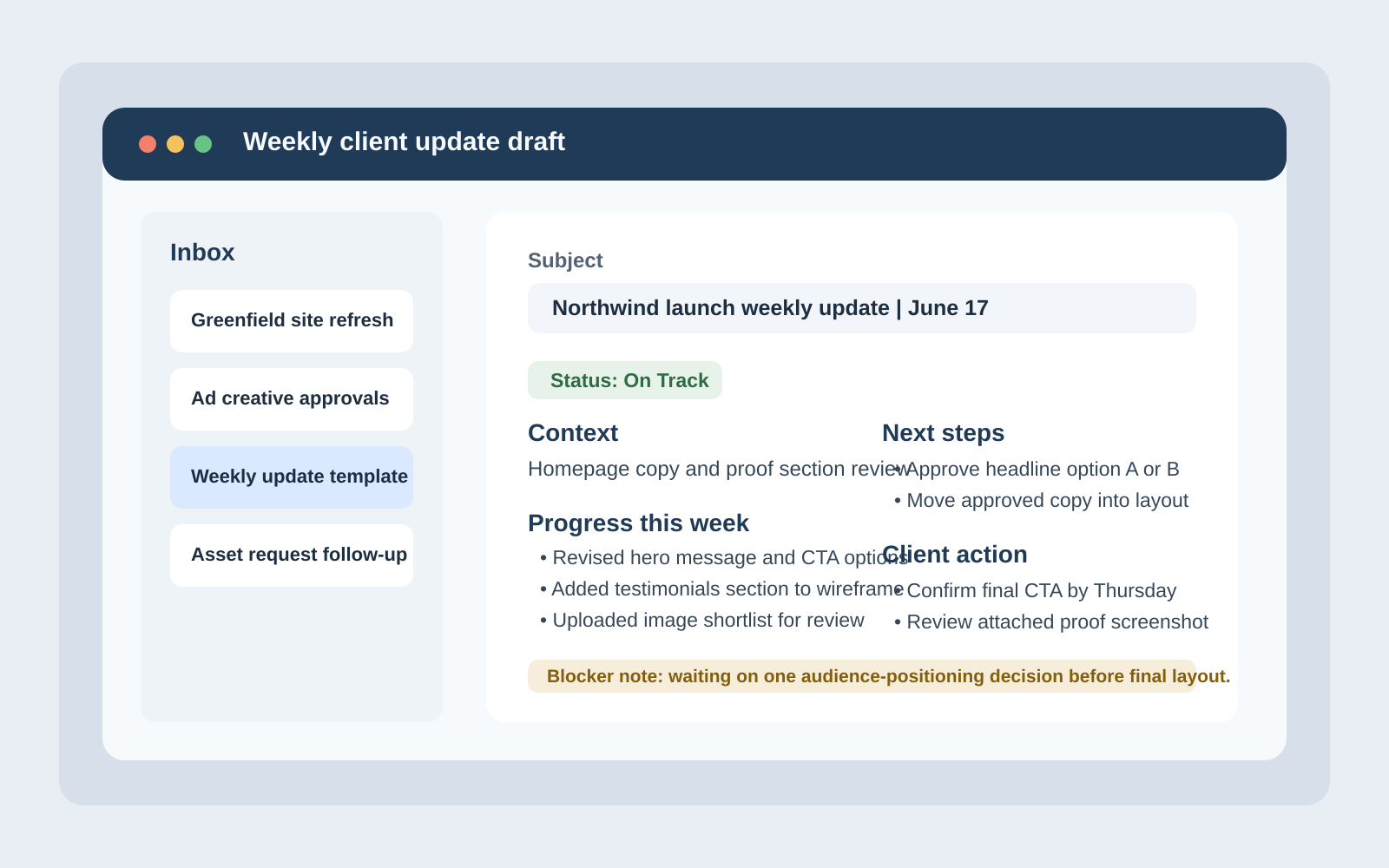
What a Good Update Includes
+A good weekly update is not a diary entry and it is not a miniature novel. It is a compact decision tool. The reader should be able to open it and answer three questions in under a minute:
+-
+
- Where are we now? Give the project context in one or two sentences so the reader knows which workstream, deliverable, or milestone the update covers. +
- What changed since the last update? Show progress in concrete terms. Finished draft, revised page, uploaded assets, approved concept. Specific beats vague every time. +
- What happens next? List the next step, next milestone, or next decision point so nobody has to infer the plan from scattered clues. +
That sounds almost too simple, which is usually a sign that the structure is right. Good systems often look obvious after someone bothers to build them.
+It also helps to keep one sentence for project health. Not a mood. Not a weather report disguised as a mood. A clear status statement that tells the client whether the work is moving normally, carrying risk, or waiting on approval.
+ +The Weekly Update Template
+Use the same layout every week. Repetition is not laziness here; it is interface design. Once stakeholders know where the information lives, they stop asking the update to do extra translation work.
+Suggested subject line: [Project Name] weekly update | [Date]
| Section | +What to include | +
|---|---|
| Status | +One clear label such as On Track, At Risk, or Needs Approval, plus a short plain-English sentence. | +
| Context | +What phase, deliverable, or priority this update covers so the reader enters the right frame immediately. | +
| Progress this week | +Bulleted list of completed work, decisions made, or meaningful movement since the last update. | +
| Next steps | +What will happen next, when it is expected, and who owns it. | +
| Blockers or risks | +Any constraint, missing input, or timing issue that could slow delivery if unresolved. | +
| Client action needed | +The exact answer, approval, file, or confirmation needed from the client, with a requested response window if relevant. | +
| Artifacts | +Links to drafts, screenshots, folders, notes, or documents that support the update. | +
If you are formalizing this into a repeatable internal workflow, even a lightweight web app generator can help map the fields, handoffs, and approval states before you build something larger. The point is not to buy software for sport. The point is to stop rebuilding the same process from scratch every Monday.
+Here is the template in plain text:
+Subject: [Project Name] weekly update | [Date]
+
+Hi [Client Name],
+
+Status: [On Track / At Risk / Needs Approval]
+
+Context
+- [One sentence on the current phase or deliverable]
+
+Progress this week
+- [Completed item]
+- [Completed item]
+- [Decision made or draft shared]
+
+Next steps
+- [Upcoming task and owner]
+- [Upcoming task and owner]
+
+Blockers or risks
+- [Constraint, dependency, or missing input]
+
+Client action needed
+- [Specific approval, answer, or file needed]
+- [Requested response window if relevant]
+
+Artifacts
+- [Draft link]
+- [Screenshot, folder, or document link]
+
+Thank you,
+[Name]The template works because it respects the reader's attention. Nothing is buried. Nothing depends on mind-reading.
+ +Handling Blockers and Decisions Without Drama
+Blockers are where many updates go sideways. Some updates hide them to avoid friction. Others announce them like the building is on fire. Neither approach is useful. A blocker should be described with enough precision that the next move becomes obvious.
+A practical blocker note usually includes three parts:
+-
+
- The issue: what is missing or unresolved? +
- The impact: what work, timing, or quality does it affect? +
- The required action: what needs to happen to clear it? +
For example, “Homepage copy draft is ready, but final audience positioning is still open. That affects the headline and CTA direction. Please confirm which audience segment is primary so design can move into layout.” That message does not panic. It does not scold. It simply makes the dependency visible.
+The same goes for decision requests. Do not ask for “thoughts” when you actually need approval. Use direct language such as:
+-
+
- Please approve Option B so the remaining page designs can be completed. +
- Please confirm the final file format before export. +
- Please choose one of the two scheduling windows so campaign setup can continue. +
That small change removes a surprising amount of drift. Vague requests invite vague replies. Then everyone acts surprised, which is a cherished workplace tradition but not a productive one.
+ +Status Levels That Mean Something
+Status labels are useful only when they trigger the right behavior. Keep them few, plain, and stable.
+| Status | +Meaning | +What the client should infer | +
|---|---|---|
| On Track | +The work is moving as planned with no material issue affecting the next step. | +No special intervention is needed beyond any listed approvals or file handoffs. | +
| At Risk | +There is a dependency, delay, or constraint that could affect timing or quality if it remains unresolved. | +A response or decision may be needed soon to prevent slippage. | +
| Needs Approval | +The next stage depends on a client decision, sign-off, or confirmation. | +The project is intentionally waiting for approval rather than silently drifting. | +
Avoid status inflation. If everything is urgent, nothing is useful. If everything is “fine” until the deadline breaks in half, that label is useless too. A restrained status system builds trust because it stays readable over time.
+ +Attach Artifacts So Nobody Has to Hunt Through Old Threads
+Weekly updates are much easier to act on when they include the materials needed for review. That might be a screenshot, a draft link, a file folder, a shared note, or a short loom-style walkthrough if the work is visual. The point is simple: if the update asks for feedback, the update should also make feedback possible.
+That is one reason shared-file guidance matters. Microsoft’s documentation for sharing files and folders in OneDrive is a useful reminder that access and permissions are part of communication, not an afterthought. A perfect review note attached to an inaccessible draft is still just an expensive way to waste twelve minutes.
+Useful artifact types include:
+-
+
- Screenshots when you want the reader to notice a specific change quickly. +
- Draft links when live review or comments are needed. +
- Shared folders when the next step depends on file delivery or upload. +
- Decision notes when multiple stakeholders need a clean record of what was approved. +
Link only what is relevant to that update. Dumping an entire project archive into every email is not thoroughness. It is camouflage.
+ +Timing: When to Send Updates
+The best time to send a weekly update is the time that gives the client a realistic chance to act on it before momentum evaporates. For many service businesses, that means sending updates on the same day each week, usually before a new work block begins or before a planned review window.
+A few timing rules work well:
+-
+
- Send the update on a consistent day so it becomes predictable. +
- Send it early enough that approvals or missing inputs can be addressed during the current work cycle. +
- Do not wait for perfect completeness if the real need is a decision or unblocker. +
- Use milestone updates for shorter projects, but keep the same structure. +
In other words, do not treat the update like a ceremony. Treat it like a handoff point in the workflow.
+ +Set Response Expectations Before You Need Them
+Response expectations belong in the process long before anyone is frustrated. If you only define them after a delay has already caused trouble, the conversation will feel personal even when the fix is procedural.
+Set expectations in plain language:
+-
+
- Routine feedback: “Please reply within two business days if possible.” +
- Time-sensitive approvals: “Please confirm by Thursday noon so production can stay on schedule.” +
- Urgent issues: “If access or launch timing changes suddenly, use email plus text so it is seen quickly.” +
This should stay realistic. Do not promise faster replies without context, and do not imply that every delay is catastrophic. The goal is simply to make the operating rules visible enough that nobody has to guess what “soon” means.
+ +Sample Short Update
+Here is what a concise weekly update can look like in practice:
+++Status: Needs Approval
+Context: This update covers the homepage copy and wireframe phase for the website refresh.
+Progress this week:
++
+- Completed homepage messaging draft and revised CTA options.
+- Shared updated wireframe with the new services section included.
+- Confirmed image requirements and file dimensions for the hero area.
+Next steps:
++
+- Finalize headline direction.
+- Move approved copy into layout.
+Blockers or risks: None beyond approval timing.
+Client action needed: Please approve headline Option A or B by Thursday so layout work can begin on Friday.
+Artifacts: Wireframe link, copy draft, and screenshot attached.
+
That is enough. It tells the story without asking the reader to reconstruct the week from memory.
+ +Checklist for Sending a Clear Update
+Before you send the update, run a quick check:
+-
+
- Does the update say what phase or deliverable it covers? +
- Did you list concrete progress instead of generic activity? +
- Is the next step visible and assigned? +
- Did you name any blocker with issue, impact, and required action? +
- Is the status label accurate rather than optimistic by habit? +
- Did you include the specific approval, answer, or file needed from the client? +
- Are the relevant screenshots, drafts, or folder links attached? +
- Did you state a realistic response window when timing matters? +
- Can someone skim the update in under a minute and still know what to do next? +
If the answer to that last question is no, the structure probably needs one more pass. Not a full rewrite. Just one more version where the signal is easier to see.
+ +Build the Rhythm Once, Then Keep It Boring
+The best weekly update is not clever. It is dependable. It creates a rhythm that clients recognize, team members can repeat, and projects can move through without constant clarification. That is what momentum usually looks like in real work: not drama, not genius, just a better interface between people, decisions, and the next useful action.
+If your current process still depends on scattered email threads and heroic memory, this is a good place to tighten it. Start small, standardize the template, and keep the status language consistent. For more practical workflow guidance, return to the home page, explore the blog, or reach out through contact when you want help building a cleaner communication rhythm.
diff --git a//home/ubuntu/apps/administrativeessentials.com/wp-content/uploads/flatlogic-codex-loop/article-generation-job-362/assets/render-weekly-update-image.js b//home/ubuntu/apps/administrativeessentials.com/wp-content/uploads/flatlogic-codex-loop/article-generation-job-362/assets/render-weekly-update-image.js new file mode 100644 index 0000000000000000000000000000000000000000..4b9a229c5bda0f009b398ce0e09615e778e1b3ac --- /dev/null +++ b//home/ubuntu/apps/administrativeessentials.com/wp-content/uploads/flatlogic-codex-loop/article-generation-job-362/assets/render-weekly-update-image.js @@ -0,0 +1,68 @@ +const fs = require('fs'); +const path = require('path'); +const sharp = require('./node_modules/sharp'); + +const outputPath = path.join(__dirname, 'weekly-client-update-template.png'); + +const svg = ` + +`; + +sharp(Buffer.from(svg)) + .png() + .toFile(outputPath) + .then(() => { + fs.writeFileSync(path.join(__dirname, 'render-success.txt'), outputPath + '\n'); + console.log(outputPath); + }) + .catch((error) => { + console.error(error); + process.exit(1); + }); diff --git a//home/ubuntu/apps/administrativeessentials.com/wp-content/uploads/flatlogic-codex-loop/article-generation-job-362/assets/weekly-client-update-post.html b//home/ubuntu/apps/administrativeessentials.com/wp-content/uploads/flatlogic-codex-loop/article-generation-job-362/assets/weekly-client-update-post.html new file mode 100644 index 0000000000000000000000000000000000000000..8e2fcfbc7a7d018061b2857eb60c6b9b54893069 --- /dev/null +++ b//home/ubuntu/apps/administrativeessentials.com/wp-content/uploads/flatlogic-codex-loop/article-generation-job-362/assets/weekly-client-update-post.html @@ -0,0 +1,213 @@ +A weekly client update should do one job well: make the next decision easier than the next follow-up email.
+If you have ever asked, “Why did this simple project suddenly need twelve clarifications?”, “Why does every update create more questions than answers?”, “How do I mention a blocker without sounding dramatic?”, or “What exactly should a client respond to in an update?”, you do not need better vibes. You need better structure.
+That structure matters because project status communication works best when readers can scan it quickly, see what changed, and understand what happens next. Resources from Asana and Atlassian both point in the same direction: updates are most useful when they separate progress, risks, and required actions instead of mixing everything into one anxious paragraph.
+This guide turns that idea into a practical operating system for the week ahead. You will get a reusable update template, a simple set of status labels, a way to handle blockers without turning the inbox into performance art, and a short checklist you can use before hitting send. If you need broader support with delivery workflows, you can also explore Administrative Essentials, browse the blog, or use the contact page when you want a second set of eyes on your process.
+ +What a Good Update Includes
+A good weekly update is not a diary entry and it is not a miniature novel. It is a compact decision tool. The reader should be able to open it and answer three questions in under a minute:
+-
+
- Where are we now? Give the project context in one or two sentences so the reader knows which workstream, deliverable, or milestone the update covers. +
- What changed since the last update? Show progress in concrete terms. Finished draft, revised page, uploaded assets, approved concept. Specific beats vague every time. +
- What happens next? List the next step, next milestone, or next decision point so nobody has to infer the plan from scattered clues. +
That sounds almost too simple, which is usually a sign that the structure is right. Good systems often look obvious after someone bothers to build them.
+It also helps to keep one sentence for project health. Not a mood. Not a weather report disguised as a mood. A clear status statement that tells the client whether the work is moving normally, carrying risk, or waiting on approval.
+ +The Weekly Update Template
+Use the same layout every week. Repetition is not laziness here; it is interface design. Once stakeholders know where the information lives, they stop asking the update to do extra translation work.
+Suggested subject line: [Project Name] weekly update | [Date]
| Section | +What to include | +
|---|---|
| Status | +One clear label such as On Track, At Risk, or Needs Approval, plus a short plain-English sentence. | +
| Context | +What phase, deliverable, or priority this update covers so the reader enters the right frame immediately. | +
| Progress this week | +Bulleted list of completed work, decisions made, or meaningful movement since the last update. | +
| Next steps | +What will happen next, when it is expected, and who owns it. | +
| Blockers or risks | +Any constraint, missing input, or timing issue that could slow delivery if unresolved. | +
| Client action needed | +The exact answer, approval, file, or confirmation needed from the client, with a requested response window if relevant. | +
| Artifacts | +Links to drafts, screenshots, folders, notes, or documents that support the update. | +
If you are formalizing this into a repeatable internal workflow, even a lightweight web app generator can help map the fields, handoffs, and approval states before you build something larger. The point is not to buy software for sport. The point is to stop rebuilding the same process from scratch every Monday.
+Here is the template in plain text:
+Subject: [Project Name] weekly update | [Date]
+
+Hi [Client Name],
+
+Status: [On Track / At Risk / Needs Approval]
+
+Context
+- [One sentence on the current phase or deliverable]
+
+Progress this week
+- [Completed item]
+- [Completed item]
+- [Decision made or draft shared]
+
+Next steps
+- [Upcoming task and owner]
+- [Upcoming task and owner]
+
+Blockers or risks
+- [Constraint, dependency, or missing input]
+
+Client action needed
+- [Specific approval, answer, or file needed]
+- [Requested response window if relevant]
+
+Artifacts
+- [Draft link]
+- [Screenshot, folder, or document link]
+
+Thank you,
+[Name]The template works because it respects the reader's attention. Nothing is buried. Nothing depends on mind-reading.
+ +Handling Blockers and Decisions Without Drama
+Blockers are where many updates go sideways. Some updates hide them to avoid friction. Others announce them like the building is on fire. Neither approach is useful. A blocker should be described with enough precision that the next move becomes obvious.
+A practical blocker note usually includes three parts:
+-
+
- The issue: what is missing or unresolved? +
- The impact: what work, timing, or quality does it affect? +
- The required action: what needs to happen to clear it? +
For example, “Homepage copy draft is ready, but final audience positioning is still open. That affects the headline and CTA direction. Please confirm which audience segment is primary so design can move into layout.” That message does not panic. It does not scold. It simply makes the dependency visible.
+The same goes for decision requests. Do not ask for “thoughts” when you actually need approval. Use direct language such as:
+-
+
- Please approve Option B so the remaining page designs can be completed. +
- Please confirm the final file format before export. +
- Please choose one of the two scheduling windows so campaign setup can continue. +
That small change removes a surprising amount of drift. Vague requests invite vague replies. Then everyone acts surprised, which is a cherished workplace tradition but not a productive one.
+ +Status Levels That Mean Something
+Status labels are useful only when they trigger the right behavior. Keep them few, plain, and stable.
+| Status | +Meaning | +What the client should infer | +
|---|---|---|
| On Track | +The work is moving as planned with no material issue affecting the next step. | +No special intervention is needed beyond any listed approvals or file handoffs. | +
| At Risk | +There is a dependency, delay, or constraint that could affect timing or quality if it remains unresolved. | +A response or decision may be needed soon to prevent slippage. | +
| Needs Approval | +The next stage depends on a client decision, sign-off, or confirmation. | +The project is intentionally waiting for approval rather than silently drifting. | +
Avoid status inflation. If everything is urgent, nothing is useful. If everything is “fine” until the deadline breaks in half, that label is useless too. A restrained status system builds trust because it stays readable over time.
+ +Attach Artifacts So Nobody Has to Hunt Through Old Threads
+Weekly updates are much easier to act on when they include the materials needed for review. That might be a screenshot, a draft link, a file folder, a shared note, or a short loom-style walkthrough if the work is visual. The point is simple: if the update asks for feedback, the update should also make feedback possible.
+That is one reason shared-file guidance matters. Microsoft’s documentation for sharing files and folders in OneDrive is a useful reminder that access and permissions are part of communication, not an afterthought. A perfect review note attached to an inaccessible draft is still just an expensive way to waste twelve minutes.
+Useful artifact types include:
+-
+
- Screenshots when you want the reader to notice a specific change quickly. +
- Draft links when live review or comments are needed. +
- Shared folders when the next step depends on file delivery or upload. +
- Decision notes when multiple stakeholders need a clean record of what was approved. +
Link only what is relevant to that update. Dumping an entire project archive into every email is not thoroughness. It is camouflage.
+ +Timing: When to Send Updates
+The best time to send a weekly update is the time that gives the client a realistic chance to act on it before momentum evaporates. For many service businesses, that means sending updates on the same day each week, usually before a new work block begins or before a planned review window.
+A few timing rules work well:
+-
+
- Send the update on a consistent day so it becomes predictable. +
- Send it early enough that approvals or missing inputs can be addressed during the current work cycle. +
- Do not wait for perfect completeness if the real need is a decision or unblocker. +
- Use milestone updates for shorter projects, but keep the same structure. +
In other words, do not treat the update like a ceremony. Treat it like a handoff point in the workflow.
+ +Set Response Expectations Before You Need Them
+Response expectations belong in the process long before anyone is frustrated. If you only define them after a delay has already caused trouble, the conversation will feel personal even when the fix is procedural.
+Set expectations in plain language:
+-
+
- Routine feedback: “Please reply within two business days if possible.” +
- Time-sensitive approvals: “Please confirm by Thursday noon so production can stay on schedule.” +
- Urgent issues: “If access or launch timing changes suddenly, use email plus text so it is seen quickly.” +
This should stay realistic. Do not promise faster replies without context, and do not imply that every delay is catastrophic. The goal is simply to make the operating rules visible enough that nobody has to guess what “soon” means.
+ +Sample Short Update
+Here is what a concise weekly update can look like in practice:
+++Status: Needs Approval
+Context: This update covers the homepage copy and wireframe phase for the website refresh.
+Progress this week:
++
+- Completed homepage messaging draft and revised CTA options.
+- Shared updated wireframe with the new services section included.
+- Confirmed image requirements and file dimensions for the hero area.
+Next steps:
++
+- Finalize headline direction.
+- Move approved copy into layout.
+Blockers or risks: None beyond approval timing.
+Client action needed: Please approve headline Option A or B by Thursday so layout work can begin on Friday.
+Artifacts: Wireframe link, copy draft, and screenshot attached.
+
That is enough. It tells the story without asking the reader to reconstruct the week from memory.
+ +Checklist for Sending a Clear Update
+Before you send the update, run a quick check:
+-
+
- Does the update say what phase or deliverable it covers? +
- Did you list concrete progress instead of generic activity? +
- Is the next step visible and assigned? +
- Did you name any blocker with issue, impact, and required action? +
- Is the status label accurate rather than optimistic by habit? +
- Did you include the specific approval, answer, or file needed from the client? +
- Are the relevant screenshots, drafts, or folder links attached? +
- Did you state a realistic response window when timing matters? +
- Can someone skim the update in under a minute and still know what to do next? +
If the answer to that last question is no, the structure probably needs one more pass. Not a full rewrite. Just one more version where the signal is easier to see.
+ +Build the Rhythm Once, Then Keep It Boring
+The best weekly update is not clever. It is dependable. It creates a rhythm that clients recognize, team members can repeat, and projects can move through without constant clarification. That is what momentum usually looks like in real work: not drama, not genius, just a better interface between people, decisions, and the next useful action.
+If your current process still depends on scattered email threads and heroic memory, this is a good place to tighten it. Start small, standardize the template, and keep the status language consistent. For more practical workflow guidance, return to the home page, explore the blog, or reach out through contact when you want help building a cleaner communication rhythm.
codex The media asset is registered and publicly reachable. I’m creating the post now with final content, excerpt, slug, author, and featured image, then I’ll run the URL/content checks required by the task. exec /bin/bash -lc 'wp post list --post_type=post --name=weekly-client-update-that-builds-momentum --field=ID' in /home/ubuntu/apps/administrativeessentials.com exec /bin/bash -lc 'wp option get page_for_posts && wp option get page_on_front' in /home/ubuntu/apps/administrativeessentials.com succeeded in 573ms: diff --git a//home/ubuntu/apps/administrativeessentials.com/wp-content/uploads/flatlogic-codex-loop/article-generation-job-362/assets/render-weekly-update-image.js b//home/ubuntu/apps/administrativeessentials.com/wp-content/uploads/flatlogic-codex-loop/article-generation-job-362/assets/render-weekly-update-image.js new file mode 100644 index 0000000000000000000000000000000000000000..4b9a229c5bda0f009b398ce0e09615e778e1b3ac --- /dev/null +++ b//home/ubuntu/apps/administrativeessentials.com/wp-content/uploads/flatlogic-codex-loop/article-generation-job-362/assets/render-weekly-update-image.js @@ -0,0 +1,68 @@ +const fs = require('fs'); +const path = require('path'); +const sharp = require('./node_modules/sharp'); + +const outputPath = path.join(__dirname, 'weekly-client-update-template.png'); + +const svg = ` + +`; + +sharp(Buffer.from(svg)) + .png() + .toFile(outputPath) + .then(() => { + fs.writeFileSync(path.join(__dirname, 'render-success.txt'), outputPath + '\n'); + console.log(outputPath); + }) + .catch((error) => { + console.error(error); + process.exit(1); + }); diff --git a//home/ubuntu/apps/administrativeessentials.com/wp-content/uploads/flatlogic-codex-loop/article-generation-job-362/assets/weekly-client-update-post.html b//home/ubuntu/apps/administrativeessentials.com/wp-content/uploads/flatlogic-codex-loop/article-generation-job-362/assets/weekly-client-update-post.html new file mode 100644 index 0000000000000000000000000000000000000000..8e2fcfbc7a7d018061b2857eb60c6b9b54893069 --- /dev/null +++ b//home/ubuntu/apps/administrativeessentials.com/wp-content/uploads/flatlogic-codex-loop/article-generation-job-362/assets/weekly-client-update-post.html @@ -0,0 +1,213 @@ +A weekly client update should do one job well: make the next decision easier than the next follow-up email.
+If you have ever asked, “Why did this simple project suddenly need twelve clarifications?”, “Why does every update create more questions than answers?”, “How do I mention a blocker without sounding dramatic?”, or “What exactly should a client respond to in an update?”, you do not need better vibes. You need better structure.
+That structure matters because project status communication works best when readers can scan it quickly, see what changed, and understand what happens next. Resources from Asana and Atlassian both point in the same direction: updates are most useful when they separate progress, risks, and required actions instead of mixing everything into one anxious paragraph.
+This guide turns that idea into a practical operating system for the week ahead. You will get a reusable update template, a simple set of status labels, a way to handle blockers without turning the inbox into performance art, and a short checklist you can use before hitting send. If you need broader support with delivery workflows, you can also explore Administrative Essentials, browse the blog, or use the contact page when you want a second set of eyes on your process.
+ +What a Good Update Includes
+A good weekly update is not a diary entry and it is not a miniature novel. It is a compact decision tool. The reader should be able to open it and answer three questions in under a minute:
+-
+
- Where are we now? Give the project context in one or two sentences so the reader knows which workstream, deliverable, or milestone the update covers. +
- What changed since the last update? Show progress in concrete terms. Finished draft, revised page, uploaded assets, approved concept. Specific beats vague every time. +
- What happens next? List the next step, next milestone, or next decision point so nobody has to infer the plan from scattered clues. +
That sounds almost too simple, which is usually a sign that the structure is right. Good systems often look obvious after someone bothers to build them.
+It also helps to keep one sentence for project health. Not a mood. Not a weather report disguised as a mood. A clear status statement that tells the client whether the work is moving normally, carrying risk, or waiting on approval.
+ +The Weekly Update Template
+Use the same layout every week. Repetition is not laziness here; it is interface design. Once stakeholders know where the information lives, they stop asking the update to do extra translation work.
+Suggested subject line: [Project Name] weekly update | [Date]
| Section | +What to include | +
|---|---|
| Status | +One clear label such as On Track, At Risk, or Needs Approval, plus a short plain-English sentence. | +
| Context | +What phase, deliverable, or priority this update covers so the reader enters the right frame immediately. | +
| Progress this week | +Bulleted list of completed work, decisions made, or meaningful movement since the last update. | +
| Next steps | +What will happen next, when it is expected, and who owns it. | +
| Blockers or risks | +Any constraint, missing input, or timing issue that could slow delivery if unresolved. | +
| Client action needed | +The exact answer, approval, file, or confirmation needed from the client, with a requested response window if relevant. | +
| Artifacts | +Links to drafts, screenshots, folders, notes, or documents that support the update. | +
If you are formalizing this into a repeatable internal workflow, even a lightweight web app generator can help map the fields, handoffs, and approval states before you build something larger. The point is not to buy software for sport. The point is to stop rebuilding the same process from scratch every Monday.
+Here is the template in plain text:
+Subject: [Project Name] weekly update | [Date]
+
+Hi [Client Name],
+
+Status: [On Track / At Risk / Needs Approval]
+
+Context
+- [One sentence on the current phase or deliverable]
+
+Progress this week
+- [Completed item]
+- [Completed item]
+- [Decision made or draft shared]
+
+Next steps
+- [Upcoming task and owner]
+- [Upcoming task and owner]
+
+Blockers or risks
+- [Constraint, dependency, or missing input]
+
+Client action needed
+- [Specific approval, answer, or file needed]
+- [Requested response window if relevant]
+
+Artifacts
+- [Draft link]
+- [Screenshot, folder, or document link]
+
+Thank you,
+[Name]The template works because it respects the reader's attention. Nothing is buried. Nothing depends on mind-reading.
+ +Handling Blockers and Decisions Without Drama
+Blockers are where many updates go sideways. Some updates hide them to avoid friction. Others announce them like the building is on fire. Neither approach is useful. A blocker should be described with enough precision that the next move becomes obvious.
+A practical blocker note usually includes three parts:
+-
+
- The issue: what is missing or unresolved? +
- The impact: what work, timing, or quality does it affect? +
- The required action: what needs to happen to clear it? +
For example, “Homepage copy draft is ready, but final audience positioning is still open. That affects the headline and CTA direction. Please confirm which audience segment is primary so design can move into layout.” That message does not panic. It does not scold. It simply makes the dependency visible.
+The same goes for decision requests. Do not ask for “thoughts” when you actually need approval. Use direct language such as:
+-
+
- Please approve Option B so the remaining page designs can be completed. +
- Please confirm the final file format before export. +
- Please choose one of the two scheduling windows so campaign setup can continue. +
That small change removes a surprising amount of drift. Vague requests invite vague replies. Then everyone acts surprised, which is a cherished workplace tradition but not a productive one.
+ +Status Levels That Mean Something
+Status labels are useful only when they trigger the right behavior. Keep them few, plain, and stable.
+| Status | +Meaning | +What the client should infer | +
|---|---|---|
| On Track | +The work is moving as planned with no material issue affecting the next step. | +No special intervention is needed beyond any listed approvals or file handoffs. | +
| At Risk | +There is a dependency, delay, or constraint that could affect timing or quality if it remains unresolved. | +A response or decision may be needed soon to prevent slippage. | +
| Needs Approval | +The next stage depends on a client decision, sign-off, or confirmation. | +The project is intentionally waiting for approval rather than silently drifting. | +
Avoid status inflation. If everything is urgent, nothing is useful. If everything is “fine” until the deadline breaks in half, that label is useless too. A restrained status system builds trust because it stays readable over time.
+ +Attach Artifacts So Nobody Has to Hunt Through Old Threads
+Weekly updates are much easier to act on when they include the materials needed for review. That might be a screenshot, a draft link, a file folder, a shared note, or a short loom-style walkthrough if the work is visual. The point is simple: if the update asks for feedback, the update should also make feedback possible.
+That is one reason shared-file guidance matters. Microsoft’s documentation for sharing files and folders in OneDrive is a useful reminder that access and permissions are part of communication, not an afterthought. A perfect review note attached to an inaccessible draft is still just an expensive way to waste twelve minutes.
+Useful artifact types include:
+-
+
- Screenshots when you want the reader to notice a specific change quickly. +
- Draft links when live review or comments are needed. +
- Shared folders when the next step depends on file delivery or upload. +
- Decision notes when multiple stakeholders need a clean record of what was approved. +
Link only what is relevant to that update. Dumping an entire project archive into every email is not thoroughness. It is camouflage.
+ +Timing: When to Send Updates
+The best time to send a weekly update is the time that gives the client a realistic chance to act on it before momentum evaporates. For many service businesses, that means sending updates on the same day each week, usually before a new work block begins or before a planned review window.
+A few timing rules work well:
+-
+
- Send the update on a consistent day so it becomes predictable. +
- Send it early enough that approvals or missing inputs can be addressed during the current work cycle. +
- Do not wait for perfect completeness if the real need is a decision or unblocker. +
- Use milestone updates for shorter projects, but keep the same structure. +
In other words, do not treat the update like a ceremony. Treat it like a handoff point in the workflow.
+ +Set Response Expectations Before You Need Them
+Response expectations belong in the process long before anyone is frustrated. If you only define them after a delay has already caused trouble, the conversation will feel personal even when the fix is procedural.
+Set expectations in plain language:
+-
+
- Routine feedback: “Please reply within two business days if possible.” +
- Time-sensitive approvals: “Please confirm by Thursday noon so production can stay on schedule.” +
- Urgent issues: “If access or launch timing changes suddenly, use email plus text so it is seen quickly.” +
This should stay realistic. Do not promise faster replies without context, and do not imply that every delay is catastrophic. The goal is simply to make the operating rules visible enough that nobody has to guess what “soon” means.
+ +Sample Short Update
+Here is what a concise weekly update can look like in practice:
+++Status: Needs Approval
+Context: This update covers the homepage copy and wireframe phase for the website refresh.
+Progress this week:
++
+- Completed homepage messaging draft and revised CTA options.
+- Shared updated wireframe with the new services section included.
+- Confirmed image requirements and file dimensions for the hero area.
+Next steps:
++
+- Finalize headline direction.
+- Move approved copy into layout.
+Blockers or risks: None beyond approval timing.
+Client action needed: Please approve headline Option A or B by Thursday so layout work can begin on Friday.
+Artifacts: Wireframe link, copy draft, and screenshot attached.
+
That is enough. It tells the story without asking the reader to reconstruct the week from memory.
+ +Checklist for Sending a Clear Update
+Before you send the update, run a quick check:
+-
+
- Does the update say what phase or deliverable it covers? +
- Did you list concrete progress instead of generic activity? +
- Is the next step visible and assigned? +
- Did you name any blocker with issue, impact, and required action? +
- Is the status label accurate rather than optimistic by habit? +
- Did you include the specific approval, answer, or file needed from the client? +
- Are the relevant screenshots, drafts, or folder links attached? +
- Did you state a realistic response window when timing matters? +
- Can someone skim the update in under a minute and still know what to do next? +
If the answer to that last question is no, the structure probably needs one more pass. Not a full rewrite. Just one more version where the signal is easier to see.
+ +Build the Rhythm Once, Then Keep It Boring
+The best weekly update is not clever. It is dependable. It creates a rhythm that clients recognize, team members can repeat, and projects can move through without constant clarification. That is what momentum usually looks like in real work: not drama, not genius, just a better interface between people, decisions, and the next useful action.
+If your current process still depends on scattered email threads and heroic memory, this is a good place to tighten it. Start small, standardize the template, and keep the status language consistent. For more practical workflow guidance, return to the home page, explore the blog, or reach out through contact when you want help building a cleaner communication rhythm.
succeeded in 1124ms: 13 7 exec /bin/bash -lc "wp post create --post_type=post --post_status=publish --post_title='Client Communication That Builds Momentum: A Simple Weekly Update That Works' --post_name='weekly-client-update-that-builds-momentum' --post_author=4 --post_excerpt='Learn how to create effective weekly client updates that enhance communication and keep projects on track. Discover a simple template and best practices for client communication.' --post_content=\""'$(cat wp-content/uploads/flatlogic-codex-loop/article-generation-job-362/assets/weekly-client-update-post.html)" --porcelain' in /home/ubuntu/apps/administrativeessentials.com diff --git a//home/ubuntu/apps/administrativeessentials.com/wp-content/uploads/flatlogic-codex-loop/article-generation-job-362/assets/render-weekly-update-image.js b//home/ubuntu/apps/administrativeessentials.com/wp-content/uploads/flatlogic-codex-loop/article-generation-job-362/assets/render-weekly-update-image.js new file mode 100644 index 0000000000000000000000000000000000000000..4b9a229c5bda0f009b398ce0e09615e778e1b3ac --- /dev/null +++ b//home/ubuntu/apps/administrativeessentials.com/wp-content/uploads/flatlogic-codex-loop/article-generation-job-362/assets/render-weekly-update-image.js @@ -0,0 +1,68 @@ +const fs = require('fs'); +const path = require('path'); +const sharp = require('./node_modules/sharp'); + +const outputPath = path.join(__dirname, 'weekly-client-update-template.png'); + +const svg = ` + +`; + +sharp(Buffer.from(svg)) + .png() + .toFile(outputPath) + .then(() => { + fs.writeFileSync(path.join(__dirname, 'render-success.txt'), outputPath + '\n'); + console.log(outputPath); + }) + .catch((error) => { + console.error(error); + process.exit(1); + }); diff --git a//home/ubuntu/apps/administrativeessentials.com/wp-content/uploads/flatlogic-codex-loop/article-generation-job-362/assets/weekly-client-update-post.html b//home/ubuntu/apps/administrativeessentials.com/wp-content/uploads/flatlogic-codex-loop/article-generation-job-362/assets/weekly-client-update-post.html new file mode 100644 index 0000000000000000000000000000000000000000..8e2fcfbc7a7d018061b2857eb60c6b9b54893069 --- /dev/null +++ b//home/ubuntu/apps/administrativeessentials.com/wp-content/uploads/flatlogic-codex-loop/article-generation-job-362/assets/weekly-client-update-post.html @@ -0,0 +1,213 @@ +A weekly client update should do one job well: make the next decision easier than the next follow-up email.
+If you have ever asked, “Why did this simple project suddenly need twelve clarifications?”, “Why does every update create more questions than answers?”, “How do I mention a blocker without sounding dramatic?”, or “What exactly should a client respond to in an update?”, you do not need better vibes. You need better structure.
+That structure matters because project status communication works best when readers can scan it quickly, see what changed, and understand what happens next. Resources from Asana and Atlassian both point in the same direction: updates are most useful when they separate progress, risks, and required actions instead of mixing everything into one anxious paragraph.
+This guide turns that idea into a practical operating system for the week ahead. You will get a reusable update template, a simple set of status labels, a way to handle blockers without turning the inbox into performance art, and a short checklist you can use before hitting send. If you need broader support with delivery workflows, you can also explore Administrative Essentials, browse the blog, or use the contact page when you want a second set of eyes on your process.
+ +What a Good Update Includes
+A good weekly update is not a diary entry and it is not a miniature novel. It is a compact decision tool. The reader should be able to open it and answer three questions in under a minute:
+-
+
- Where are we now? Give the project context in one or two sentences so the reader knows which workstream, deliverable, or milestone the update covers. +
- What changed since the last update? Show progress in concrete terms. Finished draft, revised page, uploaded assets, approved concept. Specific beats vague every time. +
- What happens next? List the next step, next milestone, or next decision point so nobody has to infer the plan from scattered clues. +
That sounds almost too simple, which is usually a sign that the structure is right. Good systems often look obvious after someone bothers to build them.
+It also helps to keep one sentence for project health. Not a mood. Not a weather report disguised as a mood. A clear status statement that tells the client whether the work is moving normally, carrying risk, or waiting on approval.
+ +The Weekly Update Template
+Use the same layout every week. Repetition is not laziness here; it is interface design. Once stakeholders know where the information lives, they stop asking the update to do extra translation work.
+Suggested subject line: [Project Name] weekly update | [Date]
| Section | +What to include | +
|---|---|
| Status | +One clear label such as On Track, At Risk, or Needs Approval, plus a short plain-English sentence. | +
| Context | +What phase, deliverable, or priority this update covers so the reader enters the right frame immediately. | +
| Progress this week | +Bulleted list of completed work, decisions made, or meaningful movement since the last update. | +
| Next steps | +What will happen next, when it is expected, and who owns it. | +
| Blockers or risks | +Any constraint, missing input, or timing issue that could slow delivery if unresolved. | +
| Client action needed | +The exact answer, approval, file, or confirmation needed from the client, with a requested response window if relevant. | +
| Artifacts | +Links to drafts, screenshots, folders, notes, or documents that support the update. | +
If you are formalizing this into a repeatable internal workflow, even a lightweight web app generator can help map the fields, handoffs, and approval states before you build something larger. The point is not to buy software for sport. The point is to stop rebuilding the same process from scratch every Monday.
+Here is the template in plain text:
+Subject: [Project Name] weekly update | [Date]
+
+Hi [Client Name],
+
+Status: [On Track / At Risk / Needs Approval]
+
+Context
+- [One sentence on the current phase or deliverable]
+
+Progress this week
+- [Completed item]
+- [Completed item]
+- [Decision made or draft shared]
+
+Next steps
+- [Upcoming task and owner]
+- [Upcoming task and owner]
+
+Blockers or risks
+- [Constraint, dependency, or missing input]
+
+Client action needed
+- [Specific approval, answer, or file needed]
+- [Requested response window if relevant]
+
+Artifacts
+- [Draft link]
+- [Screenshot, folder, or document link]
+
+Thank you,
+[Name]The template works because it respects the reader's attention. Nothing is buried. Nothing depends on mind-reading.
+ +Handling Blockers and Decisions Without Drama
+Blockers are where many updates go sideways. Some updates hide them to avoid friction. Others announce them like the building is on fire. Neither approach is useful. A blocker should be described with enough precision that the next move becomes obvious.
+A practical blocker note usually includes three parts:
+-
+
- The issue: what is missing or unresolved? +
- The impact: what work, timing, or quality does it affect? +
- The required action: what needs to happen to clear it? +
For example, “Homepage copy draft is ready, but final audience positioning is still open. That affects the headline and CTA direction. Please confirm which audience segment is primary so design can move into layout.” That message does not panic. It does not scold. It simply makes the dependency visible.
+The same goes for decision requests. Do not ask for “thoughts” when you actually need approval. Use direct language such as:
+-
+
- Please approve Option B so the remaining page designs can be completed. +
- Please confirm the final file format before export. +
- Please choose one of the two scheduling windows so campaign setup can continue. +
That small change removes a surprising amount of drift. Vague requests invite vague replies. Then everyone acts surprised, which is a cherished workplace tradition but not a productive one.
+ +Status Levels That Mean Something
+Status labels are useful only when they trigger the right behavior. Keep them few, plain, and stable.
+| Status | +Meaning | +What the client should infer | +
|---|---|---|
| On Track | +The work is moving as planned with no material issue affecting the next step. | +No special intervention is needed beyond any listed approvals or file handoffs. | +
| At Risk | +There is a dependency, delay, or constraint that could affect timing or quality if it remains unresolved. | +A response or decision may be needed soon to prevent slippage. | +
| Needs Approval | +The next stage depends on a client decision, sign-off, or confirmation. | +The project is intentionally waiting for approval rather than silently drifting. | +
Avoid status inflation. If everything is urgent, nothing is useful. If everything is “fine” until the deadline breaks in half, that label is useless too. A restrained status system builds trust because it stays readable over time.
+ +Attach Artifacts So Nobody Has to Hunt Through Old Threads
+Weekly updates are much easier to act on when they include the materials needed for review. That might be a screenshot, a draft link, a file folder, a shared note, or a short loom-style walkthrough if the work is visual. The point is simple: if the update asks for feedback, the update should also make feedback possible.
+That is one reason shared-file guidance matters. Microsoft’s documentation for sharing files and folders in OneDrive is a useful reminder that access and permissions are part of communication, not an afterthought. A perfect review note attached to an inaccessible draft is still just an expensive way to waste twelve minutes.
+Useful artifact types include:
+-
+
- Screenshots when you want the reader to notice a specific change quickly. +
- Draft links when live review or comments are needed. +
- Shared folders when the next step depends on file delivery or upload. +
- Decision notes when multiple stakeholders need a clean record of what was approved. +
Link only what is relevant to that update. Dumping an entire project archive into every email is not thoroughness. It is camouflage.
+ +Timing: When to Send Updates
+The best time to send a weekly update is the time that gives the client a realistic chance to act on it before momentum evaporates. For many service businesses, that means sending updates on the same day each week, usually before a new work block begins or before a planned review window.
+A few timing rules work well:
+-
+
- Send the update on a consistent day so it becomes predictable. +
- Send it early enough that approvals or missing inputs can be addressed during the current work cycle. +
- Do not wait for perfect completeness if the real need is a decision or unblocker. +
- Use milestone updates for shorter projects, but keep the same structure. +
In other words, do not treat the update like a ceremony. Treat it like a handoff point in the workflow.
+ +Set Response Expectations Before You Need Them
+Response expectations belong in the process long before anyone is frustrated. If you only define them after a delay has already caused trouble, the conversation will feel personal even when the fix is procedural.
+Set expectations in plain language:
+-
+
- Routine feedback: “Please reply within two business days if possible.” +
- Time-sensitive approvals: “Please confirm by Thursday noon so production can stay on schedule.” +
- Urgent issues: “If access or launch timing changes suddenly, use email plus text so it is seen quickly.” +
This should stay realistic. Do not promise faster replies without context, and do not imply that every delay is catastrophic. The goal is simply to make the operating rules visible enough that nobody has to guess what “soon” means.
+ +Sample Short Update
+Here is what a concise weekly update can look like in practice:
+++Status: Needs Approval
+Context: This update covers the homepage copy and wireframe phase for the website refresh.
+Progress this week:
++
+- Completed homepage messaging draft and revised CTA options.
+- Shared updated wireframe with the new services section included.
+- Confirmed image requirements and file dimensions for the hero area.
+Next steps:
++
+- Finalize headline direction.
+- Move approved copy into layout.
+Blockers or risks: None beyond approval timing.
+Client action needed: Please approve headline Option A or B by Thursday so layout work can begin on Friday.
+Artifacts: Wireframe link, copy draft, and screenshot attached.
+
That is enough. It tells the story without asking the reader to reconstruct the week from memory.
+ +Checklist for Sending a Clear Update
+Before you send the update, run a quick check:
+-
+
- Does the update say what phase or deliverable it covers? +
- Did you list concrete progress instead of generic activity? +
- Is the next step visible and assigned? +
- Did you name any blocker with issue, impact, and required action? +
- Is the status label accurate rather than optimistic by habit? +
- Did you include the specific approval, answer, or file needed from the client? +
- Are the relevant screenshots, drafts, or folder links attached? +
- Did you state a realistic response window when timing matters? +
- Can someone skim the update in under a minute and still know what to do next? +
If the answer to that last question is no, the structure probably needs one more pass. Not a full rewrite. Just one more version where the signal is easier to see.
+ +Build the Rhythm Once, Then Keep It Boring
+The best weekly update is not clever. It is dependable. It creates a rhythm that clients recognize, team members can repeat, and projects can move through without constant clarification. That is what momentum usually looks like in real work: not drama, not genius, just a better interface between people, decisions, and the next useful action.
+If your current process still depends on scattered email threads and heroic memory, this is a good place to tighten it. Start small, standardize the template, and keep the status language consistent. For more practical workflow guidance, return to the home page, explore the blog, or reach out through contact when you want help building a cleaner communication rhythm.
succeeded in 800ms: 82 exec /bin/bash -lc 'wp post meta update 82 _thumbnail_id 81' in /home/ubuntu/apps/administrativeessentials.com diff --git a//home/ubuntu/apps/administrativeessentials.com/wp-content/uploads/flatlogic-codex-loop/article-generation-job-362/assets/render-weekly-update-image.js b//home/ubuntu/apps/administrativeessentials.com/wp-content/uploads/flatlogic-codex-loop/article-generation-job-362/assets/render-weekly-update-image.js new file mode 100644 index 0000000000000000000000000000000000000000..4b9a229c5bda0f009b398ce0e09615e778e1b3ac --- /dev/null +++ b//home/ubuntu/apps/administrativeessentials.com/wp-content/uploads/flatlogic-codex-loop/article-generation-job-362/assets/render-weekly-update-image.js @@ -0,0 +1,68 @@ +const fs = require('fs'); +const path = require('path'); +const sharp = require('./node_modules/sharp'); + +const outputPath = path.join(__dirname, 'weekly-client-update-template.png'); + +const svg = ` + +`; + +sharp(Buffer.from(svg)) + .png() + .toFile(outputPath) + .then(() => { + fs.writeFileSync(path.join(__dirname, 'render-success.txt'), outputPath + '\n'); + console.log(outputPath); + }) + .catch((error) => { + console.error(error); + process.exit(1); + }); diff --git a//home/ubuntu/apps/administrativeessentials.com/wp-content/uploads/flatlogic-codex-loop/article-generation-job-362/assets/weekly-client-update-post.html b//home/ubuntu/apps/administrativeessentials.com/wp-content/uploads/flatlogic-codex-loop/article-generation-job-362/assets/weekly-client-update-post.html new file mode 100644 index 0000000000000000000000000000000000000000..8e2fcfbc7a7d018061b2857eb60c6b9b54893069 --- /dev/null +++ b//home/ubuntu/apps/administrativeessentials.com/wp-content/uploads/flatlogic-codex-loop/article-generation-job-362/assets/weekly-client-update-post.html @@ -0,0 +1,213 @@ +A weekly client update should do one job well: make the next decision easier than the next follow-up email.
+If you have ever asked, “Why did this simple project suddenly need twelve clarifications?”, “Why does every update create more questions than answers?”, “How do I mention a blocker without sounding dramatic?”, or “What exactly should a client respond to in an update?”, you do not need better vibes. You need better structure.
+That structure matters because project status communication works best when readers can scan it quickly, see what changed, and understand what happens next. Resources from Asana and Atlassian both point in the same direction: updates are most useful when they separate progress, risks, and required actions instead of mixing everything into one anxious paragraph.
+This guide turns that idea into a practical operating system for the week ahead. You will get a reusable update template, a simple set of status labels, a way to handle blockers without turning the inbox into performance art, and a short checklist you can use before hitting send. If you need broader support with delivery workflows, you can also explore Administrative Essentials, browse the blog, or use the contact page when you want a second set of eyes on your process.
+ +What a Good Update Includes
+A good weekly update is not a diary entry and it is not a miniature novel. It is a compact decision tool. The reader should be able to open it and answer three questions in under a minute:
+-
+
- Where are we now? Give the project context in one or two sentences so the reader knows which workstream, deliverable, or milestone the update covers. +
- What changed since the last update? Show progress in concrete terms. Finished draft, revised page, uploaded assets, approved concept. Specific beats vague every time. +
- What happens next? List the next step, next milestone, or next decision point so nobody has to infer the plan from scattered clues. +
That sounds almost too simple, which is usually a sign that the structure is right. Good systems often look obvious after someone bothers to build them.
+It also helps to keep one sentence for project health. Not a mood. Not a weather report disguised as a mood. A clear status statement that tells the client whether the work is moving normally, carrying risk, or waiting on approval.
+ +The Weekly Update Template
+Use the same layout every week. Repetition is not laziness here; it is interface design. Once stakeholders know where the information lives, they stop asking the update to do extra translation work.
+Suggested subject line: [Project Name] weekly update | [Date]
| Section | +What to include | +
|---|---|
| Status | +One clear label such as On Track, At Risk, or Needs Approval, plus a short plain-English sentence. | +
| Context | +What phase, deliverable, or priority this update covers so the reader enters the right frame immediately. | +
| Progress this week | +Bulleted list of completed work, decisions made, or meaningful movement since the last update. | +
| Next steps | +What will happen next, when it is expected, and who owns it. | +
| Blockers or risks | +Any constraint, missing input, or timing issue that could slow delivery if unresolved. | +
| Client action needed | +The exact answer, approval, file, or confirmation needed from the client, with a requested response window if relevant. | +
| Artifacts | +Links to drafts, screenshots, folders, notes, or documents that support the update. | +
If you are formalizing this into a repeatable internal workflow, even a lightweight web app generator can help map the fields, handoffs, and approval states before you build something larger. The point is not to buy software for sport. The point is to stop rebuilding the same process from scratch every Monday.
+Here is the template in plain text:
+Subject: [Project Name] weekly update | [Date]
+
+Hi [Client Name],
+
+Status: [On Track / At Risk / Needs Approval]
+
+Context
+- [One sentence on the current phase or deliverable]
+
+Progress this week
+- [Completed item]
+- [Completed item]
+- [Decision made or draft shared]
+
+Next steps
+- [Upcoming task and owner]
+- [Upcoming task and owner]
+
+Blockers or risks
+- [Constraint, dependency, or missing input]
+
+Client action needed
+- [Specific approval, answer, or file needed]
+- [Requested response window if relevant]
+
+Artifacts
+- [Draft link]
+- [Screenshot, folder, or document link]
+
+Thank you,
+[Name]The template works because it respects the reader's attention. Nothing is buried. Nothing depends on mind-reading.
+ +Handling Blockers and Decisions Without Drama
+Blockers are where many updates go sideways. Some updates hide them to avoid friction. Others announce them like the building is on fire. Neither approach is useful. A blocker should be described with enough precision that the next move becomes obvious.
+A practical blocker note usually includes three parts:
+-
+
- The issue: what is missing or unresolved? +
- The impact: what work, timing, or quality does it affect? +
- The required action: what needs to happen to clear it? +
For example, “Homepage copy draft is ready, but final audience positioning is still open. That affects the headline and CTA direction. Please confirm which audience segment is primary so design can move into layout.” That message does not panic. It does not scold. It simply makes the dependency visible.
+The same goes for decision requests. Do not ask for “thoughts” when you actually need approval. Use direct language such as:
+-
+
- Please approve Option B so the remaining page designs can be completed. +
- Please confirm the final file format before export. +
- Please choose one of the two scheduling windows so campaign setup can continue. +
That small change removes a surprising amount of drift. Vague requests invite vague replies. Then everyone acts surprised, which is a cherished workplace tradition but not a productive one.
+ +Status Levels That Mean Something
+Status labels are useful only when they trigger the right behavior. Keep them few, plain, and stable.
+| Status | +Meaning | +What the client should infer | +
|---|---|---|
| On Track | +The work is moving as planned with no material issue affecting the next step. | +No special intervention is needed beyond any listed approvals or file handoffs. | +
| At Risk | +There is a dependency, delay, or constraint that could affect timing or quality if it remains unresolved. | +A response or decision may be needed soon to prevent slippage. | +
| Needs Approval | +The next stage depends on a client decision, sign-off, or confirmation. | +The project is intentionally waiting for approval rather than silently drifting. | +
Avoid status inflation. If everything is urgent, nothing is useful. If everything is “fine” until the deadline breaks in half, that label is useless too. A restrained status system builds trust because it stays readable over time.
+ +Attach Artifacts So Nobody Has to Hunt Through Old Threads
+Weekly updates are much easier to act on when they include the materials needed for review. That might be a screenshot, a draft link, a file folder, a shared note, or a short loom-style walkthrough if the work is visual. The point is simple: if the update asks for feedback, the update should also make feedback possible.
+That is one reason shared-file guidance matters. Microsoft’s documentation for sharing files and folders in OneDrive is a useful reminder that access and permissions are part of communication, not an afterthought. A perfect review note attached to an inaccessible draft is still just an expensive way to waste twelve minutes.
+Useful artifact types include:
+-
+
- Screenshots when you want the reader to notice a specific change quickly. +
- Draft links when live review or comments are needed. +
- Shared folders when the next step depends on file delivery or upload. +
- Decision notes when multiple stakeholders need a clean record of what was approved. +
Link only what is relevant to that update. Dumping an entire project archive into every email is not thoroughness. It is camouflage.
+ +Timing: When to Send Updates
+The best time to send a weekly update is the time that gives the client a realistic chance to act on it before momentum evaporates. For many service businesses, that means sending updates on the same day each week, usually before a new work block begins or before a planned review window.
+A few timing rules work well:
+-
+
- Send the update on a consistent day so it becomes predictable. +
- Send it early enough that approvals or missing inputs can be addressed during the current work cycle. +
- Do not wait for perfect completeness if the real need is a decision or unblocker. +
- Use milestone updates for shorter projects, but keep the same structure. +
In other words, do not treat the update like a ceremony. Treat it like a handoff point in the workflow.
+ +Set Response Expectations Before You Need Them
+Response expectations belong in the process long before anyone is frustrated. If you only define them after a delay has already caused trouble, the conversation will feel personal even when the fix is procedural.
+Set expectations in plain language:
+-
+
- Routine feedback: “Please reply within two business days if possible.” +
- Time-sensitive approvals: “Please confirm by Thursday noon so production can stay on schedule.” +
- Urgent issues: “If access or launch timing changes suddenly, use email plus text so it is seen quickly.” +
This should stay realistic. Do not promise faster replies without context, and do not imply that every delay is catastrophic. The goal is simply to make the operating rules visible enough that nobody has to guess what “soon” means.
+ +Sample Short Update
+Here is what a concise weekly update can look like in practice:
+++Status: Needs Approval
+Context: This update covers the homepage copy and wireframe phase for the website refresh.
+Progress this week:
++
+- Completed homepage messaging draft and revised CTA options.
+- Shared updated wireframe with the new services section included.
+- Confirmed image requirements and file dimensions for the hero area.
+Next steps:
++
+- Finalize headline direction.
+- Move approved copy into layout.
+Blockers or risks: None beyond approval timing.
+Client action needed: Please approve headline Option A or B by Thursday so layout work can begin on Friday.
+Artifacts: Wireframe link, copy draft, and screenshot attached.
+
That is enough. It tells the story without asking the reader to reconstruct the week from memory.
+ +Checklist for Sending a Clear Update
+Before you send the update, run a quick check:
+-
+
- Does the update say what phase or deliverable it covers? +
- Did you list concrete progress instead of generic activity? +
- Is the next step visible and assigned? +
- Did you name any blocker with issue, impact, and required action? +
- Is the status label accurate rather than optimistic by habit? +
- Did you include the specific approval, answer, or file needed from the client? +
- Are the relevant screenshots, drafts, or folder links attached? +
- Did you state a realistic response window when timing matters? +
- Can someone skim the update in under a minute and still know what to do next? +
If the answer to that last question is no, the structure probably needs one more pass. Not a full rewrite. Just one more version where the signal is easier to see.
+ +Build the Rhythm Once, Then Keep It Boring
+The best weekly update is not clever. It is dependable. It creates a rhythm that clients recognize, team members can repeat, and projects can move through without constant clarification. That is what momentum usually looks like in real work: not drama, not genius, just a better interface between people, decisions, and the next useful action.
+If your current process still depends on scattered email threads and heroic memory, this is a good place to tighten it. Start small, standardize the template, and keep the status language consistent. For more practical workflow guidance, return to the home page, explore the blog, or reach out through contact when you want help building a cleaner communication rhythm.
succeeded in 546ms: Success: Updated custom field '_thumbnail_id'. codex The post is published. I’m in the verification pass now: checking the saved content, the public URL, the blog index, the inline image, and the single Flatlogic-link constraint before I close it out. exec /bin/bash -lc 'wp post get 82 --fields=ID,post_title,post_name,post_status,post_author,post_excerpt --format=json' in /home/ubuntu/apps/administrativeessentials.com exec /bin/bash -lc 'wp post url 82' in /home/ubuntu/apps/administrativeessentials.com exec /bin/bash -lc "curl -I -L -s https://administrativeessentials.com/weekly-client-update-that-builds-momentum/ | sed -n '1,20p'" in /home/ubuntu/apps/administrativeessentials.com exec /bin/bash -lc 'wp post get 82 --field=post_content | rg -n "weekly-client-update-template|wp-image-81|flatlogic.com/generator|Asana|Atlassian|OneDrive"' in /home/ubuntu/apps/administrativeessentials.com exec /bin/bash -lc "curl -s https://administrativeessentials.com/weekly-client-update-that-builds-momentum/ | rg -n \"weekly-client-update-template|wp-image-81|flatlogic.com/generator\\?utm_source=administrativeessentials.com|how-project-status-reports\\?utm_source=administrativeessentials.com|project-status-report\\?utm_source=administrativeessentials.com|share-files-and-folders-in-microsoft-onedrive-9fcc2f7d-de0c-4cec-93b0-a82024800c07\\?utm_source=administrativeessentials.com\"" in /home/ubuntu/apps/administrativeessentials.com exec /bin/bash -lc 'curl -s https://administrativeessentials.com/blog/ | rg -n "weekly-client-update-that-builds-momentum|Client Communication That Builds Momentum"' in /home/ubuntu/apps/administrativeessentials.com succeeded in 292ms: HTTP/2 200 date: Wed, 17 Jun 2026 06:32:58 GMT content-type: text/html; charset=UTF-8 link:
490:That structure matters because project status communication works best when readers can scan it quickly, see what changed, and understand what happens next. Resources from Asana and Atlassian both point in the same direction: updates are most useful when they separate progress, risks, and required actions instead of mixing everything into one anxious paragraph.
492:If you are formalizing this into a repeatable internal workflow, even a lightweight web app generator can help map the fields, handoffs, and approval states before you build something larger. The point is not to buy software for sport. The point is to stop rebuilding the same process from scratch every Monday.
624:That is one reason shared-file guidance matters. Microsoft’s documentation for sharing files and folders in OneDrive is a useful reminder that access and permissions are part of communication, not an afterthought. A perfect review note attached to an inaccessible draft is still just an expensive way to waste twelve minutes.
succeeded in 386ms: 473:Client Communication That Builds Momentum: A Simple Weekly Update That Works
A weekly client update should do one job well: make the next decision easier than the next follow-up email.
+If you have ever asked, “Why did this simple project suddenly need twelve clarifications?”, “Why does every update create more questions than answers?”, “How do I mention a blocker without sounding dramatic?”, or “What exactly should a client respond to in an update?”, you do not need better vibes. You need better structure.
+That structure matters because project status communication works best when readers can scan it quickly, see what changed, and understand what happens next. Resources from Asana and Atlassian both point in the same direction: updates are most useful when they separate progress, risks, and required actions instead of mixing everything into one anxious paragraph.
+This guide turns that idea into a practical operating system for the week ahead. You will get a reusable update template, a simple set of status labels, a way to handle blockers without turning the inbox into performance art, and a short checklist you can use before hitting send. If you need broader support with delivery workflows, you can also explore Administrative Essentials, browse the blog, or use the contact page when you want a second set of eyes on your process.
+ +What a Good Update Includes
+A good weekly update is not a diary entry and it is not a miniature novel. It is a compact decision tool. The reader should be able to open it and answer three questions in under a minute:
+-
+
- Where are we now? Give the project context in one or two sentences so the reader knows which workstream, deliverable, or milestone the update covers. +
- What changed since the last update? Show progress in concrete terms. Finished draft, revised page, uploaded assets, approved concept. Specific beats vague every time. +
- What happens next? List the next step, next milestone, or next decision point so nobody has to infer the plan from scattered clues. +
That sounds almost too simple, which is usually a sign that the structure is right. Good systems often look obvious after someone bothers to build them.
+It also helps to keep one sentence for project health. Not a mood. Not a weather report disguised as a mood. A clear status statement that tells the client whether the work is moving normally, carrying risk, or waiting on approval.
+ +The Weekly Update Template
+Use the same layout every week. Repetition is not laziness here; it is interface design. Once stakeholders know where the information lives, they stop asking the update to do extra translation work.
+Suggested subject line: [Project Name] weekly update | [Date]
| Section | +What to include | +
|---|---|
| Status | +One clear label such as On Track, At Risk, or Needs Approval, plus a short plain-English sentence. | +
| Context | +What phase, deliverable, or priority this update covers so the reader enters the right frame immediately. | +
| Progress this week | +Bulleted list of completed work, decisions made, or meaningful movement since the last update. | +
| Next steps | +What will happen next, when it is expected, and who owns it. | +
| Blockers or risks | +Any constraint, missing input, or timing issue that could slow delivery if unresolved. | +
| Client action needed | +The exact answer, approval, file, or confirmation needed from the client, with a requested response window if relevant. | +
| Artifacts | +Links to drafts, screenshots, folders, notes, or documents that support the update. | +
If you are formalizing this into a repeatable internal workflow, even a lightweight web app generator can help map the fields, handoffs, and approval states before you build something larger. The point is not to buy software for sport. The point is to stop rebuilding the same process from scratch every Monday.
+Here is the template in plain text:
+Subject: [Project Name] weekly update | [Date]
+
+Hi [Client Name],
+
+Status: [On Track / At Risk / Needs Approval]
+
+Context
+- [One sentence on the current phase or deliverable]
+
+Progress this week
+- [Completed item]
+- [Completed item]
+- [Decision made or draft shared]
+
+Next steps
+- [Upcoming task and owner]
+- [Upcoming task and owner]
+
+Blockers or risks
+- [Constraint, dependency, or missing input]
+
+Client action needed
+- [Specific approval, answer, or file needed]
+- [Requested response window if relevant]
+
+Artifacts
+- [Draft link]
+- [Screenshot, folder, or document link]
+
+Thank you,
+[Name]The template works because it respects the reader's attention. Nothing is buried. Nothing depends on mind-reading.
+ +Handling Blockers and Decisions Without Drama
+Blockers are where many updates go sideways. Some updates hide them to avoid friction. Others announce them like the building is on fire. Neither approach is useful. A blocker should be described with enough precision that the next move becomes obvious.
+A practical blocker note usually includes three parts:
+-
+
- The issue: what is missing or unresolved? +
- The impact: what work, timing, or quality does it affect? +
- The required action: what needs to happen to clear it? +
For example, “Homepage copy draft is ready, but final audience positioning is still open. That affects the headline and CTA direction. Please confirm which audience segment is primary so design can move into layout.” That message does not panic. It does not scold. It simply makes the dependency visible.
+The same goes for decision requests. Do not ask for “thoughts” when you actually need approval. Use direct language such as:
+-
+
- Please approve Option B so the remaining page designs can be completed. +
- Please confirm the final file format before export. +
- Please choose one of the two scheduling windows so campaign setup can continue. +
That small change removes a surprising amount of drift. Vague requests invite vague replies. Then everyone acts surprised, which is a cherished workplace tradition but not a productive one.
+ +Status Levels That Mean Something
+Status labels are useful only when they trigger the right behavior. Keep them few, plain, and stable.
+| Status | +Meaning | +What the client should infer | +
|---|---|---|
| On Track | +The work is moving as planned with no material issue affecting the next step. | +No special intervention is needed beyond any listed approvals or file handoffs. | +
| At Risk | +There is a dependency, delay, or constraint that could affect timing or quality if it remains unresolved. | +A response or decision may be needed soon to prevent slippage. | +
| Needs Approval | +The next stage depends on a client decision, sign-off, or confirmation. | +The project is intentionally waiting for approval rather than silently drifting. | +
Avoid status inflation. If everything is urgent, nothing is useful. If everything is “fine” until the deadline breaks in half, that label is useless too. A restrained status system builds trust because it stays readable over time.
+ +Attach Artifacts So Nobody Has to Hunt Through Old Threads
+Weekly updates are much easier to act on when they include the materials needed for review. That might be a screenshot, a draft link, a file folder, a shared note, or a short loom-style walkthrough if the work is visual. The point is simple: if the update asks for feedback, the update should also make feedback possible.
+That is one reason shared-file guidance matters. Microsoft’s documentation for sharing files and folders in OneDrive is a useful reminder that access and permissions are part of communication, not an afterthought. A perfect review note attached to an inaccessible draft is still just an expensive way to waste twelve minutes.
+Useful artifact types include:
+-
+
- Screenshots when you want the reader to notice a specific change quickly. +
- Draft links when live review or comments are needed. +
- Shared folders when the next step depends on file delivery or upload. +
- Decision notes when multiple stakeholders need a clean record of what was approved. +
Link only what is relevant to that update. Dumping an entire project archive into every email is not thoroughness. It is camouflage.
+ +Timing: When to Send Updates
+The best time to send a weekly update is the time that gives the client a realistic chance to act on it before momentum evaporates. For many service businesses, that means sending updates on the same day each week, usually before a new work block begins or before a planned review window.
+A few timing rules work well:
+-
+
- Send the update on a consistent day so it becomes predictable. +
- Send it early enough that approvals or missing inputs can be addressed during the current work cycle. +
- Do not wait for perfect completeness if the real need is a decision or unblocker. +
- Use milestone updates for shorter projects, but keep the same structure. +
In other words, do not treat the update like a ceremony. Treat it like a handoff point in the workflow.
+ +Set Response Expectations Before You Need Them
+Response expectations belong in the process long before anyone is frustrated. If you only define them after a delay has already caused trouble, the conversation will feel personal even when the fix is procedural.
+Set expectations in plain language:
+-
+
- Routine feedback: “Please reply within two business days if possible.” +
- Time-sensitive approvals: “Please confirm by Thursday noon so production can stay on schedule.” +
- Urgent issues: “If access or launch timing changes suddenly, use email plus text so it is seen quickly.” +
This should stay realistic. Do not promise faster replies without context, and do not imply that every delay is catastrophic. The goal is simply to make the operating rules visible enough that nobody has to guess what “soon” means.
+ +Sample Short Update
+Here is what a concise weekly update can look like in practice:
+++Status: Needs Approval
+Context: This update covers the homepage copy and wireframe phase for the website refresh.
+Progress this week:
++
+- Completed homepage messaging draft and revised CTA options.
+- Shared updated wireframe with the new services section included.
+- Confirmed image requirements and file dimensions for the hero area.
+Next steps:
++
+- Finalize headline direction.
+- Move approved copy into layout.
+Blockers or risks: None beyond approval timing.
+Client action needed: Please approve headline Option A or B by Thursday so layout work can begin on Friday.
+Artifacts: Wireframe link, copy draft, and screenshot attached.
+
That is enough. It tells the story without asking the reader to reconstruct the week from memory.
+ +Checklist for Sending a Clear Update
+Before you send the update, run a quick check:
+-
+
- Does the update say what phase or deliverable it covers? +
- Did you list concrete progress instead of generic activity? +
- Is the next step visible and assigned? +
- Did you name any blocker with issue, impact, and required action? +
- Is the status label accurate rather than optimistic by habit? +
- Did you include the specific approval, answer, or file needed from the client? +
- Are the relevant screenshots, drafts, or folder links attached? +
- Did you state a realistic response window when timing matters? +
- Can someone skim the update in under a minute and still know what to do next? +
If the answer to that last question is no, the structure probably needs one more pass. Not a full rewrite. Just one more version where the signal is easier to see.
+ +Build the Rhythm Once, Then Keep It Boring
+The best weekly update is not clever. It is dependable. It creates a rhythm that clients recognize, team members can repeat, and projects can move through without constant clarification. That is what momentum usually looks like in real work: not drama, not genius, just a better interface between people, decisions, and the next useful action.
+If your current process still depends on scattered email threads and heroic memory, this is a good place to tighten it. Start small, standardize the template, and keep the status language consistent. For more practical workflow guidance, return to the home page, explore the blog, or reach out through contact when you want help building a cleaner communication rhythm.
succeeded in 663ms: 3:That structure matters because project status communication works best when readers can scan it quickly, see what changed, and understand what happens next. Resources from Asana and Atlassian both point in the same direction: updates are most useful when they separate progress, risks, and required actions instead of mixing everything into one anxious paragraph.
6:If you are formalizing this into a repeatable internal workflow, even a lightweight web app generator can help map the fields, handoffs, and approval states before you build something larger. The point is not to buy software for sport. The point is to stop rebuilding the same process from scratch every Monday.
143:That is one reason shared-file guidance matters. Microsoft’s documentation for sharing files and folders in OneDrive is a useful reminder that access and permissions are part of communication, not an afterthought. A perfect review note attached to an inaccessible draft is still just an expensive way to waste twelve minutes.
succeeded in 684ms: https://administrativeessentials.com/weekly-client-update-that-builds-momentum/ codex The article is live and valid, but it landed a bit shorter than the stricter post-creator baseline. I’m expanding a few sections now so it stays comfortably substantive instead of merely acceptable. 2026-06-17T06:33:19.140788Z ERROR codex_core::tools::router: error=apply_patch verification failed: Failed to find expected lines in /home/ubuntu/apps/administrativeessentials.com/wp-content/uploads/flatlogic-codex-loop/article-generation-job-362/assets/weekly-client-update-post.html:That should stay realistic. Do not promise faster replies without context, and do not imply that every delay is catastrophic. The goal is simply to make the operating rules visible enough that nobody has to guess what “soon” means.
diff --git a//home/ubuntu/apps/administrativeessentials.com/wp-content/uploads/flatlogic-codex-loop/article-generation-job-362/assets/render-weekly-update-image.js b//home/ubuntu/apps/administrativeessentials.com/wp-content/uploads/flatlogic-codex-loop/article-generation-job-362/assets/render-weekly-update-image.js new file mode 100644 index 0000000000000000000000000000000000000000..4b9a229c5bda0f009b398ce0e09615e778e1b3ac --- /dev/null +++ b//home/ubuntu/apps/administrativeessentials.com/wp-content/uploads/flatlogic-codex-loop/article-generation-job-362/assets/render-weekly-update-image.js @@ -0,0 +1,68 @@ +const fs = require('fs'); +const path = require('path'); +const sharp = require('./node_modules/sharp'); + +const outputPath = path.join(__dirname, 'weekly-client-update-template.png'); + +const svg = ` + +`; + +sharp(Buffer.from(svg)) + .png() + .toFile(outputPath) + .then(() => { + fs.writeFileSync(path.join(__dirname, 'render-success.txt'), outputPath + '\n'); + console.log(outputPath); + }) + .catch((error) => { + console.error(error); + process.exit(1); + }); diff --git a//home/ubuntu/apps/administrativeessentials.com/wp-content/uploads/flatlogic-codex-loop/article-generation-job-362/assets/weekly-client-update-post.html b//home/ubuntu/apps/administrativeessentials.com/wp-content/uploads/flatlogic-codex-loop/article-generation-job-362/assets/weekly-client-update-post.html new file mode 100644 index 0000000000000000000000000000000000000000..8e2fcfbc7a7d018061b2857eb60c6b9b54893069 --- /dev/null +++ b//home/ubuntu/apps/administrativeessentials.com/wp-content/uploads/flatlogic-codex-loop/article-generation-job-362/assets/weekly-client-update-post.html @@ -0,0 +1,213 @@ +A weekly client update should do one job well: make the next decision easier than the next follow-up email.
+If you have ever asked, “Why did this simple project suddenly need twelve clarifications?”, “Why does every update create more questions than answers?”, “How do I mention a blocker without sounding dramatic?”, or “What exactly should a client respond to in an update?”, you do not need better vibes. You need better structure.
+That structure matters because project status communication works best when readers can scan it quickly, see what changed, and understand what happens next. Resources from Asana and Atlassian both point in the same direction: updates are most useful when they separate progress, risks, and required actions instead of mixing everything into one anxious paragraph.
+This guide turns that idea into a practical operating system for the week ahead. You will get a reusable update template, a simple set of status labels, a way to handle blockers without turning the inbox into performance art, and a short checklist you can use before hitting send. If you need broader support with delivery workflows, you can also explore Administrative Essentials, browse the blog, or use the contact page when you want a second set of eyes on your process.
+ +What a Good Update Includes
+A good weekly update is not a diary entry and it is not a miniature novel. It is a compact decision tool. The reader should be able to open it and answer three questions in under a minute:
+-
+
- Where are we now? Give the project context in one or two sentences so the reader knows which workstream, deliverable, or milestone the update covers. +
- What changed since the last update? Show progress in concrete terms. Finished draft, revised page, uploaded assets, approved concept. Specific beats vague every time. +
- What happens next? List the next step, next milestone, or next decision point so nobody has to infer the plan from scattered clues. +
That sounds almost too simple, which is usually a sign that the structure is right. Good systems often look obvious after someone bothers to build them.
+It also helps to keep one sentence for project health. Not a mood. Not a weather report disguised as a mood. A clear status statement that tells the client whether the work is moving normally, carrying risk, or waiting on approval.
+ +The Weekly Update Template
+Use the same layout every week. Repetition is not laziness here; it is interface design. Once stakeholders know where the information lives, they stop asking the update to do extra translation work.
+Suggested subject line: [Project Name] weekly update | [Date]
| Section | +What to include | +
|---|---|
| Status | +One clear label such as On Track, At Risk, or Needs Approval, plus a short plain-English sentence. | +
| Context | +What phase, deliverable, or priority this update covers so the reader enters the right frame immediately. | +
| Progress this week | +Bulleted list of completed work, decisions made, or meaningful movement since the last update. | +
| Next steps | +What will happen next, when it is expected, and who owns it. | +
| Blockers or risks | +Any constraint, missing input, or timing issue that could slow delivery if unresolved. | +
| Client action needed | +The exact answer, approval, file, or confirmation needed from the client, with a requested response window if relevant. | +
| Artifacts | +Links to drafts, screenshots, folders, notes, or documents that support the update. | +
If you are formalizing this into a repeatable internal workflow, even a lightweight web app generator can help map the fields, handoffs, and approval states before you build something larger. The point is not to buy software for sport. The point is to stop rebuilding the same process from scratch every Monday.
+Here is the template in plain text:
+Subject: [Project Name] weekly update | [Date]
+
+Hi [Client Name],
+
+Status: [On Track / At Risk / Needs Approval]
+
+Context
+- [One sentence on the current phase or deliverable]
+
+Progress this week
+- [Completed item]
+- [Completed item]
+- [Decision made or draft shared]
+
+Next steps
+- [Upcoming task and owner]
+- [Upcoming task and owner]
+
+Blockers or risks
+- [Constraint, dependency, or missing input]
+
+Client action needed
+- [Specific approval, answer, or file needed]
+- [Requested response window if relevant]
+
+Artifacts
+- [Draft link]
+- [Screenshot, folder, or document link]
+
+Thank you,
+[Name]The template works because it respects the reader's attention. Nothing is buried. Nothing depends on mind-reading.
+ +Handling Blockers and Decisions Without Drama
+Blockers are where many updates go sideways. Some updates hide them to avoid friction. Others announce them like the building is on fire. Neither approach is useful. A blocker should be described with enough precision that the next move becomes obvious.
+A practical blocker note usually includes three parts:
+-
+
- The issue: what is missing or unresolved? +
- The impact: what work, timing, or quality does it affect? +
- The required action: what needs to happen to clear it? +
For example, “Homepage copy draft is ready, but final audience positioning is still open. That affects the headline and CTA direction. Please confirm which audience segment is primary so design can move into layout.” That message does not panic. It does not scold. It simply makes the dependency visible.
+The same goes for decision requests. Do not ask for “thoughts” when you actually need approval. Use direct language such as:
+-
+
- Please approve Option B so the remaining page designs can be completed. +
- Please confirm the final file format before export. +
- Please choose one of the two scheduling windows so campaign setup can continue. +
That small change removes a surprising amount of drift. Vague requests invite vague replies. Then everyone acts surprised, which is a cherished workplace tradition but not a productive one.
+ +Status Levels That Mean Something
+Status labels are useful only when they trigger the right behavior. Keep them few, plain, and stable.
+| Status | +Meaning | +What the client should infer | +
|---|---|---|
| On Track | +The work is moving as planned with no material issue affecting the next step. | +No special intervention is needed beyond any listed approvals or file handoffs. | +
| At Risk | +There is a dependency, delay, or constraint that could affect timing or quality if it remains unresolved. | +A response or decision may be needed soon to prevent slippage. | +
| Needs Approval | +The next stage depends on a client decision, sign-off, or confirmation. | +The project is intentionally waiting for approval rather than silently drifting. | +
Avoid status inflation. If everything is urgent, nothing is useful. If everything is “fine” until the deadline breaks in half, that label is useless too. A restrained status system builds trust because it stays readable over time.
+ +Attach Artifacts So Nobody Has to Hunt Through Old Threads
+Weekly updates are much easier to act on when they include the materials needed for review. That might be a screenshot, a draft link, a file folder, a shared note, or a short loom-style walkthrough if the work is visual. The point is simple: if the update asks for feedback, the update should also make feedback possible.
+That is one reason shared-file guidance matters. Microsoft’s documentation for sharing files and folders in OneDrive is a useful reminder that access and permissions are part of communication, not an afterthought. A perfect review note attached to an inaccessible draft is still just an expensive way to waste twelve minutes.
+Useful artifact types include:
+-
+
- Screenshots when you want the reader to notice a specific change quickly. +
- Draft links when live review or comments are needed. +
- Shared folders when the next step depends on file delivery or upload. +
- Decision notes when multiple stakeholders need a clean record of what was approved. +
Link only what is relevant to that update. Dumping an entire project archive into every email is not thoroughness. It is camouflage.
+ +Timing: When to Send Updates
+The best time to send a weekly update is the time that gives the client a realistic chance to act on it before momentum evaporates. For many service businesses, that means sending updates on the same day each week, usually before a new work block begins or before a planned review window.
+A few timing rules work well:
+-
+
- Send the update on a consistent day so it becomes predictable. +
- Send it early enough that approvals or missing inputs can be addressed during the current work cycle. +
- Do not wait for perfect completeness if the real need is a decision or unblocker. +
- Use milestone updates for shorter projects, but keep the same structure. +
In other words, do not treat the update like a ceremony. Treat it like a handoff point in the workflow.
+ +Set Response Expectations Before You Need Them
+Response expectations belong in the process long before anyone is frustrated. If you only define them after a delay has already caused trouble, the conversation will feel personal even when the fix is procedural.
+Set expectations in plain language:
+-
+
- Routine feedback: “Please reply within two business days if possible.” +
- Time-sensitive approvals: “Please confirm by Thursday noon so production can stay on schedule.” +
- Urgent issues: “If access or launch timing changes suddenly, use email plus text so it is seen quickly.” +
This should stay realistic. Do not promise faster replies without context, and do not imply that every delay is catastrophic. The goal is simply to make the operating rules visible enough that nobody has to guess what “soon” means.
+ +Sample Short Update
+Here is what a concise weekly update can look like in practice:
+++Status: Needs Approval
+Context: This update covers the homepage copy and wireframe phase for the website refresh.
+Progress this week:
++
+- Completed homepage messaging draft and revised CTA options.
+- Shared updated wireframe with the new services section included.
+- Confirmed image requirements and file dimensions for the hero area.
+Next steps:
++
+- Finalize headline direction.
+- Move approved copy into layout.
+Blockers or risks: None beyond approval timing.
+Client action needed: Please approve headline Option A or B by Thursday so layout work can begin on Friday.
+Artifacts: Wireframe link, copy draft, and screenshot attached.
+
That is enough. It tells the story without asking the reader to reconstruct the week from memory.
+ +Checklist for Sending a Clear Update
+Before you send the update, run a quick check:
+-
+
- Does the update say what phase or deliverable it covers? +
- Did you list concrete progress instead of generic activity? +
- Is the next step visible and assigned? +
- Did you name any blocker with issue, impact, and required action? +
- Is the status label accurate rather than optimistic by habit? +
- Did you include the specific approval, answer, or file needed from the client? +
- Are the relevant screenshots, drafts, or folder links attached? +
- Did you state a realistic response window when timing matters? +
- Can someone skim the update in under a minute and still know what to do next? +
If the answer to that last question is no, the structure probably needs one more pass. Not a full rewrite. Just one more version where the signal is easier to see.
+ +Build the Rhythm Once, Then Keep It Boring
+The best weekly update is not clever. It is dependable. It creates a rhythm that clients recognize, team members can repeat, and projects can move through without constant clarification. That is what momentum usually looks like in real work: not drama, not genius, just a better interface between people, decisions, and the next useful action.
+If your current process still depends on scattered email threads and heroic memory, this is a good place to tighten it. Start small, standardize the template, and keep the status language consistent. For more practical workflow guidance, return to the home page, explore the blog, or reach out through contact when you want help building a cleaner communication rhythm.
exec /bin/bash -lc "sed -n '1,120p' wp-content/uploads/flatlogic-codex-loop/article-generation-job-362/assets/weekly-client-update-post.html" in /home/ubuntu/apps/administrativeessentials.com succeeded in 0ms:A weekly client update should do one job well: make the next decision easier than the next follow-up email.
If you have ever asked, “Why did this simple project suddenly need twelve clarifications?”, “Why does every update create more questions than answers?”, “How do I mention a blocker without sounding dramatic?”, or “What exactly should a client respond to in an update?”, you do not need better vibes. You need better structure.
That structure matters because project status communication works best when readers can scan it quickly, see what changed, and understand what happens next. Resources from Asana and Atlassian both point in the same direction: updates are most useful when they separate progress, risks, and required actions instead of mixing everything into one anxious paragraph.
This guide turns that idea into a practical operating system for the week ahead. You will get a reusable update template, a simple set of status labels, a way to handle blockers without turning the inbox into performance art, and a short checklist you can use before hitting send. If you need broader support with delivery workflows, you can also explore Administrative Essentials, browse the blog, or use the contact page when you want a second set of eyes on your process.
What a Good Update Includes
A good weekly update is not a diary entry and it is not a miniature novel. It is a compact decision tool. The reader should be able to open it and answer three questions in under a minute:
- Where are we now? Give the project context in one or two sentences so the reader knows which workstream, deliverable, or milestone the update covers.
- What changed since the last update? Show progress in concrete terms. Finished draft, revised page, uploaded assets, approved concept. Specific beats vague every time.
- What happens next? List the next step, next milestone, or next decision point so nobody has to infer the plan from scattered clues.
That sounds almost too simple, which is usually a sign that the structure is right. Good systems often look obvious after someone bothers to build them.
It also helps to keep one sentence for project health. Not a mood. Not a weather report disguised as a mood. A clear status statement that tells the client whether the work is moving normally, carrying risk, or waiting on approval.
The Weekly Update Template
Use the same layout every week. Repetition is not laziness here; it is interface design. Once stakeholders know where the information lives, they stop asking the update to do extra translation work.
Suggested subject line: [Project Name] weekly update | [Date]
| Section | What to include |
|---|---|
| Status | One clear label such as On Track, At Risk, or Needs Approval, plus a short plain-English sentence. |
| Context | What phase, deliverable, or priority this update covers so the reader enters the right frame immediately. |
| Progress this week | Bulleted list of completed work, decisions made, or meaningful movement since the last update. |
| Next steps | What will happen next, when it is expected, and who owns it. |
| Blockers or risks | Any constraint, missing input, or timing issue that could slow delivery if unresolved. |
| Client action needed | The exact answer, approval, file, or confirmation needed from the client, with a requested response window if relevant. |
| Artifacts | Links to drafts, screenshots, folders, notes, or documents that support the update. |
If you are formalizing this into a repeatable internal workflow, even a lightweight web app generator can help map the fields, handoffs, and approval states before you build something larger. The point is not to buy software for sport. The point is to stop rebuilding the same process from scratch every Monday.
Here is the template in plain text:
Subject: [Project Name] weekly update | [Date]

Hi [Client Name],

Status: [On Track / At Risk / Needs Approval]

Context
- [One sentence on the current phase or deliverable]

Progress this week
- [Completed item]
- [Completed item]
- [Decision made or draft shared]

Next steps
- [Upcoming task and owner]
- [Upcoming task and owner]

Blockers or risks
- [Constraint, dependency, or missing input]

Client action needed
- [Specific approval, answer, or file needed]
- [Requested response window if relevant]

Artifacts
- [Draft link]
- [Screenshot, folder, or document link]

Thank you,
[Name]
The template works because it respects the reader's attention. Nothing is buried. Nothing depends on mind-reading.
Handling Blockers and Decisions Without Drama
Blockers are where many updates go sideways. Some updates hide them to avoid friction. Others announce them like the building is on fire. Neither approach is useful. A blocker should be described with enough precision that the next move becomes obvious.
A practical blocker note usually includes three parts:
- The issue: what is missing or unresolved?
- The impact: what work, timing, or quality does it affect?
- The required action: what needs to happen to clear it?
For example, “Homepage copy draft is ready, but final audience positioning is still open. That affects the headline and CTA direction. Please confirm which audience segment is primary so design can move into layout.” That message does not panic. It does not scold. It simply makes the dependency visible.
The same goes for decision requests. Do not ask for “thoughts” when you actually need approval. Use direct language such as:
- Please approve Option B so the remaining page designs can be completed.
- Please confirm the final file format before export.
- Please choose one of the two scheduling windows so campaign setup can continue.
That small change removes a surprising amount of drift. Vague requests invite vague replies. Then everyone acts surprised, which is a cherished workplace tradition but not a productive one.
Status Levels That Mean Something
Status labels are useful only when they trigger the right behavior. Keep them few, plain, and stable.
| Status | Meaning | What the client should infer |
|---|---|---|
| On Track | The work is moving as planned with no material issue affecting the next step. | No special intervention is needed beyond any listed approvals or file handoffs. |
| At Risk | There is a dependency, delay, or constraint that could affect timing or quality if it remains unresolved. | A response or decision may be needed soon to prevent slippage. |
| Needs Approval | The next stage depends on a client decision, sign-off, or confirmation. | The project is intentionally waiting for approval rather than silently drifting. |
Avoid status inflation. If everything is urgent, nothing is useful. If everything is “fine” until the deadline breaks in half, that label is useless too. A restrained status system builds trust because it stays readable over time.
Attach Artifacts So Nobody Has to Hunt Through Old Threads
Weekly updates are much easier to act on when they include the materials needed for review. That might be a screenshot, a draft link, a file folder, a shared note, or a short loom-style walkthrough if the work is visual. The point is simple: if the update asks for feedback, the update should also make feedback possible.
That is one reason shared-file guidance matters. Microsoft’s documentation for sharing files and folders in OneDrive is a useful reminder that access and permissions are part of communication, not an afterthought. A perfect review note attached to an inaccessible draft is still just an expensive way to waste twelve minutes.
Useful artifact types include:
- Screenshots when you want the reader to notice a specific change quickly.
- Draft links when live review or comments are needed.
- Shared folders when the next step depends on file delivery or upload.
- Decision notes when multiple stakeholders need a clean record of what was approved.
Link only what is relevant to that update. Dumping an entire project archive into every email is not thoroughness. It is camouflage.
Timing: When to Send Updates
The best time to send a weekly update is the time that gives the client a realistic chance to act on it before momentum evaporates. For many service businesses, that means sending updates on the same day each week, usually before a new work block begins or before a planned review window.
A few timing rules work well:
- Send the update on a consistent day so it becomes predictable.
- Send it early enough that approvals or missing inputs can be addressed during the current work cycle.
- Do not wait for perfect completeness if the real need is a decision or unblocker.
- Use milestone updates for shorter projects, but keep the same structure.
In other words, do not treat the update like a ceremony. Treat it like a handoff point in the workflow.
Set Response Expectations Before You Need Them
Response expectations belong in the process long before anyone is frustrated. If you only define them after a delay has already caused trouble, the conversation will feel personal even when the fix is procedural.
Set expectations in plain language:
- Routine feedback: “Please reply within two business days if possible.”
- Time-sensitive approvals: “Please confirm by Thursday noon so production can stay on schedule.”
- Urgent issues: “If access or launch timing changes suddenly, use email plus text so it is seen quickly.”
This should stay realistic. Do not promise faster replies without context, and do not imply that every delay is catastrophic. The goal is simply to make the operating rules visible enough that nobody has to guess what “soon” means.
Sample Short Update
Here is what a concise weekly update can look like in practice:
Status: Needs Approval
Context: This update covers the homepage copy and wireframe phase for the website refresh.
Progress this week:
- Completed homepage messaging draft and revised CTA options.
- Shared updated wireframe with the new services section included.
- Confirmed image requirements and file dimensions for the hero area.
Next steps:
- Finalize headline direction.
- Move approved copy into layout.
Blockers or risks: None beyond approval timing.
Client action needed: Please approve headline Option A or B by Thursday so layout work can begin on Friday.
Artifacts: Wireframe link, copy draft, and screenshot attached.
That is enough. It tells the story without asking the reader to reconstruct the week from memory.
Checklist for Sending a Clear Update
Before you send the update, run a quick check:
- Does the update say what phase or deliverable it covers?
- Did you list concrete progress instead of generic activity?
- Is the next step visible and assigned?
- Did you name any blocker with issue, impact, and required action?
- Is the status label accurate rather than optimistic by habit?
- Did you include the specific approval, answer, or file needed from the client?
- Are the relevant screenshots, drafts, or folder links attached?
- Did you state a realistic response window when timing matters?
- Can someone skim the update in under a minute and still know what to do next?
If the answer to that last question is no, the structure probably needs one more pass. Not a full rewrite. Just one more version where the signal is easier to see.
Build the Rhythm Once, Then Keep It Boring
The best weekly update is not clever. It is dependable. It creates a rhythm that clients recognize, team members can repeat, and projects can move through without constant clarification. That is what momentum usually looks like in real work: not drama, not genius, just a better interface between people, decisions, and the next useful action.
If your current process still depends on scattered email threads and heroic memory, this is a good place to tighten it. Start small, standardize the template, and keep the status language consistent. For more practical workflow guidance, return to the home page, explore the blog, or reach out through contact when you want help building a cleaner communication rhythm.
diff --git a//home/ubuntu/apps/administrativeessentials.com/wp-content/uploads/flatlogic-codex-loop/article-generation-job-362/assets/render-weekly-update-image.js b//home/ubuntu/apps/administrativeessentials.com/wp-content/uploads/flatlogic-codex-loop/article-generation-job-362/assets/render-weekly-update-image.js new file mode 100644 index 0000000000000000000000000000000000000000..4b9a229c5bda0f009b398ce0e09615e778e1b3ac --- /dev/null +++ b//home/ubuntu/apps/administrativeessentials.com/wp-content/uploads/flatlogic-codex-loop/article-generation-job-362/assets/render-weekly-update-image.js @@ -0,0 +1,68 @@ +const fs = require('fs'); +const path = require('path'); +const sharp = require('./node_modules/sharp'); + +const outputPath = path.join(__dirname, 'weekly-client-update-template.png'); + +const svg = ` + +`; + +sharp(Buffer.from(svg)) + .png() + .toFile(outputPath) + .then(() => { + fs.writeFileSync(path.join(__dirname, 'render-success.txt'), outputPath + '\n'); + console.log(outputPath); + }) + .catch((error) => { + console.error(error); + process.exit(1); + }); diff --git a//home/ubuntu/apps/administrativeessentials.com/wp-content/uploads/flatlogic-codex-loop/article-generation-job-362/assets/weekly-client-update-post.html b//home/ubuntu/apps/administrativeessentials.com/wp-content/uploads/flatlogic-codex-loop/article-generation-job-362/assets/weekly-client-update-post.html new file mode 100644 index 0000000000000000000000000000000000000000..8e2fcfbc7a7d018061b2857eb60c6b9b54893069 --- /dev/null +++ b//home/ubuntu/apps/administrativeessentials.com/wp-content/uploads/flatlogic-codex-loop/article-generation-job-362/assets/weekly-client-update-post.html @@ -0,0 +1,213 @@ +A weekly client update should do one job well: make the next decision easier than the next follow-up email.
+If you have ever asked, “Why did this simple project suddenly need twelve clarifications?”, “Why does every update create more questions than answers?”, “How do I mention a blocker without sounding dramatic?”, or “What exactly should a client respond to in an update?”, you do not need better vibes. You need better structure.
+That structure matters because project status communication works best when readers can scan it quickly, see what changed, and understand what happens next. Resources from Asana and Atlassian both point in the same direction: updates are most useful when they separate progress, risks, and required actions instead of mixing everything into one anxious paragraph.
+This guide turns that idea into a practical operating system for the week ahead. You will get a reusable update template, a simple set of status labels, a way to handle blockers without turning the inbox into performance art, and a short checklist you can use before hitting send. If you need broader support with delivery workflows, you can also explore Administrative Essentials, browse the blog, or use the contact page when you want a second set of eyes on your process.
+ +What a Good Update Includes
+A good weekly update is not a diary entry and it is not a miniature novel. It is a compact decision tool. The reader should be able to open it and answer three questions in under a minute:
+-
+
- Where are we now? Give the project context in one or two sentences so the reader knows which workstream, deliverable, or milestone the update covers. +
- What changed since the last update? Show progress in concrete terms. Finished draft, revised page, uploaded assets, approved concept. Specific beats vague every time. +
- What happens next? List the next step, next milestone, or next decision point so nobody has to infer the plan from scattered clues. +
That sounds almost too simple, which is usually a sign that the structure is right. Good systems often look obvious after someone bothers to build them.
+It also helps to keep one sentence for project health. Not a mood. Not a weather report disguised as a mood. A clear status statement that tells the client whether the work is moving normally, carrying risk, or waiting on approval.
+ +The Weekly Update Template
+Use the same layout every week. Repetition is not laziness here; it is interface design. Once stakeholders know where the information lives, they stop asking the update to do extra translation work.
+Suggested subject line: [Project Name] weekly update | [Date]
| Section | +What to include | +
|---|---|
| Status | +One clear label such as On Track, At Risk, or Needs Approval, plus a short plain-English sentence. | +
| Context | +What phase, deliverable, or priority this update covers so the reader enters the right frame immediately. | +
| Progress this week | +Bulleted list of completed work, decisions made, or meaningful movement since the last update. | +
| Next steps | +What will happen next, when it is expected, and who owns it. | +
| Blockers or risks | +Any constraint, missing input, or timing issue that could slow delivery if unresolved. | +
| Client action needed | +The exact answer, approval, file, or confirmation needed from the client, with a requested response window if relevant. | +
| Artifacts | +Links to drafts, screenshots, folders, notes, or documents that support the update. | +
If you are formalizing this into a repeatable internal workflow, even a lightweight web app generator can help map the fields, handoffs, and approval states before you build something larger. The point is not to buy software for sport. The point is to stop rebuilding the same process from scratch every Monday.
+Here is the template in plain text:
+Subject: [Project Name] weekly update | [Date]
+
+Hi [Client Name],
+
+Status: [On Track / At Risk / Needs Approval]
+
+Context
+- [One sentence on the current phase or deliverable]
+
+Progress this week
+- [Completed item]
+- [Completed item]
+- [Decision made or draft shared]
+
+Next steps
+- [Upcoming task and owner]
+- [Upcoming task and owner]
+
+Blockers or risks
+- [Constraint, dependency, or missing input]
+
+Client action needed
+- [Specific approval, answer, or file needed]
+- [Requested response window if relevant]
+
+Artifacts
+- [Draft link]
+- [Screenshot, folder, or document link]
+
+Thank you,
+[Name]The template works because it respects the reader's attention. Nothing is buried. Nothing depends on mind-reading.
+ +Handling Blockers and Decisions Without Drama
+Blockers are where many updates go sideways. Some updates hide them to avoid friction. Others announce them like the building is on fire. Neither approach is useful. A blocker should be described with enough precision that the next move becomes obvious.
+A practical blocker note usually includes three parts:
+-
+
- The issue: what is missing or unresolved? +
- The impact: what work, timing, or quality does it affect? +
- The required action: what needs to happen to clear it? +
For example, “Homepage copy draft is ready, but final audience positioning is still open. That affects the headline and CTA direction. Please confirm which audience segment is primary so design can move into layout.” That message does not panic. It does not scold. It simply makes the dependency visible.
+The same goes for decision requests. Do not ask for “thoughts” when you actually need approval. Use direct language such as:
+-
+
- Please approve Option B so the remaining page designs can be completed. +
- Please confirm the final file format before export. +
- Please choose one of the two scheduling windows so campaign setup can continue. +
That small change removes a surprising amount of drift. Vague requests invite vague replies. Then everyone acts surprised, which is a cherished workplace tradition but not a productive one.
+ +Status Levels That Mean Something
+Status labels are useful only when they trigger the right behavior. Keep them few, plain, and stable.
+| Status | +Meaning | +What the client should infer | +
|---|---|---|
| On Track | +The work is moving as planned with no material issue affecting the next step. | +No special intervention is needed beyond any listed approvals or file handoffs. | +
| At Risk | +There is a dependency, delay, or constraint that could affect timing or quality if it remains unresolved. | +A response or decision may be needed soon to prevent slippage. | +
| Needs Approval | +The next stage depends on a client decision, sign-off, or confirmation. | +The project is intentionally waiting for approval rather than silently drifting. | +
Avoid status inflation. If everything is urgent, nothing is useful. If everything is “fine” until the deadline breaks in half, that label is useless too. A restrained status system builds trust because it stays readable over time.
+ +Attach Artifacts So Nobody Has to Hunt Through Old Threads
+Weekly updates are much easier to act on when they include the materials needed for review. That might be a screenshot, a draft link, a file folder, a shared note, or a short loom-style walkthrough if the work is visual. The point is simple: if the update asks for feedback, the update should also make feedback possible.
+That is one reason shared-file guidance matters. Microsoft’s documentation for sharing files and folders in OneDrive is a useful reminder that access and permissions are part of communication, not an afterthought. A perfect review note attached to an inaccessible draft is still just an expensive way to waste twelve minutes.
+Useful artifact types include:
+-
+
- Screenshots when you want the reader to notice a specific change quickly. +
- Draft links when live review or comments are needed. +
- Shared folders when the next step depends on file delivery or upload. +
- Decision notes when multiple stakeholders need a clean record of what was approved. +
Link only what is relevant to that update. Dumping an entire project archive into every email is not thoroughness. It is camouflage.
+ +Timing: When to Send Updates
+The best time to send a weekly update is the time that gives the client a realistic chance to act on it before momentum evaporates. For many service businesses, that means sending updates on the same day each week, usually before a new work block begins or before a planned review window.
+A few timing rules work well:
+-
+
- Send the update on a consistent day so it becomes predictable. +
- Send it early enough that approvals or missing inputs can be addressed during the current work cycle. +
- Do not wait for perfect completeness if the real need is a decision or unblocker. +
- Use milestone updates for shorter projects, but keep the same structure. +
In other words, do not treat the update like a ceremony. Treat it like a handoff point in the workflow.
+ +Set Response Expectations Before You Need Them
+Response expectations belong in the process long before anyone is frustrated. If you only define them after a delay has already caused trouble, the conversation will feel personal even when the fix is procedural.
+Set expectations in plain language:
+-
+
- Routine feedback: “Please reply within two business days if possible.” +
- Time-sensitive approvals: “Please confirm by Thursday noon so production can stay on schedule.” +
- Urgent issues: “If access or launch timing changes suddenly, use email plus text so it is seen quickly.” +
This should stay realistic. Do not promise faster replies without context, and do not imply that every delay is catastrophic. The goal is simply to make the operating rules visible enough that nobody has to guess what “soon” means.
+ +Sample Short Update
+Here is what a concise weekly update can look like in practice:
+++Status: Needs Approval
+Context: This update covers the homepage copy and wireframe phase for the website refresh.
+Progress this week:
++
+- Completed homepage messaging draft and revised CTA options.
+- Shared updated wireframe with the new services section included.
+- Confirmed image requirements and file dimensions for the hero area.
+Next steps:
++
+- Finalize headline direction.
+- Move approved copy into layout.
+Blockers or risks: None beyond approval timing.
+Client action needed: Please approve headline Option A or B by Thursday so layout work can begin on Friday.
+Artifacts: Wireframe link, copy draft, and screenshot attached.
+
That is enough. It tells the story without asking the reader to reconstruct the week from memory.
+ +Checklist for Sending a Clear Update
+Before you send the update, run a quick check:
+-
+
- Does the update say what phase or deliverable it covers? +
- Did you list concrete progress instead of generic activity? +
- Is the next step visible and assigned? +
- Did you name any blocker with issue, impact, and required action? +
- Is the status label accurate rather than optimistic by habit? +
- Did you include the specific approval, answer, or file needed from the client? +
- Are the relevant screenshots, drafts, or folder links attached? +
- Did you state a realistic response window when timing matters? +
- Can someone skim the update in under a minute and still know what to do next? +
If the answer to that last question is no, the structure probably needs one more pass. Not a full rewrite. Just one more version where the signal is easier to see.
+ +Build the Rhythm Once, Then Keep It Boring
+The best weekly update is not clever. It is dependable. It creates a rhythm that clients recognize, team members can repeat, and projects can move through without constant clarification. That is what momentum usually looks like in real work: not drama, not genius, just a better interface between people, decisions, and the next useful action.
+If your current process still depends on scattered email threads and heroic memory, this is a good place to tighten it. Start small, standardize the template, and keep the status language consistent. For more practical workflow guidance, return to the home page, explore the blog, or reach out through contact when you want help building a cleaner communication rhythm.
apply patch patch: completed /home/ubuntu/apps/administrativeessentials.com/wp-content/uploads/flatlogic-codex-loop/article-generation-job-362/assets/weekly-client-update-post.html diff --git a//home/ubuntu/apps/administrativeessentials.com/wp-content/uploads/flatlogic-codex-loop/article-generation-job-362/assets/render-weekly-update-image.js b//home/ubuntu/apps/administrativeessentials.com/wp-content/uploads/flatlogic-codex-loop/article-generation-job-362/assets/render-weekly-update-image.js new file mode 100644 index 0000000000000000000000000000000000000000..4b9a229c5bda0f009b398ce0e09615e778e1b3ac --- /dev/null +++ b//home/ubuntu/apps/administrativeessentials.com/wp-content/uploads/flatlogic-codex-loop/article-generation-job-362/assets/render-weekly-update-image.js @@ -0,0 +1,68 @@ +const fs = require('fs'); +const path = require('path'); +const sharp = require('./node_modules/sharp'); + +const outputPath = path.join(__dirname, 'weekly-client-update-template.png'); + +const svg = ` + +`; + +sharp(Buffer.from(svg)) + .png() + .toFile(outputPath) + .then(() => { + fs.writeFileSync(path.join(__dirname, 'render-success.txt'), outputPath + '\n'); + console.log(outputPath); + }) + .catch((error) => { + console.error(error); + process.exit(1); + }); diff --git a//home/ubuntu/apps/administrativeessentials.com/wp-content/uploads/flatlogic-codex-loop/article-generation-job-362/assets/weekly-client-update-post.html b//home/ubuntu/apps/administrativeessentials.com/wp-content/uploads/flatlogic-codex-loop/article-generation-job-362/assets/weekly-client-update-post.html new file mode 100644 index 0000000000000000000000000000000000000000..ca894c565be5ba2957a5f65618eb7222b4e6c950 --- /dev/null +++ b//home/ubuntu/apps/administrativeessentials.com/wp-content/uploads/flatlogic-codex-loop/article-generation-job-362/assets/weekly-client-update-post.html @@ -0,0 +1,244 @@ +A weekly client update should do one job well: make the next decision easier than the next follow-up email.
+If you have ever asked, “Why did this simple project suddenly need twelve clarifications?”, “Why does every update create more questions than answers?”, “How do I mention a blocker without sounding dramatic?”, or “What exactly should a client respond to in an update?”, you do not need better vibes. You need better structure.
+That structure matters because project status communication works best when readers can scan it quickly, see what changed, and understand what happens next. Resources from Asana and Atlassian both point in the same direction: updates are most useful when they separate progress, risks, and required actions instead of mixing everything into one anxious paragraph.
+This guide turns that idea into a practical operating system for the week ahead. You will get a reusable update template, a simple set of status labels, a way to handle blockers without turning the inbox into performance art, and a short checklist you can use before hitting send. If you need broader support with delivery workflows, you can also explore Administrative Essentials, browse the blog, or use the contact page when you want a second set of eyes on your process.
+ +What a Good Update Includes
+A good weekly update is not a diary entry and it is not a miniature novel. It is a compact decision tool. The reader should be able to open it and answer three questions in under a minute:
+-
+
- Where are we now? Give the project context in one or two sentences so the reader knows which workstream, deliverable, or milestone the update covers. +
- What changed since the last update? Show progress in concrete terms. Finished draft, revised page, uploaded assets, approved concept. Specific beats vague every time. +
- What happens next? List the next step, next milestone, or next decision point so nobody has to infer the plan from scattered clues. +
That sounds almost too simple, which is usually a sign that the structure is right. Good systems often look obvious after someone bothers to build them.
+It also helps to keep one sentence for project health. Not a mood. Not a weather report disguised as a mood. A clear status statement that tells the client whether the work is moving normally, carrying risk, or waiting on approval.
+Each of those three parts has a separate job inside the workflow:
+-
+
- Context makes sure the reader opens the right mental tab. If several projects are moving at once, “Here is your update” is almost useless. “This update covers the homepage copy and layout phase” is better because it restores orientation immediately. +
- Progress proves that the week produced movement. It should describe outputs, decisions, or completed steps rather than general activity. “Revised two CTA routes and shared the updated wireframe” gives the reader something they can picture. +
- Next steps turns the email into a handoff. This is where momentum usually wins or dies. If the next move is not visible, the client has to infer it, and that is how you end up with polite but unhelpful replies like “Looks good so far.” +
A fast quality check is to skim only the labels and first line of each section. If that quick scan still explains the state of the work, the update is probably structured well enough.
+ +The Weekly Update Template
+Use the same layout every week. Repetition is not laziness here; it is interface design. Once stakeholders know where the information lives, they stop asking the update to do extra translation work.
+Suggested subject line: [Project Name] weekly update | [Date]
| Section | +What to include | +
|---|---|
| Status | +One clear label such as On Track, At Risk, or Needs Approval, plus a short plain-English sentence. | +
| Context | +What phase, deliverable, or priority this update covers so the reader enters the right frame immediately. | +
| Progress this week | +Bulleted list of completed work, decisions made, or meaningful movement since the last update. | +
| Next steps | +What will happen next, when it is expected, and who owns it. | +
| Blockers or risks | +Any constraint, missing input, or timing issue that could slow delivery if unresolved. | +
| Client action needed | +The exact answer, approval, file, or confirmation needed from the client, with a requested response window if relevant. | +
| Artifacts | +Links to drafts, screenshots, folders, notes, or documents that support the update. | +
If you are formalizing this into a repeatable internal workflow, even a lightweight web app generator can help map the fields, handoffs, and approval states before you build something larger. The point is not to buy software for sport. The point is to stop rebuilding the same process from scratch every Monday.
+Here is the template in plain text:
+Subject: [Project Name] weekly update | [Date]
+
+Hi [Client Name],
+
+Status: [On Track / At Risk / Needs Approval]
+
+Context
+- [One sentence on the current phase or deliverable]
+
+Progress this week
+- [Completed item]
+- [Completed item]
+- [Decision made or draft shared]
+
+Next steps
+- [Upcoming task and owner]
+- [Upcoming task and owner]
+
+Blockers or risks
+- [Constraint, dependency, or missing input]
+
+Client action needed
+- [Specific approval, answer, or file needed]
+- [Requested response window if relevant]
+
+Artifacts
+- [Draft link]
+- [Screenshot, folder, or document link]
+
+Thank you,
+[Name]The template works because it respects the reader's attention. Nothing is buried. Nothing depends on mind-reading.
+It also scales well. A solo service provider can use it with one client. A small team can use it across multiple accounts. An internal operations lead can use the same bones for stakeholder updates. The exact wording can shift, but the architecture stays the same: orient, report movement, surface risk, request action.
+What should stay out of the template? Mostly clutter:
+-
+
- Long historical recap that repeats already-approved background. +
- Multiple unrelated asks with no clear priority. +
- Internal task chatter that does not help the client decide anything. +
- Soft filler such as “just checking in” when a clearer status line would do the work better. +
The moment an update tries to become a full archive, it stops being a useful update.
+ +Handling Blockers and Decisions Without Drama
+Blockers are where many updates go sideways. Some updates hide them to avoid friction. Others announce them like the building is on fire. Neither approach is useful. A blocker should be described with enough precision that the next move becomes obvious.
+A practical blocker note usually includes three parts:
+-
+
- The issue: what is missing or unresolved? +
- The impact: what work, timing, or quality does it affect? +
- The required action: what needs to happen to clear it? +
For example, “Homepage copy draft is ready, but final audience positioning is still open. That affects the headline and CTA direction. Please confirm which audience segment is primary so design can move into layout.” That message does not panic. It does not scold. It simply makes the dependency visible.
+The same goes for decision requests. Do not ask for “thoughts” when you actually need approval. Use direct language such as:
+-
+
- Please approve Option B so the remaining page designs can be completed. +
- Please confirm the final file format before export. +
- Please choose one of the two scheduling windows so campaign setup can continue. +
That small change removes a surprising amount of drift. Vague requests invite vague replies. Then everyone acts surprised, which is a cherished workplace tradition but not a productive one.
+When possible, keep each decision request to one visible question per line item. If one bullet asks for audience approval, final file format, platform choice, and launch timing all at once, the client will often answer only the easiest part. That is not always resistance. Sometimes it is just cognitive triage.
+Another useful move is to phrase the request in terms of available options. “Please choose headline route A or B” is easier to answer than “What do you think about the homepage?” One question invites a decision. The other invites a meandering commentary track.
+ +Status Levels That Mean Something
+Status labels are useful only when they trigger the right behavior. Keep them few, plain, and stable.
+| Status | +Meaning | +What the client should infer | +
|---|---|---|
| On Track | +The work is moving as planned with no material issue affecting the next step. | +No special intervention is needed beyond any listed approvals or file handoffs. | +
| At Risk | +There is a dependency, delay, or constraint that could affect timing or quality if it remains unresolved. | +A response or decision may be needed soon to prevent slippage. | +
| Needs Approval | +The next stage depends on a client decision, sign-off, or confirmation. | +The project is intentionally waiting for approval rather than silently drifting. | +
Avoid status inflation. If everything is urgent, nothing is useful. If everything is “fine” until the deadline breaks in half, that label is useless too. A restrained status system builds trust because it stays readable over time.
+ +Attach Artifacts So Nobody Has to Hunt Through Old Threads
+Weekly updates are much easier to act on when they include the materials needed for review. That might be a screenshot, a draft link, a file folder, a shared note, or a short loom-style walkthrough if the work is visual. The point is simple: if the update asks for feedback, the update should also make feedback possible.
+That is one reason shared-file guidance matters. Microsoft’s documentation for sharing files and folders in OneDrive is a useful reminder that access and permissions are part of communication, not an afterthought. A perfect review note attached to an inaccessible draft is still just an expensive way to waste twelve minutes.
+Useful artifact types include:
+-
+
- Screenshots when you want the reader to notice a specific change quickly. +
- Draft links when live review or comments are needed. +
- Shared folders when the next step depends on file delivery or upload. +
- Decision notes when multiple stakeholders need a clean record of what was approved. +
Link only what is relevant to that update. Dumping an entire project archive into every email is not thoroughness. It is camouflage.
+ +Timing: When to Send Updates
+The best time to send a weekly update is the time that gives the client a realistic chance to act on it before momentum evaporates. For many service businesses, that means sending updates on the same day each week, usually before a new work block begins or before a planned review window.
+A few timing rules work well:
+-
+
- Send the update on a consistent day so it becomes predictable. +
- Send it early enough that approvals or missing inputs can be addressed during the current work cycle. +
- Do not wait for perfect completeness if the real need is a decision or unblocker. +
- Use milestone updates for shorter projects, but keep the same structure. +
In other words, do not treat the update like a ceremony. Treat it like a handoff point in the workflow.
+If you are deciding between weekly updates and milestone updates, match the rhythm to the rate of meaningful change. Ongoing marketing support, administrative work, and multi-week website projects usually benefit from weekly cadence because small decisions accumulate quickly. Short, fixed-scope design tasks often work better with milestone updates because the real approval points arrive in bursts.
+The real mistake is sending updates only when something feels tense enough to justify one. Irregular updates teach clients to worry. Predictable updates teach them where to look for signal.
+ +Set Response Expectations Before You Need Them
+Response expectations belong in the process long before anyone is frustrated. If you only define them after a delay has already caused trouble, the conversation will feel personal even when the fix is procedural.
+Set expectations in plain language:
+-
+
- Routine feedback: “Please reply within two business days if possible.” +
- Time-sensitive approvals: “Please confirm by Thursday noon so production can stay on schedule.” +
- Urgent issues: “If access or launch timing changes suddenly, use email plus text so it is seen quickly.” +
This should stay realistic. Do not promise faster replies without context, and do not imply that every delay is catastrophic. The goal is simply to make the operating rules visible enough that nobody has to guess what “soon” means.
+ +Common Update Mistakes That Quietly Kill Momentum
+Most weak updates fail in ordinary ways. They do not need a total rewrite. They need cleaner structure.
+-
+
- Reporting activity instead of outcomes. “Reviewed files” is weaker than “Reviewed files and narrowed the final asset set to three approved options.” +
- Hiding the real ask. If the needed approval sits halfway down a long paragraph, it may never get the response it needs. +
- Over-explaining stable details. Repeating the same background every week makes the message longer without making it clearer. +
- Softening risk until it disappears. If a missing login or delayed approval affects the schedule, say so plainly. +
- Blending feedback and approval into one vague mode. Review can stay open. Approval should close a decision and unlock the next step. +
These are small writing mistakes with large process consequences. Fixing them does not require a new platform. It requires a sharper interface between the update and the action it is supposed to trigger.
+ +Sample Short Update
+Here is what a concise weekly update can look like in practice:
+++Status: Needs Approval
+Context: This update covers the homepage copy and wireframe phase for the website refresh.
+Progress this week:
++
+- Completed homepage messaging draft and revised CTA options.
+- Shared updated wireframe with the new services section included.
+- Confirmed image requirements and file dimensions for the hero area.
+Next steps:
++
+- Finalize headline direction.
+- Move approved copy into layout.
+Blockers or risks: None beyond approval timing.
+Client action needed: Please approve headline Option A or B by Thursday so layout work can begin on Friday.
+Artifacts: Wireframe link, copy draft, and screenshot attached.
+
That is enough. It tells the story without asking the reader to reconstruct the week from memory.
+ +Checklist for Sending a Clear Update
+Before you send the update, run a quick check:
+-
+
- Does the update say what phase or deliverable it covers? +
- Did you list concrete progress instead of generic activity? +
- Is the next step visible and assigned? +
- Did you name any blocker with issue, impact, and required action? +
- Is the status label accurate rather than optimistic by habit? +
- Did you include the specific approval, answer, or file needed from the client? +
- Are the relevant screenshots, drafts, or folder links attached? +
- Did you state a realistic response window when timing matters? +
- Can someone skim the update in under a minute and still know what to do next? +
If the answer to that last question is no, the structure probably needs one more pass. Not a full rewrite. Just one more version where the signal is easier to see.
+ +Build the Rhythm Once, Then Keep It Boring
+The best weekly update is not clever. It is dependable. It creates a rhythm that clients recognize, team members can repeat, and projects can move through without constant clarification. That is what momentum usually looks like in real work: not drama, not genius, just a better interface between people, decisions, and the next useful action.
+If your current process still depends on scattered email threads and heroic memory, this is a good place to tighten it. Start small, standardize the template, and keep the status language consistent. For more practical workflow guidance, return to the home page, explore the blog, or reach out through contact when you want help building a cleaner communication rhythm.
diff --git a//home/ubuntu/apps/administrativeessentials.com/wp-content/uploads/flatlogic-codex-loop/article-generation-job-362/assets/render-weekly-update-image.js b//home/ubuntu/apps/administrativeessentials.com/wp-content/uploads/flatlogic-codex-loop/article-generation-job-362/assets/render-weekly-update-image.js new file mode 100644 index 0000000000000000000000000000000000000000..4b9a229c5bda0f009b398ce0e09615e778e1b3ac --- /dev/null +++ b//home/ubuntu/apps/administrativeessentials.com/wp-content/uploads/flatlogic-codex-loop/article-generation-job-362/assets/render-weekly-update-image.js @@ -0,0 +1,68 @@ +const fs = require('fs'); +const path = require('path'); +const sharp = require('./node_modules/sharp'); + +const outputPath = path.join(__dirname, 'weekly-client-update-template.png'); + +const svg = ` + +`; + +sharp(Buffer.from(svg)) + .png() + .toFile(outputPath) + .then(() => { + fs.writeFileSync(path.join(__dirname, 'render-success.txt'), outputPath + '\n'); + console.log(outputPath); + }) + .catch((error) => { + console.error(error); + process.exit(1); + }); diff --git a//home/ubuntu/apps/administrativeessentials.com/wp-content/uploads/flatlogic-codex-loop/article-generation-job-362/assets/weekly-client-update-post.html b//home/ubuntu/apps/administrativeessentials.com/wp-content/uploads/flatlogic-codex-loop/article-generation-job-362/assets/weekly-client-update-post.html new file mode 100644 index 0000000000000000000000000000000000000000..ca894c565be5ba2957a5f65618eb7222b4e6c950 --- /dev/null +++ b//home/ubuntu/apps/administrativeessentials.com/wp-content/uploads/flatlogic-codex-loop/article-generation-job-362/assets/weekly-client-update-post.html @@ -0,0 +1,244 @@ +A weekly client update should do one job well: make the next decision easier than the next follow-up email.
+If you have ever asked, “Why did this simple project suddenly need twelve clarifications?”, “Why does every update create more questions than answers?”, “How do I mention a blocker without sounding dramatic?”, or “What exactly should a client respond to in an update?”, you do not need better vibes. You need better structure.
+That structure matters because project status communication works best when readers can scan it quickly, see what changed, and understand what happens next. Resources from Asana and Atlassian both point in the same direction: updates are most useful when they separate progress, risks, and required actions instead of mixing everything into one anxious paragraph.
+This guide turns that idea into a practical operating system for the week ahead. You will get a reusable update template, a simple set of status labels, a way to handle blockers without turning the inbox into performance art, and a short checklist you can use before hitting send. If you need broader support with delivery workflows, you can also explore Administrative Essentials, browse the blog, or use the contact page when you want a second set of eyes on your process.
+ +What a Good Update Includes
+A good weekly update is not a diary entry and it is not a miniature novel. It is a compact decision tool. The reader should be able to open it and answer three questions in under a minute:
+-
+
- Where are we now? Give the project context in one or two sentences so the reader knows which workstream, deliverable, or milestone the update covers. +
- What changed since the last update? Show progress in concrete terms. Finished draft, revised page, uploaded assets, approved concept. Specific beats vague every time. +
- What happens next? List the next step, next milestone, or next decision point so nobody has to infer the plan from scattered clues. +
That sounds almost too simple, which is usually a sign that the structure is right. Good systems often look obvious after someone bothers to build them.
+It also helps to keep one sentence for project health. Not a mood. Not a weather report disguised as a mood. A clear status statement that tells the client whether the work is moving normally, carrying risk, or waiting on approval.
+Each of those three parts has a separate job inside the workflow:
+-
+
- Context makes sure the reader opens the right mental tab. If several projects are moving at once, “Here is your update” is almost useless. “This update covers the homepage copy and layout phase” is better because it restores orientation immediately. +
- Progress proves that the week produced movement. It should describe outputs, decisions, or completed steps rather than general activity. “Revised two CTA routes and shared the updated wireframe” gives the reader something they can picture. +
- Next steps turns the email into a handoff. This is where momentum usually wins or dies. If the next move is not visible, the client has to infer it, and that is how you end up with polite but unhelpful replies like “Looks good so far.” +
A fast quality check is to skim only the labels and first line of each section. If that quick scan still explains the state of the work, the update is probably structured well enough.
+ +The Weekly Update Template
+Use the same layout every week. Repetition is not laziness here; it is interface design. Once stakeholders know where the information lives, they stop asking the update to do extra translation work.
+Suggested subject line: [Project Name] weekly update | [Date]
| Section | +What to include | +
|---|---|
| Status | +One clear label such as On Track, At Risk, or Needs Approval, plus a short plain-English sentence. | +
| Context | +What phase, deliverable, or priority this update covers so the reader enters the right frame immediately. | +
| Progress this week | +Bulleted list of completed work, decisions made, or meaningful movement since the last update. | +
| Next steps | +What will happen next, when it is expected, and who owns it. | +
| Blockers or risks | +Any constraint, missing input, or timing issue that could slow delivery if unresolved. | +
| Client action needed | +The exact answer, approval, file, or confirmation needed from the client, with a requested response window if relevant. | +
| Artifacts | +Links to drafts, screenshots, folders, notes, or documents that support the update. | +
If you are formalizing this into a repeatable internal workflow, even a lightweight web app generator can help map the fields, handoffs, and approval states before you build something larger. The point is not to buy software for sport. The point is to stop rebuilding the same process from scratch every Monday.
+Here is the template in plain text:
+Subject: [Project Name] weekly update | [Date]
+
+Hi [Client Name],
+
+Status: [On Track / At Risk / Needs Approval]
+
+Context
+- [One sentence on the current phase or deliverable]
+
+Progress this week
+- [Completed item]
+- [Completed item]
+- [Decision made or draft shared]
+
+Next steps
+- [Upcoming task and owner]
+- [Upcoming task and owner]
+
+Blockers or risks
+- [Constraint, dependency, or missing input]
+
+Client action needed
+- [Specific approval, answer, or file needed]
+- [Requested response window if relevant]
+
+Artifacts
+- [Draft link]
+- [Screenshot, folder, or document link]
+
+Thank you,
+[Name]The template works because it respects the reader's attention. Nothing is buried. Nothing depends on mind-reading.
+It also scales well. A solo service provider can use it with one client. A small team can use it across multiple accounts. An internal operations lead can use the same bones for stakeholder updates. The exact wording can shift, but the architecture stays the same: orient, report movement, surface risk, request action.
+What should stay out of the template? Mostly clutter:
+-
+
- Long historical recap that repeats already-approved background. +
- Multiple unrelated asks with no clear priority. +
- Internal task chatter that does not help the client decide anything. +
- Soft filler such as “just checking in” when a clearer status line would do the work better. +
The moment an update tries to become a full archive, it stops being a useful update.
+ +Handling Blockers and Decisions Without Drama
+Blockers are where many updates go sideways. Some updates hide them to avoid friction. Others announce them like the building is on fire. Neither approach is useful. A blocker should be described with enough precision that the next move becomes obvious.
+A practical blocker note usually includes three parts:
+-
+
- The issue: what is missing or unresolved? +
- The impact: what work, timing, or quality does it affect? +
- The required action: what needs to happen to clear it? +
For example, “Homepage copy draft is ready, but final audience positioning is still open. That affects the headline and CTA direction. Please confirm which audience segment is primary so design can move into layout.” That message does not panic. It does not scold. It simply makes the dependency visible.
+The same goes for decision requests. Do not ask for “thoughts” when you actually need approval. Use direct language such as:
+-
+
- Please approve Option B so the remaining page designs can be completed. +
- Please confirm the final file format before export. +
- Please choose one of the two scheduling windows so campaign setup can continue. +
That small change removes a surprising amount of drift. Vague requests invite vague replies. Then everyone acts surprised, which is a cherished workplace tradition but not a productive one.
+When possible, keep each decision request to one visible question per line item. If one bullet asks for audience approval, final file format, platform choice, and launch timing all at once, the client will often answer only the easiest part. That is not always resistance. Sometimes it is just cognitive triage.
+Another useful move is to phrase the request in terms of available options. “Please choose headline route A or B” is easier to answer than “What do you think about the homepage?” One question invites a decision. The other invites a meandering commentary track.
+ +Status Levels That Mean Something
+Status labels are useful only when they trigger the right behavior. Keep them few, plain, and stable.
+| Status | +Meaning | +What the client should infer | +
|---|---|---|
| On Track | +The work is moving as planned with no material issue affecting the next step. | +No special intervention is needed beyond any listed approvals or file handoffs. | +
| At Risk | +There is a dependency, delay, or constraint that could affect timing or quality if it remains unresolved. | +A response or decision may be needed soon to prevent slippage. | +
| Needs Approval | +The next stage depends on a client decision, sign-off, or confirmation. | +The project is intentionally waiting for approval rather than silently drifting. | +
Avoid status inflation. If everything is urgent, nothing is useful. If everything is “fine” until the deadline breaks in half, that label is useless too. A restrained status system builds trust because it stays readable over time.
+ +Attach Artifacts So Nobody Has to Hunt Through Old Threads
+Weekly updates are much easier to act on when they include the materials needed for review. That might be a screenshot, a draft link, a file folder, a shared note, or a short loom-style walkthrough if the work is visual. The point is simple: if the update asks for feedback, the update should also make feedback possible.
+That is one reason shared-file guidance matters. Microsoft’s documentation for sharing files and folders in OneDrive is a useful reminder that access and permissions are part of communication, not an afterthought. A perfect review note attached to an inaccessible draft is still just an expensive way to waste twelve minutes.
+Useful artifact types include:
+-
+
- Screenshots when you want the reader to notice a specific change quickly. +
- Draft links when live review or comments are needed. +
- Shared folders when the next step depends on file delivery or upload. +
- Decision notes when multiple stakeholders need a clean record of what was approved. +
Link only what is relevant to that update. Dumping an entire project archive into every email is not thoroughness. It is camouflage.
+ +Timing: When to Send Updates
+The best time to send a weekly update is the time that gives the client a realistic chance to act on it before momentum evaporates. For many service businesses, that means sending updates on the same day each week, usually before a new work block begins or before a planned review window.
+A few timing rules work well:
+-
+
- Send the update on a consistent day so it becomes predictable. +
- Send it early enough that approvals or missing inputs can be addressed during the current work cycle. +
- Do not wait for perfect completeness if the real need is a decision or unblocker. +
- Use milestone updates for shorter projects, but keep the same structure. +
In other words, do not treat the update like a ceremony. Treat it like a handoff point in the workflow.
+If you are deciding between weekly updates and milestone updates, match the rhythm to the rate of meaningful change. Ongoing marketing support, administrative work, and multi-week website projects usually benefit from weekly cadence because small decisions accumulate quickly. Short, fixed-scope design tasks often work better with milestone updates because the real approval points arrive in bursts.
+The real mistake is sending updates only when something feels tense enough to justify one. Irregular updates teach clients to worry. Predictable updates teach them where to look for signal.
+ +Set Response Expectations Before You Need Them
+Response expectations belong in the process long before anyone is frustrated. If you only define them after a delay has already caused trouble, the conversation will feel personal even when the fix is procedural.
+Set expectations in plain language:
+-
+
- Routine feedback: “Please reply within two business days if possible.” +
- Time-sensitive approvals: “Please confirm by Thursday noon so production can stay on schedule.” +
- Urgent issues: “If access or launch timing changes suddenly, use email plus text so it is seen quickly.” +
This should stay realistic. Do not promise faster replies without context, and do not imply that every delay is catastrophic. The goal is simply to make the operating rules visible enough that nobody has to guess what “soon” means.
+ +Common Update Mistakes That Quietly Kill Momentum
+Most weak updates fail in ordinary ways. They do not need a total rewrite. They need cleaner structure.
+-
+
- Reporting activity instead of outcomes. “Reviewed files” is weaker than “Reviewed files and narrowed the final asset set to three approved options.” +
- Hiding the real ask. If the needed approval sits halfway down a long paragraph, it may never get the response it needs. +
- Over-explaining stable details. Repeating the same background every week makes the message longer without making it clearer. +
- Softening risk until it disappears. If a missing login or delayed approval affects the schedule, say so plainly. +
- Blending feedback and approval into one vague mode. Review can stay open. Approval should close a decision and unlock the next step. +
These are small writing mistakes with large process consequences. Fixing them does not require a new platform. It requires a sharper interface between the update and the action it is supposed to trigger.
+ +Sample Short Update
+Here is what a concise weekly update can look like in practice:
+++Status: Needs Approval
+Context: This update covers the homepage copy and wireframe phase for the website refresh.
+Progress this week:
++
+- Completed homepage messaging draft and revised CTA options.
+- Shared updated wireframe with the new services section included.
+- Confirmed image requirements and file dimensions for the hero area.
+Next steps:
++
+- Finalize headline direction.
+- Move approved copy into layout.
+Blockers or risks: None beyond approval timing.
+Client action needed: Please approve headline Option A or B by Thursday so layout work can begin on Friday.
+Artifacts: Wireframe link, copy draft, and screenshot attached.
+
That is enough. It tells the story without asking the reader to reconstruct the week from memory.
+ +Checklist for Sending a Clear Update
+Before you send the update, run a quick check:
+-
+
- Does the update say what phase or deliverable it covers? +
- Did you list concrete progress instead of generic activity? +
- Is the next step visible and assigned? +
- Did you name any blocker with issue, impact, and required action? +
- Is the status label accurate rather than optimistic by habit? +
- Did you include the specific approval, answer, or file needed from the client? +
- Are the relevant screenshots, drafts, or folder links attached? +
- Did you state a realistic response window when timing matters? +
- Can someone skim the update in under a minute and still know what to do next? +
If the answer to that last question is no, the structure probably needs one more pass. Not a full rewrite. Just one more version where the signal is easier to see.
+ +Build the Rhythm Once, Then Keep It Boring
+The best weekly update is not clever. It is dependable. It creates a rhythm that clients recognize, team members can repeat, and projects can move through without constant clarification. That is what momentum usually looks like in real work: not drama, not genius, just a better interface between people, decisions, and the next useful action.
+If your current process still depends on scattered email threads and heroic memory, this is a good place to tighten it. Start small, standardize the template, and keep the status language consistent. For more practical workflow guidance, return to the home page, explore the blog, or reach out through contact when you want help building a cleaner communication rhythm.
exec /bin/bash -lc 'wc -w wp-content/uploads/flatlogic-codex-loop/article-generation-job-362/assets/weekly-client-update-post.html' in /home/ubuntu/apps/administrativeessentials.com succeeded in 0ms: 2661 wp-content/uploads/flatlogic-codex-loop/article-generation-job-362/assets/weekly-client-update-post.html exec /bin/bash -lc 'wp post update 82 --post_content="$(cat wp-content/uploads/flatlogic-codex-loop/article-generation-job-362/assets/weekly-client-update-post.html)"' in /home/ubuntu/apps/administrativeessentials.com diff --git a//home/ubuntu/apps/administrativeessentials.com/wp-content/uploads/flatlogic-codex-loop/article-generation-job-362/assets/render-weekly-update-image.js b//home/ubuntu/apps/administrativeessentials.com/wp-content/uploads/flatlogic-codex-loop/article-generation-job-362/assets/render-weekly-update-image.js new file mode 100644 index 0000000000000000000000000000000000000000..4b9a229c5bda0f009b398ce0e09615e778e1b3ac --- /dev/null +++ b//home/ubuntu/apps/administrativeessentials.com/wp-content/uploads/flatlogic-codex-loop/article-generation-job-362/assets/render-weekly-update-image.js @@ -0,0 +1,68 @@ +const fs = require('fs'); +const path = require('path'); +const sharp = require('./node_modules/sharp'); + +const outputPath = path.join(__dirname, 'weekly-client-update-template.png'); + +const svg = ` + +`; + +sharp(Buffer.from(svg)) + .png() + .toFile(outputPath) + .then(() => { + fs.writeFileSync(path.join(__dirname, 'render-success.txt'), outputPath + '\n'); + console.log(outputPath); + }) + .catch((error) => { + console.error(error); + process.exit(1); + }); diff --git a//home/ubuntu/apps/administrativeessentials.com/wp-content/uploads/flatlogic-codex-loop/article-generation-job-362/assets/weekly-client-update-post.html b//home/ubuntu/apps/administrativeessentials.com/wp-content/uploads/flatlogic-codex-loop/article-generation-job-362/assets/weekly-client-update-post.html new file mode 100644 index 0000000000000000000000000000000000000000..ca894c565be5ba2957a5f65618eb7222b4e6c950 --- /dev/null +++ b//home/ubuntu/apps/administrativeessentials.com/wp-content/uploads/flatlogic-codex-loop/article-generation-job-362/assets/weekly-client-update-post.html @@ -0,0 +1,244 @@ +A weekly client update should do one job well: make the next decision easier than the next follow-up email.
+If you have ever asked, “Why did this simple project suddenly need twelve clarifications?”, “Why does every update create more questions than answers?”, “How do I mention a blocker without sounding dramatic?”, or “What exactly should a client respond to in an update?”, you do not need better vibes. You need better structure.
+That structure matters because project status communication works best when readers can scan it quickly, see what changed, and understand what happens next. Resources from Asana and Atlassian both point in the same direction: updates are most useful when they separate progress, risks, and required actions instead of mixing everything into one anxious paragraph.
+This guide turns that idea into a practical operating system for the week ahead. You will get a reusable update template, a simple set of status labels, a way to handle blockers without turning the inbox into performance art, and a short checklist you can use before hitting send. If you need broader support with delivery workflows, you can also explore Administrative Essentials, browse the blog, or use the contact page when you want a second set of eyes on your process.
+ +What a Good Update Includes
+A good weekly update is not a diary entry and it is not a miniature novel. It is a compact decision tool. The reader should be able to open it and answer three questions in under a minute:
+-
+
- Where are we now? Give the project context in one or two sentences so the reader knows which workstream, deliverable, or milestone the update covers. +
- What changed since the last update? Show progress in concrete terms. Finished draft, revised page, uploaded assets, approved concept. Specific beats vague every time. +
- What happens next? List the next step, next milestone, or next decision point so nobody has to infer the plan from scattered clues. +
That sounds almost too simple, which is usually a sign that the structure is right. Good systems often look obvious after someone bothers to build them.
+It also helps to keep one sentence for project health. Not a mood. Not a weather report disguised as a mood. A clear status statement that tells the client whether the work is moving normally, carrying risk, or waiting on approval.
+Each of those three parts has a separate job inside the workflow:
+-
+
- Context makes sure the reader opens the right mental tab. If several projects are moving at once, “Here is your update” is almost useless. “This update covers the homepage copy and layout phase” is better because it restores orientation immediately. +
- Progress proves that the week produced movement. It should describe outputs, decisions, or completed steps rather than general activity. “Revised two CTA routes and shared the updated wireframe” gives the reader something they can picture. +
- Next steps turns the email into a handoff. This is where momentum usually wins or dies. If the next move is not visible, the client has to infer it, and that is how you end up with polite but unhelpful replies like “Looks good so far.” +
A fast quality check is to skim only the labels and first line of each section. If that quick scan still explains the state of the work, the update is probably structured well enough.
+ +The Weekly Update Template
+Use the same layout every week. Repetition is not laziness here; it is interface design. Once stakeholders know where the information lives, they stop asking the update to do extra translation work.
+Suggested subject line: [Project Name] weekly update | [Date]
| Section | +What to include | +
|---|---|
| Status | +One clear label such as On Track, At Risk, or Needs Approval, plus a short plain-English sentence. | +
| Context | +What phase, deliverable, or priority this update covers so the reader enters the right frame immediately. | +
| Progress this week | +Bulleted list of completed work, decisions made, or meaningful movement since the last update. | +
| Next steps | +What will happen next, when it is expected, and who owns it. | +
| Blockers or risks | +Any constraint, missing input, or timing issue that could slow delivery if unresolved. | +
| Client action needed | +The exact answer, approval, file, or confirmation needed from the client, with a requested response window if relevant. | +
| Artifacts | +Links to drafts, screenshots, folders, notes, or documents that support the update. | +
If you are formalizing this into a repeatable internal workflow, even a lightweight web app generator can help map the fields, handoffs, and approval states before you build something larger. The point is not to buy software for sport. The point is to stop rebuilding the same process from scratch every Monday.
+Here is the template in plain text:
+Subject: [Project Name] weekly update | [Date]
+
+Hi [Client Name],
+
+Status: [On Track / At Risk / Needs Approval]
+
+Context
+- [One sentence on the current phase or deliverable]
+
+Progress this week
+- [Completed item]
+- [Completed item]
+- [Decision made or draft shared]
+
+Next steps
+- [Upcoming task and owner]
+- [Upcoming task and owner]
+
+Blockers or risks
+- [Constraint, dependency, or missing input]
+
+Client action needed
+- [Specific approval, answer, or file needed]
+- [Requested response window if relevant]
+
+Artifacts
+- [Draft link]
+- [Screenshot, folder, or document link]
+
+Thank you,
+[Name]The template works because it respects the reader's attention. Nothing is buried. Nothing depends on mind-reading.
+It also scales well. A solo service provider can use it with one client. A small team can use it across multiple accounts. An internal operations lead can use the same bones for stakeholder updates. The exact wording can shift, but the architecture stays the same: orient, report movement, surface risk, request action.
+What should stay out of the template? Mostly clutter:
+-
+
- Long historical recap that repeats already-approved background. +
- Multiple unrelated asks with no clear priority. +
- Internal task chatter that does not help the client decide anything. +
- Soft filler such as “just checking in” when a clearer status line would do the work better. +
The moment an update tries to become a full archive, it stops being a useful update.
+ +Handling Blockers and Decisions Without Drama
+Blockers are where many updates go sideways. Some updates hide them to avoid friction. Others announce them like the building is on fire. Neither approach is useful. A blocker should be described with enough precision that the next move becomes obvious.
+A practical blocker note usually includes three parts:
+-
+
- The issue: what is missing or unresolved? +
- The impact: what work, timing, or quality does it affect? +
- The required action: what needs to happen to clear it? +
For example, “Homepage copy draft is ready, but final audience positioning is still open. That affects the headline and CTA direction. Please confirm which audience segment is primary so design can move into layout.” That message does not panic. It does not scold. It simply makes the dependency visible.
+The same goes for decision requests. Do not ask for “thoughts” when you actually need approval. Use direct language such as:
+-
+
- Please approve Option B so the remaining page designs can be completed. +
- Please confirm the final file format before export. +
- Please choose one of the two scheduling windows so campaign setup can continue. +
That small change removes a surprising amount of drift. Vague requests invite vague replies. Then everyone acts surprised, which is a cherished workplace tradition but not a productive one.
+When possible, keep each decision request to one visible question per line item. If one bullet asks for audience approval, final file format, platform choice, and launch timing all at once, the client will often answer only the easiest part. That is not always resistance. Sometimes it is just cognitive triage.
+Another useful move is to phrase the request in terms of available options. “Please choose headline route A or B” is easier to answer than “What do you think about the homepage?” One question invites a decision. The other invites a meandering commentary track.
+ +Status Levels That Mean Something
+Status labels are useful only when they trigger the right behavior. Keep them few, plain, and stable.
+| Status | +Meaning | +What the client should infer | +
|---|---|---|
| On Track | +The work is moving as planned with no material issue affecting the next step. | +No special intervention is needed beyond any listed approvals or file handoffs. | +
| At Risk | +There is a dependency, delay, or constraint that could affect timing or quality if it remains unresolved. | +A response or decision may be needed soon to prevent slippage. | +
| Needs Approval | +The next stage depends on a client decision, sign-off, or confirmation. | +The project is intentionally waiting for approval rather than silently drifting. | +
Avoid status inflation. If everything is urgent, nothing is useful. If everything is “fine” until the deadline breaks in half, that label is useless too. A restrained status system builds trust because it stays readable over time.
+ +Attach Artifacts So Nobody Has to Hunt Through Old Threads
+Weekly updates are much easier to act on when they include the materials needed for review. That might be a screenshot, a draft link, a file folder, a shared note, or a short loom-style walkthrough if the work is visual. The point is simple: if the update asks for feedback, the update should also make feedback possible.
+That is one reason shared-file guidance matters. Microsoft’s documentation for sharing files and folders in OneDrive is a useful reminder that access and permissions are part of communication, not an afterthought. A perfect review note attached to an inaccessible draft is still just an expensive way to waste twelve minutes.
+Useful artifact types include:
+-
+
- Screenshots when you want the reader to notice a specific change quickly. +
- Draft links when live review or comments are needed. +
- Shared folders when the next step depends on file delivery or upload. +
- Decision notes when multiple stakeholders need a clean record of what was approved. +
Link only what is relevant to that update. Dumping an entire project archive into every email is not thoroughness. It is camouflage.
+ +Timing: When to Send Updates
+The best time to send a weekly update is the time that gives the client a realistic chance to act on it before momentum evaporates. For many service businesses, that means sending updates on the same day each week, usually before a new work block begins or before a planned review window.
+A few timing rules work well:
+-
+
- Send the update on a consistent day so it becomes predictable. +
- Send it early enough that approvals or missing inputs can be addressed during the current work cycle. +
- Do not wait for perfect completeness if the real need is a decision or unblocker. +
- Use milestone updates for shorter projects, but keep the same structure. +
In other words, do not treat the update like a ceremony. Treat it like a handoff point in the workflow.
+If you are deciding between weekly updates and milestone updates, match the rhythm to the rate of meaningful change. Ongoing marketing support, administrative work, and multi-week website projects usually benefit from weekly cadence because small decisions accumulate quickly. Short, fixed-scope design tasks often work better with milestone updates because the real approval points arrive in bursts.
+The real mistake is sending updates only when something feels tense enough to justify one. Irregular updates teach clients to worry. Predictable updates teach them where to look for signal.
+ +Set Response Expectations Before You Need Them
+Response expectations belong in the process long before anyone is frustrated. If you only define them after a delay has already caused trouble, the conversation will feel personal even when the fix is procedural.
+Set expectations in plain language:
+-
+
- Routine feedback: “Please reply within two business days if possible.” +
- Time-sensitive approvals: “Please confirm by Thursday noon so production can stay on schedule.” +
- Urgent issues: “If access or launch timing changes suddenly, use email plus text so it is seen quickly.” +
This should stay realistic. Do not promise faster replies without context, and do not imply that every delay is catastrophic. The goal is simply to make the operating rules visible enough that nobody has to guess what “soon” means.
+ +Common Update Mistakes That Quietly Kill Momentum
+Most weak updates fail in ordinary ways. They do not need a total rewrite. They need cleaner structure.
+-
+
- Reporting activity instead of outcomes. “Reviewed files” is weaker than “Reviewed files and narrowed the final asset set to three approved options.” +
- Hiding the real ask. If the needed approval sits halfway down a long paragraph, it may never get the response it needs. +
- Over-explaining stable details. Repeating the same background every week makes the message longer without making it clearer. +
- Softening risk until it disappears. If a missing login or delayed approval affects the schedule, say so plainly. +
- Blending feedback and approval into one vague mode. Review can stay open. Approval should close a decision and unlock the next step. +
These are small writing mistakes with large process consequences. Fixing them does not require a new platform. It requires a sharper interface between the update and the action it is supposed to trigger.
+ +Sample Short Update
+Here is what a concise weekly update can look like in practice:
+++Status: Needs Approval
+Context: This update covers the homepage copy and wireframe phase for the website refresh.
+Progress this week:
++
+- Completed homepage messaging draft and revised CTA options.
+- Shared updated wireframe with the new services section included.
+- Confirmed image requirements and file dimensions for the hero area.
+Next steps:
++
+- Finalize headline direction.
+- Move approved copy into layout.
+Blockers or risks: None beyond approval timing.
+Client action needed: Please approve headline Option A or B by Thursday so layout work can begin on Friday.
+Artifacts: Wireframe link, copy draft, and screenshot attached.
+
That is enough. It tells the story without asking the reader to reconstruct the week from memory.
+ +Checklist for Sending a Clear Update
+Before you send the update, run a quick check:
+-
+
- Does the update say what phase or deliverable it covers? +
- Did you list concrete progress instead of generic activity? +
- Is the next step visible and assigned? +
- Did you name any blocker with issue, impact, and required action? +
- Is the status label accurate rather than optimistic by habit? +
- Did you include the specific approval, answer, or file needed from the client? +
- Are the relevant screenshots, drafts, or folder links attached? +
- Did you state a realistic response window when timing matters? +
- Can someone skim the update in under a minute and still know what to do next? +
If the answer to that last question is no, the structure probably needs one more pass. Not a full rewrite. Just one more version where the signal is easier to see.
+ +Build the Rhythm Once, Then Keep It Boring
+The best weekly update is not clever. It is dependable. It creates a rhythm that clients recognize, team members can repeat, and projects can move through without constant clarification. That is what momentum usually looks like in real work: not drama, not genius, just a better interface between people, decisions, and the next useful action.
+If your current process still depends on scattered email threads and heroic memory, this is a good place to tighten it. Start small, standardize the template, and keep the status language consistent. For more practical workflow guidance, return to the home page, explore the blog, or reach out through contact when you want help building a cleaner communication rhythm.
succeeded in 738ms: Success: Updated post 82. codex The article now clears the stricter content baseline as well. I’m running one final verification sweep after the update so the saved post, public HTML, and blog index all reflect the expanded version. exec /bin/bash -lc "curl -s https://administrativeessentials.com/weekly-client-update-that-builds-momentum/ | rg -o 'https://flatlogic.com/generator\\?utm_source=administrativeessentials.com' | wc -l" in /home/ubuntu/apps/administrativeessentials.com exec /bin/bash -lc "curl -s https://administrativeessentials.com/weekly-client-update-that-builds-momentum/ | rg -n \"Common Update Mistakes That Quietly Kill Momentum|weekly-client-update-template|wp-image-81|Status: Needs Approval|share-files-and-folders-in-microsoft-onedrive-9fcc2f7d-de0c-4cec-93b0-a82024800c07\\?utm_source=administrativeessentials.com\"" in /home/ubuntu/apps/administrativeessentials.com exec /bin/bash -lc "wp eval '"'$p=get_post(82); echo str_word_count(wp_strip_all_tags($p->post_content));'"'" in /home/ubuntu/apps/administrativeessentials.com exec /bin/bash -lc 'curl -s https://administrativeessentials.com/blog/ | rg -n "weekly-client-update-that-builds-momentum|Client Communication That Builds Momentum"' in /home/ubuntu/apps/administrativeessentials.com exec /bin/bash -lc "curl -I -L -s https://administrativeessentials.com/blog/ | sed -n '1,20p'" in /home/ubuntu/apps/administrativeessentials.com exec /bin/bash -lc "wp eval 'echo get_post_meta(82, \"_thumbnail_id\", true);'" in /home/ubuntu/apps/administrativeessentials.com succeeded in 300ms: 1 succeeded in 236ms: 19: 29: 482: That is one reason shared-file guidance matters. Microsoft’s documentation for sharing files and folders in OneDrive is a useful reminder that access and permissions are part of communication, not an afterthought. A perfect review note attached to an inaccessible draft is still just an expensive way to waste twelve minutes.
673:Common Update Mistakes That Quietly Kill Momentum
succeeded in 311ms: HTTP/2 200 date: Wed, 17 Jun 2026 06:33:41 GMT content-type: text/html; charset=UTF-8 link:Client Communication That Builds Momentum: A Simple Weekly Update That Works
A weekly client update should do one job well: make the next decision easier than the next follow-up email.
+If you have ever asked, “Why did this simple project suddenly need twelve clarifications?”, “Why does every update create more questions than answers?”, “How do I mention a blocker without sounding dramatic?”, or “What exactly should a client respond to in an update?”, you do not need better vibes. You need better structure.
+That structure matters because project status communication works best when readers can scan it quickly, see what changed, and understand what happens next. Resources from Asana and Atlassian both point in the same direction: updates are most useful when they separate progress, risks, and required actions instead of mixing everything into one anxious paragraph.
+This guide turns that idea into a practical operating system for the week ahead. You will get a reusable update template, a simple set of status labels, a way to handle blockers without turning the inbox into performance art, and a short checklist you can use before hitting send. If you need broader support with delivery workflows, you can also explore Administrative Essentials, browse the blog, or use the contact page when you want a second set of eyes on your process.
+ +What a Good Update Includes
+A good weekly update is not a diary entry and it is not a miniature novel. It is a compact decision tool. The reader should be able to open it and answer three questions in under a minute:
+-
+
- Where are we now? Give the project context in one or two sentences so the reader knows which workstream, deliverable, or milestone the update covers. +
- What changed since the last update? Show progress in concrete terms. Finished draft, revised page, uploaded assets, approved concept. Specific beats vague every time. +
- What happens next? List the next step, next milestone, or next decision point so nobody has to infer the plan from scattered clues. +
That sounds almost too simple, which is usually a sign that the structure is right. Good systems often look obvious after someone bothers to build them.
+It also helps to keep one sentence for project health. Not a mood. Not a weather report disguised as a mood. A clear status statement that tells the client whether the work is moving normally, carrying risk, or waiting on approval.
+Each of those three parts has a separate job inside the workflow:
+-
+
- Context makes sure the reader opens the right mental tab. If several projects are moving at once, “Here is your update” is almost useless. “This update covers the homepage copy and layout phase” is better because it restores orientation immediately. +
- Progress proves that the week produced movement. It should describe outputs, decisions, or completed steps rather than general activity. “Revised two CTA routes and shared the updated wireframe” gives the reader something they can picture. +
- Next steps turns the email into a handoff. This is where momentum usually wins or dies. If the next move is not visible, the client has to infer it, and that is how you end up with polite but unhelpful replies like “Looks good so far.” +
A fast quality check is to skim only the labels and first line of each section. If that quick scan still explains the state of the work, the update is probably structured well enough.
+ +The Weekly Update Template
+Use the same layout every week. Repetition is not laziness here; it is interface design. Once stakeholders know where the information lives, they stop asking the update to do extra translation work.
+Suggested subject line: [Project Name] weekly update | [Date]
| Section | +What to include | +
|---|---|
| Status | +One clear label such as On Track, At Risk, or Needs Approval, plus a short plain-English sentence. | +
| Context | +What phase, deliverable, or priority this update covers so the reader enters the right frame immediately. | +
| Progress this week | +Bulleted list of completed work, decisions made, or meaningful movement since the last update. | +
| Next steps | +What will happen next, when it is expected, and who owns it. | +
| Blockers or risks | +Any constraint, missing input, or timing issue that could slow delivery if unresolved. | +
| Client action needed | +The exact answer, approval, file, or confirmation needed from the client, with a requested response window if relevant. | +
| Artifacts | +Links to drafts, screenshots, folders, notes, or documents that support the update. | +
If you are formalizing this into a repeatable internal workflow, even a lightweight web app generator can help map the fields, handoffs, and approval states before you build something larger. The point is not to buy software for sport. The point is to stop rebuilding the same process from scratch every Monday.
+Here is the template in plain text:
+Subject: [Project Name] weekly update | [Date]
+
+Hi [Client Name],
+
+Status: [On Track / At Risk / Needs Approval]
+
+Context
+- [One sentence on the current phase or deliverable]
+
+Progress this week
+- [Completed item]
+- [Completed item]
+- [Decision made or draft shared]
+
+Next steps
+- [Upcoming task and owner]
+- [Upcoming task and owner]
+
+Blockers or risks
+- [Constraint, dependency, or missing input]
+
+Client action needed
+- [Specific approval, answer, or file needed]
+- [Requested response window if relevant]
+
+Artifacts
+- [Draft link]
+- [Screenshot, folder, or document link]
+
+Thank you,
+[Name]The template works because it respects the reader's attention. Nothing is buried. Nothing depends on mind-reading.
+It also scales well. A solo service provider can use it with one client. A small team can use it across multiple accounts. An internal operations lead can use the same bones for stakeholder updates. The exact wording can shift, but the architecture stays the same: orient, report movement, surface risk, request action.
+What should stay out of the template? Mostly clutter:
+-
+
- Long historical recap that repeats already-approved background. +
- Multiple unrelated asks with no clear priority. +
- Internal task chatter that does not help the client decide anything. +
- Soft filler such as “just checking in” when a clearer status line would do the work better. +
The moment an update tries to become a full archive, it stops being a useful update.
+ +Handling Blockers and Decisions Without Drama
+Blockers are where many updates go sideways. Some updates hide them to avoid friction. Others announce them like the building is on fire. Neither approach is useful. A blocker should be described with enough precision that the next move becomes obvious.
+A practical blocker note usually includes three parts:
+-
+
- The issue: what is missing or unresolved? +
- The impact: what work, timing, or quality does it affect? +
- The required action: what needs to happen to clear it? +
For example, “Homepage copy draft is ready, but final audience positioning is still open. That affects the headline and CTA direction. Please confirm which audience segment is primary so design can move into layout.” That message does not panic. It does not scold. It simply makes the dependency visible.
+The same goes for decision requests. Do not ask for “thoughts” when you actually need approval. Use direct language such as:
+-
+
- Please approve Option B so the remaining page designs can be completed. +
- Please confirm the final file format before export. +
- Please choose one of the two scheduling windows so campaign setup can continue. +
That small change removes a surprising amount of drift. Vague requests invite vague replies. Then everyone acts surprised, which is a cherished workplace tradition but not a productive one.
+When possible, keep each decision request to one visible question per line item. If one bullet asks for audience approval, final file format, platform choice, and launch timing all at once, the client will often answer only the easiest part. That is not always resistance. Sometimes it is just cognitive triage.
+Another useful move is to phrase the request in terms of available options. “Please choose headline route A or B” is easier to answer than “What do you think about the homepage?” One question invites a decision. The other invites a meandering commentary track.
+ +Status Levels That Mean Something
+Status labels are useful only when they trigger the right behavior. Keep them few, plain, and stable.
+| Status | +Meaning | +What the client should infer | +
|---|---|---|
| On Track | +The work is moving as planned with no material issue affecting the next step. | +No special intervention is needed beyond any listed approvals or file handoffs. | +
| At Risk | +There is a dependency, delay, or constraint that could affect timing or quality if it remains unresolved. | +A response or decision may be needed soon to prevent slippage. | +
| Needs Approval | +The next stage depends on a client decision, sign-off, or confirmation. | +The project is intentionally waiting for approval rather than silently drifting. | +
Avoid status inflation. If everything is urgent, nothing is useful. If everything is “fine” until the deadline breaks in half, that label is useless too. A restrained status system builds trust because it stays readable over time.
+ +Attach Artifacts So Nobody Has to Hunt Through Old Threads
+Weekly updates are much easier to act on when they include the materials needed for review. That might be a screenshot, a draft link, a file folder, a shared note, or a short loom-style walkthrough if the work is visual. The point is simple: if the update asks for feedback, the update should also make feedback possible.
+That is one reason shared-file guidance matters. Microsoft’s documentation for sharing files and folders in OneDrive is a useful reminder that access and permissions are part of communication, not an afterthought. A perfect review note attached to an inaccessible draft is still just an expensive way to waste twelve minutes.
+Useful artifact types include:
+-
+
- Screenshots when you want the reader to notice a specific change quickly. +
- Draft links when live review or comments are needed. +
- Shared folders when the next step depends on file delivery or upload. +
- Decision notes when multiple stakeholders need a clean record of what was approved. +
Link only what is relevant to that update. Dumping an entire project archive into every email is not thoroughness. It is camouflage.
+ +Timing: When to Send Updates
+The best time to send a weekly update is the time that gives the client a realistic chance to act on it before momentum evaporates. For many service businesses, that means sending updates on the same day each week, usually before a new work block begins or before a planned review window.
+A few timing rules work well:
+-
+
- Send the update on a consistent day so it becomes predictable. +
- Send it early enough that approvals or missing inputs can be addressed during the current work cycle. +
- Do not wait for perfect completeness if the real need is a decision or unblocker. +
- Use milestone updates for shorter projects, but keep the same structure. +
In other words, do not treat the update like a ceremony. Treat it like a handoff point in the workflow.
+If you are deciding between weekly updates and milestone updates, match the rhythm to the rate of meaningful change. Ongoing marketing support, administrative work, and multi-week website projects usually benefit from weekly cadence because small decisions accumulate quickly. Short, fixed-scope design tasks often work better with milestone updates because the real approval points arrive in bursts.
+The real mistake is sending updates only when something feels tense enough to justify one. Irregular updates teach clients to worry. Predictable updates teach them where to look for signal.
+ +Set Response Expectations Before You Need Them
+Response expectations belong in the process long before anyone is frustrated. If you only define them after a delay has already caused trouble, the conversation will feel personal even when the fix is procedural.
+Set expectations in plain language:
+-
+
- Routine feedback: “Please reply within two business days if possible.” +
- Time-sensitive approvals: “Please confirm by Thursday noon so production can stay on schedule.” +
- Urgent issues: “If access or launch timing changes suddenly, use email plus text so it is seen quickly.” +
This should stay realistic. Do not promise faster replies without context, and do not imply that every delay is catastrophic. The goal is simply to make the operating rules visible enough that nobody has to guess what “soon” means.
+ +Common Update Mistakes That Quietly Kill Momentum
+Most weak updates fail in ordinary ways. They do not need a total rewrite. They need cleaner structure.
+-
+
- Reporting activity instead of outcomes. “Reviewed files” is weaker than “Reviewed files and narrowed the final asset set to three approved options.” +
- Hiding the real ask. If the needed approval sits halfway down a long paragraph, it may never get the response it needs. +
- Over-explaining stable details. Repeating the same background every week makes the message longer without making it clearer. +
- Softening risk until it disappears. If a missing login or delayed approval affects the schedule, say so plainly. +
- Blending feedback and approval into one vague mode. Review can stay open. Approval should close a decision and unlock the next step. +
These are small writing mistakes with large process consequences. Fixing them does not require a new platform. It requires a sharper interface between the update and the action it is supposed to trigger.
+ +Sample Short Update
+Here is what a concise weekly update can look like in practice:
+++Status: Needs Approval
+Context: This update covers the homepage copy and wireframe phase for the website refresh.
+Progress this week:
++
+- Completed homepage messaging draft and revised CTA options.
+- Shared updated wireframe with the new services section included.
+- Confirmed image requirements and file dimensions for the hero area.
+Next steps:
++
+- Finalize headline direction.
+- Move approved copy into layout.
+Blockers or risks: None beyond approval timing.
+Client action needed: Please approve headline Option A or B by Thursday so layout work can begin on Friday.
+Artifacts: Wireframe link, copy draft, and screenshot attached.
+
That is enough. It tells the story without asking the reader to reconstruct the week from memory.
+ +Checklist for Sending a Clear Update
+Before you send the update, run a quick check:
+-
+
- Does the update say what phase or deliverable it covers? +
- Did you list concrete progress instead of generic activity? +
- Is the next step visible and assigned? +
- Did you name any blocker with issue, impact, and required action? +
- Is the status label accurate rather than optimistic by habit? +
- Did you include the specific approval, answer, or file needed from the client? +
- Are the relevant screenshots, drafts, or folder links attached? +
- Did you state a realistic response window when timing matters? +
- Can someone skim the update in under a minute and still know what to do next? +
If the answer to that last question is no, the structure probably needs one more pass. Not a full rewrite. Just one more version where the signal is easier to see.
+ +Build the Rhythm Once, Then Keep It Boring
+The best weekly update is not clever. It is dependable. It creates a rhythm that clients recognize, team members can repeat, and projects can move through without constant clarification. That is what momentum usually looks like in real work: not drama, not genius, just a better interface between people, decisions, and the next useful action.
+If your current process still depends on scattered email threads and heroic memory, this is a good place to tighten it. Start small, standardize the template, and keep the status language consistent. For more practical workflow guidance, return to the home page, explore the blog, or reach out through contact when you want help building a cleaner communication rhythm.
succeeded in 639ms: 81 succeeded in 652ms: 2566 codex Published a new post at `weekly-client-update-that-builds-momentum` and assigned it to `Theo Marlowe`. The article follows the requested angle and outline, includes a reusable weekly-update template, status-level guidance, blocker/decision handling, timing and response-expectation sections, a sample short update, and a final checklist. I also added the required internal links, three third-party source links with `utm_source=administrativeessentials.com`, and one contextual Flatlogic body link. For the image requirement, I created a screenshot-style PNG of a structured weekly update draft, registered it in the Media Library manually, inserted it visibly in `post_content`, and set it as the featured image. Verification completed: `wp post get` and `wp post url` both match the published post, the public post URL returns `200`, `/blog/` returns `200` and surfaces the post, the inline image is present in the saved and public HTML, and the Flatlogic target appears exactly once. Backlink restoration targets were not changed in this run. Remaining risk: this WordPress install does not have GD/Imagick, so the attachment had to be registered manually instead of using `wp media import`; the original PNG is served correctly, but WordPress did not generate derivative image sizes. WP_POST_ID: 82 WP_POST_STATUS: publish WP_POST_URL: https://administrativeessentials.com/weekly-client-update-that-builds-momentum/ WP_AUTHOR_USER: theo-marlowe / Theo Marlowe FEATURED_IMAGE_ID: 81 INLINE_IMAGE_IDS: 81 BLOG_INDEX_STATUS: ready; https://administrativeessentials.com/blog/ returns 200 and page_for_posts=13 (Blog) LINK_TARGETS_USED: https://flatlogic.com/generator?utm_source=administrativeessentials.com diff --git a//home/ubuntu/apps/administrativeessentials.com/wp-content/uploads/flatlogic-codex-loop/article-generation-job-362/assets/render-weekly-update-image.js b//home/ubuntu/apps/administrativeessentials.com/wp-content/uploads/flatlogic-codex-loop/article-generation-job-362/assets/render-weekly-update-image.js new file mode 100644 index 0000000000000000000000000000000000000000..4b9a229c5bda0f009b398ce0e09615e778e1b3ac --- /dev/null +++ b//home/ubuntu/apps/administrativeessentials.com/wp-content/uploads/flatlogic-codex-loop/article-generation-job-362/assets/render-weekly-update-image.js @@ -0,0 +1,68 @@ +const fs = require('fs'); +const path = require('path'); +const sharp = require('./node_modules/sharp'); + +const outputPath = path.join(__dirname, 'weekly-client-update-template.png'); + +const svg = ` + +`; + +sharp(Buffer.from(svg)) + .png() + .toFile(outputPath) + .then(() => { + fs.writeFileSync(path.join(__dirname, 'render-success.txt'), outputPath + '\n'); + console.log(outputPath); + }) + .catch((error) => { + console.error(error); + process.exit(1); + }); diff --git a//home/ubuntu/apps/administrativeessentials.com/wp-content/uploads/flatlogic-codex-loop/article-generation-job-362/assets/weekly-client-update-post.html b//home/ubuntu/apps/administrativeessentials.com/wp-content/uploads/flatlogic-codex-loop/article-generation-job-362/assets/weekly-client-update-post.html new file mode 100644 index 0000000000000000000000000000000000000000..ca894c565be5ba2957a5f65618eb7222b4e6c950 --- /dev/null +++ b//home/ubuntu/apps/administrativeessentials.com/wp-content/uploads/flatlogic-codex-loop/article-generation-job-362/assets/weekly-client-update-post.html @@ -0,0 +1,244 @@ +A weekly client update should do one job well: make the next decision easier than the next follow-up email.
+If you have ever asked, “Why did this simple project suddenly need twelve clarifications?”, “Why does every update create more questions than answers?”, “How do I mention a blocker without sounding dramatic?”, or “What exactly should a client respond to in an update?”, you do not need better vibes. You need better structure.
+That structure matters because project status communication works best when readers can scan it quickly, see what changed, and understand what happens next. Resources from Asana and Atlassian both point in the same direction: updates are most useful when they separate progress, risks, and required actions instead of mixing everything into one anxious paragraph.
+This guide turns that idea into a practical operating system for the week ahead. You will get a reusable update template, a simple set of status labels, a way to handle blockers without turning the inbox into performance art, and a short checklist you can use before hitting send. If you need broader support with delivery workflows, you can also explore Administrative Essentials, browse the blog, or use the contact page when you want a second set of eyes on your process.
+ +What a Good Update Includes
+A good weekly update is not a diary entry and it is not a miniature novel. It is a compact decision tool. The reader should be able to open it and answer three questions in under a minute:
+-
+
- Where are we now? Give the project context in one or two sentences so the reader knows which workstream, deliverable, or milestone the update covers. +
- What changed since the last update? Show progress in concrete terms. Finished draft, revised page, uploaded assets, approved concept. Specific beats vague every time. +
- What happens next? List the next step, next milestone, or next decision point so nobody has to infer the plan from scattered clues. +
That sounds almost too simple, which is usually a sign that the structure is right. Good systems often look obvious after someone bothers to build them.
+It also helps to keep one sentence for project health. Not a mood. Not a weather report disguised as a mood. A clear status statement that tells the client whether the work is moving normally, carrying risk, or waiting on approval.
+Each of those three parts has a separate job inside the workflow:
+-
+
- Context makes sure the reader opens the right mental tab. If several projects are moving at once, “Here is your update” is almost useless. “This update covers the homepage copy and layout phase” is better because it restores orientation immediately. +
- Progress proves that the week produced movement. It should describe outputs, decisions, or completed steps rather than general activity. “Revised two CTA routes and shared the updated wireframe” gives the reader something they can picture. +
- Next steps turns the email into a handoff. This is where momentum usually wins or dies. If the next move is not visible, the client has to infer it, and that is how you end up with polite but unhelpful replies like “Looks good so far.” +
A fast quality check is to skim only the labels and first line of each section. If that quick scan still explains the state of the work, the update is probably structured well enough.
+ +The Weekly Update Template
+Use the same layout every week. Repetition is not laziness here; it is interface design. Once stakeholders know where the information lives, they stop asking the update to do extra translation work.
+Suggested subject line: [Project Name] weekly update | [Date]
| Section | +What to include | +
|---|---|
| Status | +One clear label such as On Track, At Risk, or Needs Approval, plus a short plain-English sentence. | +
| Context | +What phase, deliverable, or priority this update covers so the reader enters the right frame immediately. | +
| Progress this week | +Bulleted list of completed work, decisions made, or meaningful movement since the last update. | +
| Next steps | +What will happen next, when it is expected, and who owns it. | +
| Blockers or risks | +Any constraint, missing input, or timing issue that could slow delivery if unresolved. | +
| Client action needed | +The exact answer, approval, file, or confirmation needed from the client, with a requested response window if relevant. | +
| Artifacts | +Links to drafts, screenshots, folders, notes, or documents that support the update. | +
If you are formalizing this into a repeatable internal workflow, even a lightweight web app generator can help map the fields, handoffs, and approval states before you build something larger. The point is not to buy software for sport. The point is to stop rebuilding the same process from scratch every Monday.
+Here is the template in plain text:
+Subject: [Project Name] weekly update | [Date]
+
+Hi [Client Name],
+
+Status: [On Track / At Risk / Needs Approval]
+
+Context
+- [One sentence on the current phase or deliverable]
+
+Progress this week
+- [Completed item]
+- [Completed item]
+- [Decision made or draft shared]
+
+Next steps
+- [Upcoming task and owner]
+- [Upcoming task and owner]
+
+Blockers or risks
+- [Constraint, dependency, or missing input]
+
+Client action needed
+- [Specific approval, answer, or file needed]
+- [Requested response window if relevant]
+
+Artifacts
+- [Draft link]
+- [Screenshot, folder, or document link]
+
+Thank you,
+[Name]The template works because it respects the reader's attention. Nothing is buried. Nothing depends on mind-reading.
+It also scales well. A solo service provider can use it with one client. A small team can use it across multiple accounts. An internal operations lead can use the same bones for stakeholder updates. The exact wording can shift, but the architecture stays the same: orient, report movement, surface risk, request action.
+What should stay out of the template? Mostly clutter:
+-
+
- Long historical recap that repeats already-approved background. +
- Multiple unrelated asks with no clear priority. +
- Internal task chatter that does not help the client decide anything. +
- Soft filler such as “just checking in” when a clearer status line would do the work better. +
The moment an update tries to become a full archive, it stops being a useful update.
+ +Handling Blockers and Decisions Without Drama
+Blockers are where many updates go sideways. Some updates hide them to avoid friction. Others announce them like the building is on fire. Neither approach is useful. A blocker should be described with enough precision that the next move becomes obvious.
+A practical blocker note usually includes three parts:
+-
+
- The issue: what is missing or unresolved? +
- The impact: what work, timing, or quality does it affect? +
- The required action: what needs to happen to clear it? +
For example, “Homepage copy draft is ready, but final audience positioning is still open. That affects the headline and CTA direction. Please confirm which audience segment is primary so design can move into layout.” That message does not panic. It does not scold. It simply makes the dependency visible.
+The same goes for decision requests. Do not ask for “thoughts” when you actually need approval. Use direct language such as:
+-
+
- Please approve Option B so the remaining page designs can be completed. +
- Please confirm the final file format before export. +
- Please choose one of the two scheduling windows so campaign setup can continue. +
That small change removes a surprising amount of drift. Vague requests invite vague replies. Then everyone acts surprised, which is a cherished workplace tradition but not a productive one.
+When possible, keep each decision request to one visible question per line item. If one bullet asks for audience approval, final file format, platform choice, and launch timing all at once, the client will often answer only the easiest part. That is not always resistance. Sometimes it is just cognitive triage.
+Another useful move is to phrase the request in terms of available options. “Please choose headline route A or B” is easier to answer than “What do you think about the homepage?” One question invites a decision. The other invites a meandering commentary track.
+ +Status Levels That Mean Something
+Status labels are useful only when they trigger the right behavior. Keep them few, plain, and stable.
+| Status | +Meaning | +What the client should infer | +
|---|---|---|
| On Track | +The work is moving as planned with no material issue affecting the next step. | +No special intervention is needed beyond any listed approvals or file handoffs. | +
| At Risk | +There is a dependency, delay, or constraint that could affect timing or quality if it remains unresolved. | +A response or decision may be needed soon to prevent slippage. | +
| Needs Approval | +The next stage depends on a client decision, sign-off, or confirmation. | +The project is intentionally waiting for approval rather than silently drifting. | +
Avoid status inflation. If everything is urgent, nothing is useful. If everything is “fine” until the deadline breaks in half, that label is useless too. A restrained status system builds trust because it stays readable over time.
+ +Attach Artifacts So Nobody Has to Hunt Through Old Threads
+Weekly updates are much easier to act on when they include the materials needed for review. That might be a screenshot, a draft link, a file folder, a shared note, or a short loom-style walkthrough if the work is visual. The point is simple: if the update asks for feedback, the update should also make feedback possible.
+That is one reason shared-file guidance matters. Microsoft’s documentation for sharing files and folders in OneDrive is a useful reminder that access and permissions are part of communication, not an afterthought. A perfect review note attached to an inaccessible draft is still just an expensive way to waste twelve minutes.
+Useful artifact types include:
+-
+
- Screenshots when you want the reader to notice a specific change quickly. +
- Draft links when live review or comments are needed. +
- Shared folders when the next step depends on file delivery or upload. +
- Decision notes when multiple stakeholders need a clean record of what was approved. +
Link only what is relevant to that update. Dumping an entire project archive into every email is not thoroughness. It is camouflage.
+ +Timing: When to Send Updates
+The best time to send a weekly update is the time that gives the client a realistic chance to act on it before momentum evaporates. For many service businesses, that means sending updates on the same day each week, usually before a new work block begins or before a planned review window.
+A few timing rules work well:
+-
+
- Send the update on a consistent day so it becomes predictable. +
- Send it early enough that approvals or missing inputs can be addressed during the current work cycle. +
- Do not wait for perfect completeness if the real need is a decision or unblocker. +
- Use milestone updates for shorter projects, but keep the same structure. +
In other words, do not treat the update like a ceremony. Treat it like a handoff point in the workflow.
+If you are deciding between weekly updates and milestone updates, match the rhythm to the rate of meaningful change. Ongoing marketing support, administrative work, and multi-week website projects usually benefit from weekly cadence because small decisions accumulate quickly. Short, fixed-scope design tasks often work better with milestone updates because the real approval points arrive in bursts.
+The real mistake is sending updates only when something feels tense enough to justify one. Irregular updates teach clients to worry. Predictable updates teach them where to look for signal.
+ +Set Response Expectations Before You Need Them
+Response expectations belong in the process long before anyone is frustrated. If you only define them after a delay has already caused trouble, the conversation will feel personal even when the fix is procedural.
+Set expectations in plain language:
+-
+
- Routine feedback: “Please reply within two business days if possible.” +
- Time-sensitive approvals: “Please confirm by Thursday noon so production can stay on schedule.” +
- Urgent issues: “If access or launch timing changes suddenly, use email plus text so it is seen quickly.” +
This should stay realistic. Do not promise faster replies without context, and do not imply that every delay is catastrophic. The goal is simply to make the operating rules visible enough that nobody has to guess what “soon” means.
+ +Common Update Mistakes That Quietly Kill Momentum
+Most weak updates fail in ordinary ways. They do not need a total rewrite. They need cleaner structure.
+-
+
- Reporting activity instead of outcomes. “Reviewed files” is weaker than “Reviewed files and narrowed the final asset set to three approved options.” +
- Hiding the real ask. If the needed approval sits halfway down a long paragraph, it may never get the response it needs. +
- Over-explaining stable details. Repeating the same background every week makes the message longer without making it clearer. +
- Softening risk until it disappears. If a missing login or delayed approval affects the schedule, say so plainly. +
- Blending feedback and approval into one vague mode. Review can stay open. Approval should close a decision and unlock the next step. +
These are small writing mistakes with large process consequences. Fixing them does not require a new platform. It requires a sharper interface between the update and the action it is supposed to trigger.
+ +Sample Short Update
+Here is what a concise weekly update can look like in practice:
+++Status: Needs Approval
+Context: This update covers the homepage copy and wireframe phase for the website refresh.
+Progress this week:
++
+- Completed homepage messaging draft and revised CTA options.
+- Shared updated wireframe with the new services section included.
+- Confirmed image requirements and file dimensions for the hero area.
+Next steps:
++
+- Finalize headline direction.
+- Move approved copy into layout.
+Blockers or risks: None beyond approval timing.
+Client action needed: Please approve headline Option A or B by Thursday so layout work can begin on Friday.
+Artifacts: Wireframe link, copy draft, and screenshot attached.
+
That is enough. It tells the story without asking the reader to reconstruct the week from memory.
+ +Checklist for Sending a Clear Update
+Before you send the update, run a quick check:
+-
+
- Does the update say what phase or deliverable it covers? +
- Did you list concrete progress instead of generic activity? +
- Is the next step visible and assigned? +
- Did you name any blocker with issue, impact, and required action? +
- Is the status label accurate rather than optimistic by habit? +
- Did you include the specific approval, answer, or file needed from the client? +
- Are the relevant screenshots, drafts, or folder links attached? +
- Did you state a realistic response window when timing matters? +
- Can someone skim the update in under a minute and still know what to do next? +
If the answer to that last question is no, the structure probably needs one more pass. Not a full rewrite. Just one more version where the signal is easier to see.
+ +Build the Rhythm Once, Then Keep It Boring
+The best weekly update is not clever. It is dependable. It creates a rhythm that clients recognize, team members can repeat, and projects can move through without constant clarification. That is what momentum usually looks like in real work: not drama, not genius, just a better interface between people, decisions, and the next useful action.
+If your current process still depends on scattered email threads and heroic memory, this is a good place to tighten it. Start small, standardize the template, and keep the status language consistent. For more practical workflow guidance, return to the home page, explore the blog, or reach out through contact when you want help building a cleaner communication rhythm.
tokens used 170,254