
A weekly client update should do one job well: make the next decision easier than the next follow-up email.
If you have ever asked, “Why did this simple project suddenly need twelve clarifications?”, “Why does every update create more questions than answers?”, “How do I mention a blocker without sounding dramatic?”, or “What exactly should a client respond to in an update?”, you do not need better vibes. You need better structure.
That structure matters because project status communication works best when readers can scan it quickly, see what changed, and understand what happens next. Resources from Asana and Atlassian both point in the same direction: updates are most useful when they separate progress, risks, and required actions instead of mixing everything into one anxious paragraph.
This guide turns that idea into a practical operating system for the week ahead. You will get a reusable update template, a simple set of status labels, a way to handle blockers without turning the inbox into performance art, and a short checklist you can use before hitting send. If you need broader support with delivery workflows, you can also explore Administrative Essentials, browse the blog, or use the contact page when you want a second set of eyes on your process.
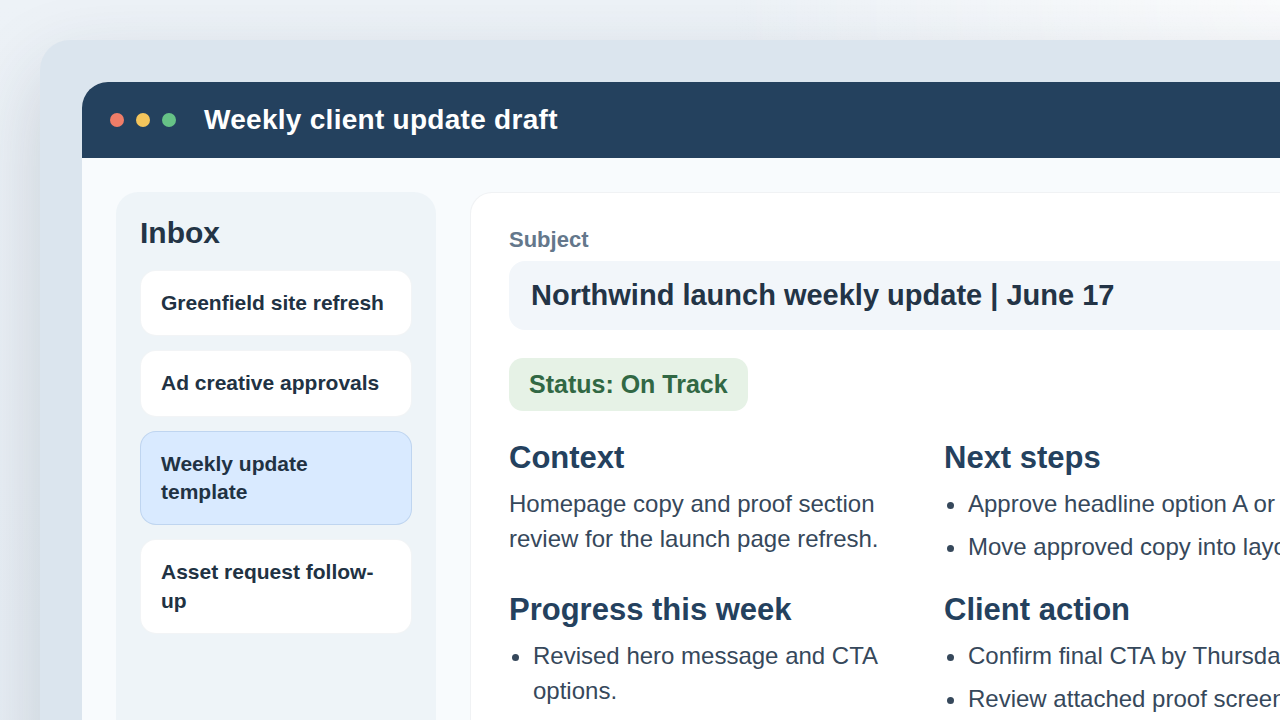
What a Good Update Includes
A good weekly update is not a diary entry and it is not a miniature novel. It is a compact decision tool. The reader should be able to open it and answer three questions in under a minute:
- Where are we now? Give the project context in one or two sentences so the reader knows which workstream, deliverable, or milestone the update covers.
- What changed since the last update? Show progress in concrete terms. Finished draft, revised page, uploaded assets, approved concept. Specific beats vague every time.
- What happens next? List the next step, next milestone, or next decision point so nobody has to infer the plan from scattered clues.
That sounds almost too simple, which is usually a sign that the structure is right. Good systems often look obvious after someone bothers to build them.
It also helps to keep one sentence for project health. Not a mood. Not a weather report disguised as a mood. A clear status statement that tells the client whether the work is moving normally, carrying risk, or waiting on approval.
Each of those three parts has a separate job inside the workflow:
- Context makes sure the reader opens the right mental tab. If several projects are moving at once, “Here is your update” is almost useless. “This update covers the homepage copy and layout phase” is better because it restores orientation immediately.
- Progress proves that the week produced movement. It should describe outputs, decisions, or completed steps rather than general activity. “Revised two CTA routes and shared the updated wireframe” gives the reader something they can picture.
- Next steps turns the email into a handoff. This is where momentum usually wins or dies. If the next move is not visible, the client has to infer it, and that is how you end up with polite but unhelpful replies like “Looks good so far.”
A fast quality check is to skim only the labels and first line of each section. If that quick scan still explains the state of the work, the update is probably structured well enough.
The Weekly Update Template
Use the same layout every week. Repetition is not laziness here; it is interface design. Once stakeholders know where the information lives, they stop asking the update to do extra translation work.
Suggested subject line: [Project Name] weekly update | [Date]
| Section | What to include |
|---|---|
| Status | One clear label such as On Track, At Risk, or Needs Approval, plus a short plain-English sentence. |
| Context | What phase, deliverable, or priority this update covers so the reader enters the right frame immediately. |
| Progress this week | Bulleted list of completed work, decisions made, or meaningful movement since the last update. |
| Next steps | What will happen next, when it is expected, and who owns it. |
| Blockers or risks | Any constraint, missing input, or timing issue that could slow delivery if unresolved. |
| Client action needed | The exact answer, approval, file, or confirmation needed from the client, with a requested response window if relevant. |
| Artifacts | Links to drafts, screenshots, folders, notes, or documents that support the update. |
If you are formalizing this into a repeatable internal workflow, even a lightweight web app generator can help map the fields, handoffs, and approval states before you build something larger. The point is not to buy software for sport. The point is to stop rebuilding the same process from scratch every Monday.
Here is the template in plain text:
Subject: [Project Name] weekly update | [Date]

Hi [Client Name],

Status: [On Track / At Risk / Needs Approval]

Context
- [One sentence on the current phase or deliverable]

Progress this week
- [Completed item]
- [Completed item]
- [Decision made or draft shared]

Next steps
- [Upcoming task and owner]
- [Upcoming task and owner]

Blockers or risks
- [Constraint, dependency, or missing input]

Client action needed
- [Specific approval, answer, or file needed]
- [Requested response window if relevant]

Artifacts
- [Draft link]
- [Screenshot, folder, or document link]

Thank you,
[Name]
The template works because it respects the reader’s attention. Nothing is buried. Nothing depends on mind-reading.
It also scales well. A solo service provider can use it with one client. A small team can use it across multiple accounts. An internal operations lead can use the same bones for stakeholder updates. The exact wording can shift, but the architecture stays the same: orient, report movement, surface risk, request action.
What should stay out of the template? Mostly clutter:
- Long historical recap that repeats already-approved background.
- Multiple unrelated asks with no clear priority.
- Internal task chatter that does not help the client decide anything.
- Soft filler such as “just checking in” when a clearer status line would do the work better.
The moment an update tries to become a full archive, it stops being a useful update.
Handling Blockers and Decisions Without Drama
Blockers are where many updates go sideways. Some updates hide them to avoid friction. Others announce them like the building is on fire. Neither approach is useful. A blocker should be described with enough precision that the next move becomes obvious.
A practical blocker note usually includes three parts:
- The issue: what is missing or unresolved?
- The impact: what work, timing, or quality does it affect?
- The required action: what needs to happen to clear it?
For example, “Homepage copy draft is ready, but final audience positioning is still open. That affects the headline and CTA direction. Please confirm which audience segment is primary so design can move into layout.” That message does not panic. It does not scold. It simply makes the dependency visible.
The same goes for decision requests. Do not ask for “thoughts” when you actually need approval. Use direct language such as:
- Please approve Option B so the remaining page designs can be completed.
- Please confirm the final file format before export.
- Please choose one of the two scheduling windows so campaign setup can continue.
That small change removes a surprising amount of drift. Vague requests invite vague replies. Then everyone acts surprised, which is a cherished workplace tradition but not a productive one.
When possible, keep each decision request to one visible question per line item. If one bullet asks for audience approval, final file format, platform choice, and launch timing all at once, the client will often answer only the easiest part. That is not always resistance. Sometimes it is just cognitive triage.
Another useful move is to phrase the request in terms of available options. “Please choose headline route A or B” is easier to answer than “What do you think about the homepage?” One question invites a decision. The other invites a meandering commentary track.
Status Levels That Mean Something
Status labels are useful only when they trigger the right behavior. Keep them few, plain, and stable.
| Status | Meaning | What the client should infer |
|---|---|---|
| On Track | The work is moving as planned with no material issue affecting the next step. | No special intervention is needed beyond any listed approvals or file handoffs. |
| At Risk | There is a dependency, delay, or constraint that could affect timing or quality if it remains unresolved. | A response or decision may be needed soon to prevent slippage. |
| Needs Approval | The next stage depends on a client decision, sign-off, or confirmation. | The project is intentionally waiting for approval rather than silently drifting. |
Avoid status inflation. If everything is urgent, nothing is useful. If everything is “fine” until the deadline breaks in half, that label is useless too. A restrained status system builds trust because it stays readable over time.
Attach Artifacts So Nobody Has to Hunt Through Old Threads
Weekly updates are much easier to act on when they include the materials needed for review. That might be a screenshot, a draft link, a file folder, a shared note, or a short loom-style walkthrough if the work is visual. The point is simple: if the update asks for feedback, the update should also make feedback possible.
That is one reason shared-file guidance matters. Microsoft’s documentation for sharing files and folders in OneDrive is a useful reminder that access and permissions are part of communication, not an afterthought. A perfect review note attached to an inaccessible draft is still just an expensive way to waste twelve minutes.
Useful artifact types include:
- Screenshots when you want the reader to notice a specific change quickly.
- Draft links when live review or comments are needed.
- Shared folders when the next step depends on file delivery or upload.
- Decision notes when multiple stakeholders need a clean record of what was approved.
Link only what is relevant to that update. Dumping an entire project archive into every email is not thoroughness. It is camouflage.
Timing: When to Send Updates
The best time to send a weekly update is the time that gives the client a realistic chance to act on it before momentum evaporates. For many service businesses, that means sending updates on the same day each week, usually before a new work block begins or before a planned review window.
A few timing rules work well:
- Send the update on a consistent day so it becomes predictable.
- Send it early enough that approvals or missing inputs can be addressed during the current work cycle.
- Do not wait for perfect completeness if the real need is a decision or unblocker.
- Use milestone updates for shorter projects, but keep the same structure.
In other words, do not treat the update like a ceremony. Treat it like a handoff point in the workflow.
If you are deciding between weekly updates and milestone updates, match the rhythm to the rate of meaningful change. Ongoing marketing support, administrative work, and multi-week website projects usually benefit from weekly cadence because small decisions accumulate quickly. Short, fixed-scope design tasks often work better with milestone updates because the real approval points arrive in bursts.
The real mistake is sending updates only when something feels tense enough to justify one. Irregular updates teach clients to worry. Predictable updates teach them where to look for signal.
Set Response Expectations Before You Need Them
Response expectations belong in the process long before anyone is frustrated. If you only define them after a delay has already caused trouble, the conversation will feel personal even when the fix is procedural.
Set expectations in plain language:
- Routine feedback: “Please reply within two business days if possible.”
- Time-sensitive approvals: “Please confirm by Thursday noon so production can stay on schedule.”
- Urgent issues: “If access or launch timing changes suddenly, use email plus text so it is seen quickly.”
This should stay realistic. Do not promise faster replies without context, and do not imply that every delay is catastrophic. The goal is simply to make the operating rules visible enough that nobody has to guess what “soon” means.
Common Update Mistakes That Quietly Kill Momentum
Most weak updates fail in ordinary ways. They do not need a total rewrite. They need cleaner structure.
- Reporting activity instead of outcomes. “Reviewed files” is weaker than “Reviewed files and narrowed the final asset set to three approved options.”
- Hiding the real ask. If the needed approval sits halfway down a long paragraph, it may never get the response it needs.
- Over-explaining stable details. Repeating the same background every week makes the message longer without making it clearer.
- Softening risk until it disappears. If a missing login or delayed approval affects the schedule, say so plainly.
- Blending feedback and approval into one vague mode. Review can stay open. Approval should close a decision and unlock the next step.
These are small writing mistakes with large process consequences. Fixing them does not require a new platform. It requires a sharper interface between the update and the action it is supposed to trigger.
Sample Short Update
Here is what a concise weekly update can look like in practice:
Status: Needs Approval
Context: This update covers the homepage copy and wireframe phase for the website refresh.
Progress this week:
- Completed homepage messaging draft and revised CTA options.
- Shared updated wireframe with the new services section included.
- Confirmed image requirements and file dimensions for the hero area.
Next steps:
- Finalize headline direction.
- Move approved copy into layout.
Blockers or risks: None beyond approval timing.
Client action needed: Please approve headline Option A or B by Thursday so layout work can begin on Friday.
Artifacts: Wireframe link, copy draft, and screenshot attached.
That is enough. It tells the story without asking the reader to reconstruct the week from memory.
Checklist for Sending a Clear Update
Before you send the update, run a quick check:
- Does the update say what phase or deliverable it covers?
- Did you list concrete progress instead of generic activity?
- Is the next step visible and assigned?
- Did you name any blocker with issue, impact, and required action?
- Is the status label accurate rather than optimistic by habit?
- Did you include the specific approval, answer, or file needed from the client?
- Are the relevant screenshots, drafts, or folder links attached?
- Did you state a realistic response window when timing matters?
- Can someone skim the update in under a minute and still know what to do next?
If the answer to that last question is no, the structure probably needs one more pass. Not a full rewrite. Just one more version where the signal is easier to see.
Build the Rhythm Once, Then Keep It Boring
The best weekly update is not clever. It is dependable. It creates a rhythm that clients recognize, team members can repeat, and projects can move through without constant clarification. That is what momentum usually looks like in real work: not drama, not genius, just a better interface between people, decisions, and the next useful action.
If your current process still depends on scattered email threads and heroic memory, this is a good place to tighten it. Start small, standardize the template, and keep the status language consistent. For more practical workflow guidance, return to the home page, explore the blog, or reach out through contact when you want help building a cleaner communication rhythm.